Hello there!

Need Help? We are right here!

Support Icon
miniOrange Email Support
success

Thanks for your Enquiry. Our team will soon reach out to you.

If you don't hear from us within 24 hours, please feel free to send a follow-up email to info@xecurify.com

Search Results:

×

How to add a SCIM Server App


miniOrange SCIM Server application is used for outbound provisioning using SCIM protocol. In outbound provisioning, A user gets provisioned from miniOrange to another application using SCIM protocol.


Steps to setup provisioning from miniOrange to SCIM supported app


  • Login into miniOrange Admin Console.
  • Click on Apps. It shows a list of all configured applications and option to modify them. Click on Add Application.

  • miniOrange Identity Platform Admin Handbook: Add Application

  • Select Provisioning from the All Apps dropdown.
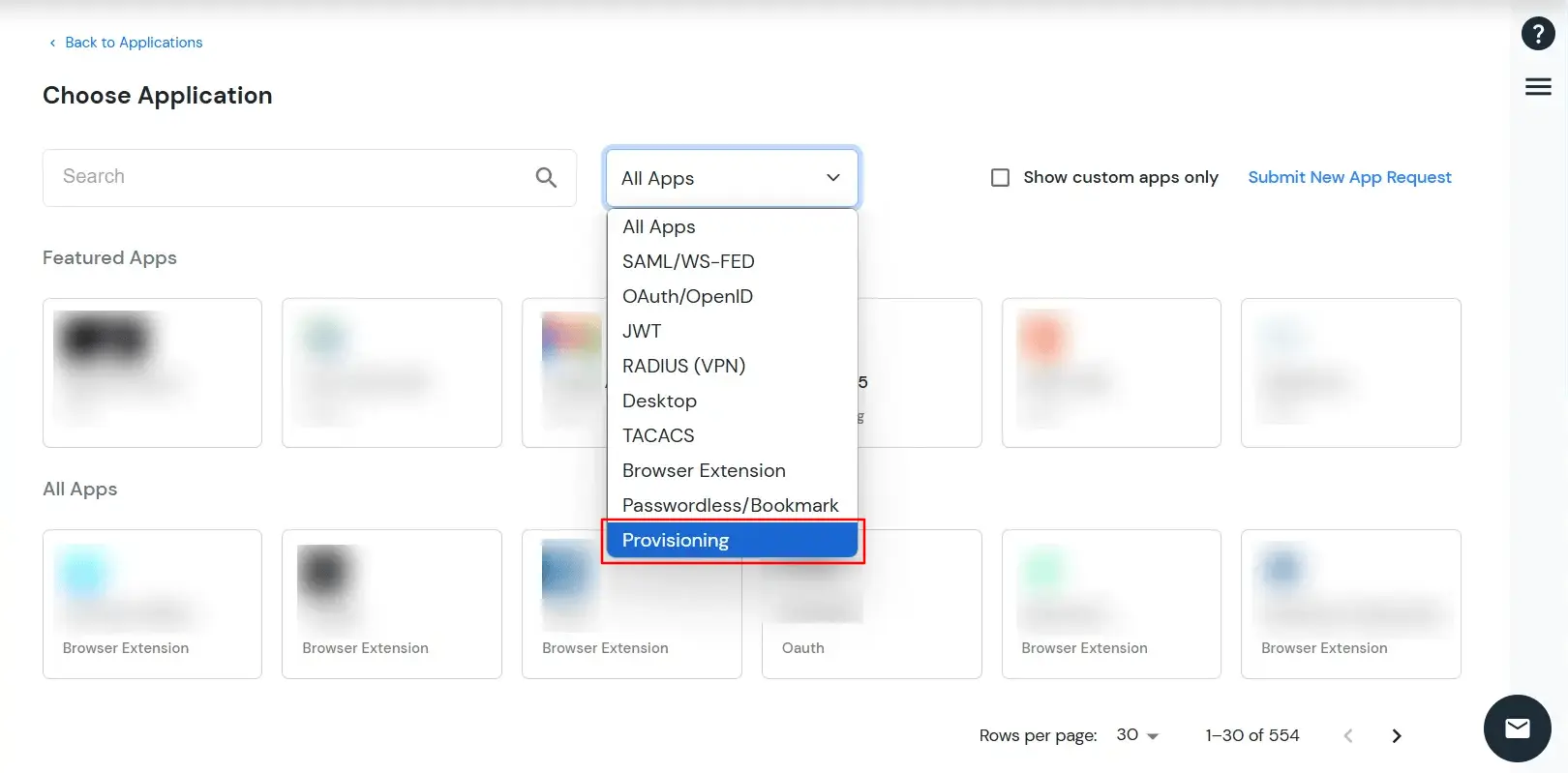
  • miniOrange Identity Platform Admin Handbook: Provisioning app type

  • Search for your application from the list, if your application is not found. Search for SCIM Server and you can set up your app via SCIM Server (Destination).
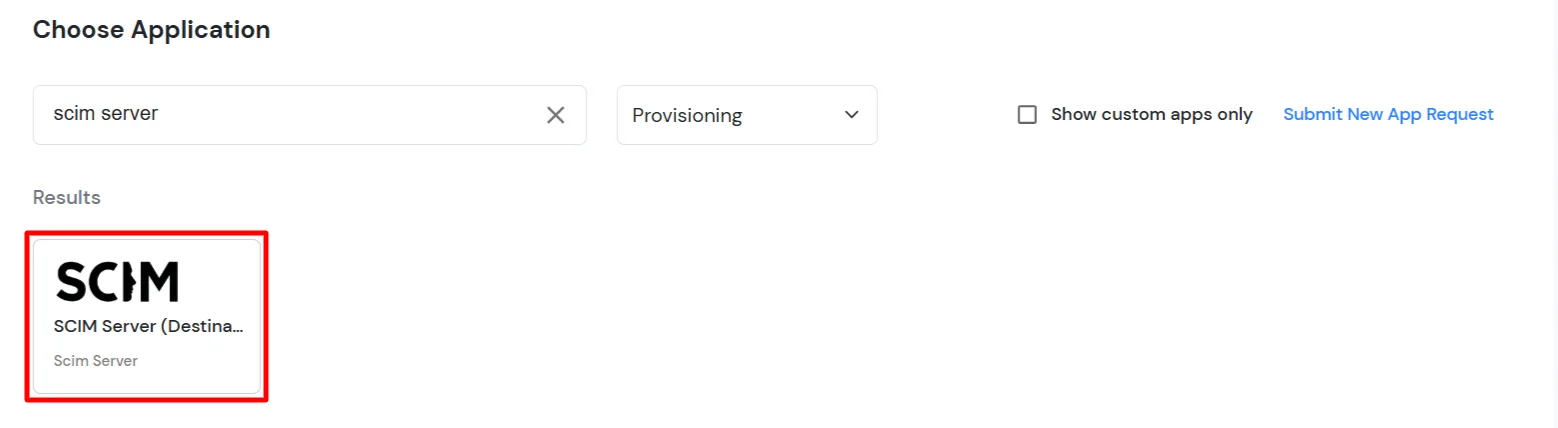
  • miniOrange Identity Platform Platform Admin Handbook: Search SCIM Server

  • Under Basic Settings, enter Display Application Name and click the Save button to add the app.

  • miniOrange Identity Platform Platform Admin Handbook: Scim Server Display Application Name

  • In the Authorization Configuration section, enter the SCIM Base URL and Bearer Token that you copied from the application.
  • Click the Test Connection button to verify details.
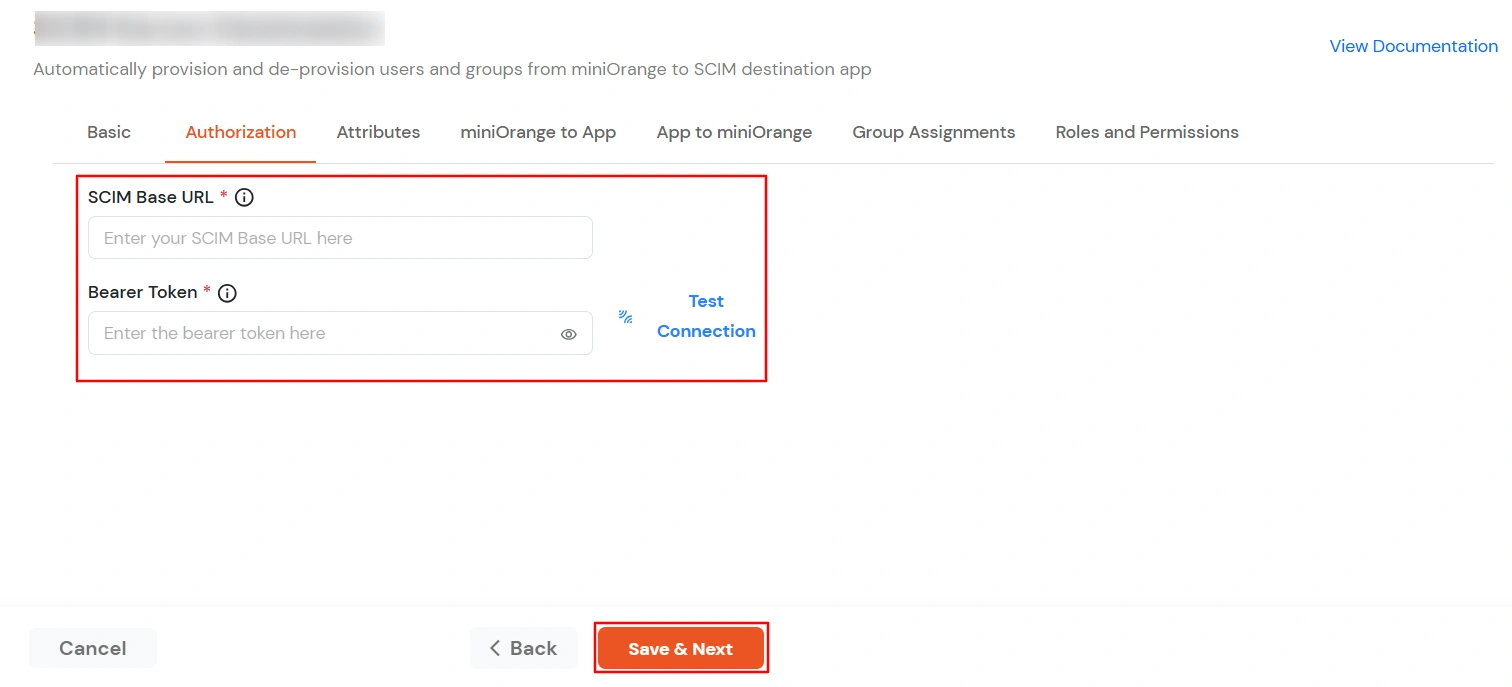
  • SCIM Provisioning Configuration

  • Then, click Save & Next button.

2. Attribute Mapping

  • Navigate to the Attributes Mapping tab in your application SCIM Provisioning configuration.
  • Under this tab, you'll find two sections: Users and Groups, where you can map miniOrange attributes to SCIM Server attributes for synchronization.
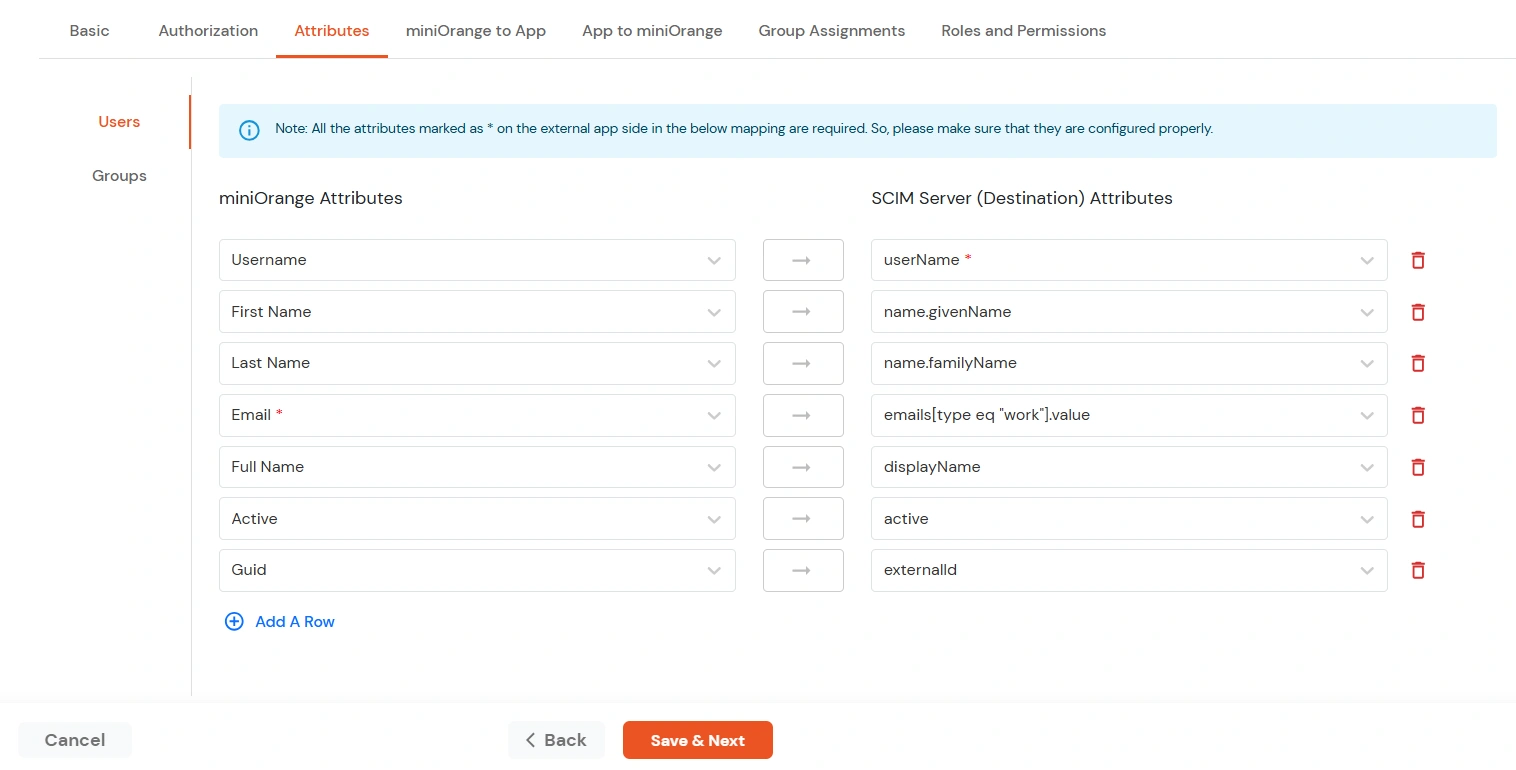
  • miniOrange Identity Platform Admin Handbook: SCIM Provisioning Add Attribute Mapping

    Users Mapping:

    Note: The userName, name.givenName, name.familyName, emails[type eq \"work\"].value, displayName and active fields are required for SCIM integration.

    • In the Users section, map the attributes from miniOrange Attributes to the corresponding SCIM Server Attributes.
    • miniOrange Identity Platform Admin Handbook: SCIM Provisioning Users Attribute Mapping

    • Once all required mappings are configured, click the Save & Next button to proceed.

    Groups Mapping:

    Note: If you don't need group provisioning, skip this step.

    • Click on the Groups tab.
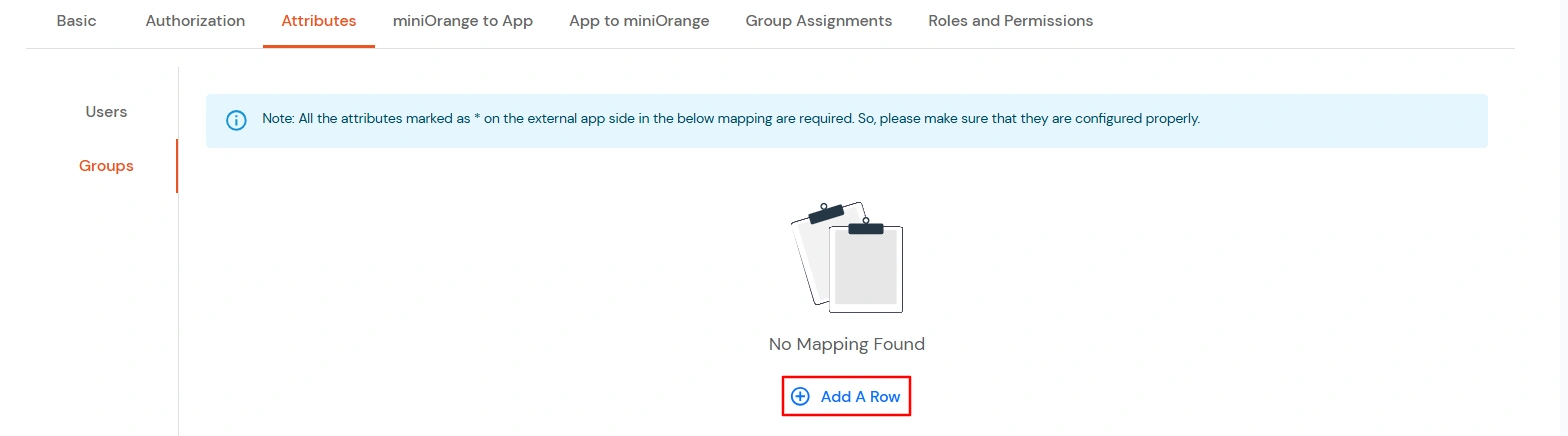
    • Click Add A Row to add a new mapping.
    • miniOrange Identity Platform Admin Handbook: SCIM Provisioning Switch to Group tab, click on Add A Row link

    • From the miniOrange Attributes dropdown, choose an attribute (like Group Name).
    • In the SCIM Server (Destination) Attributes field, type the attribute (like displayName).
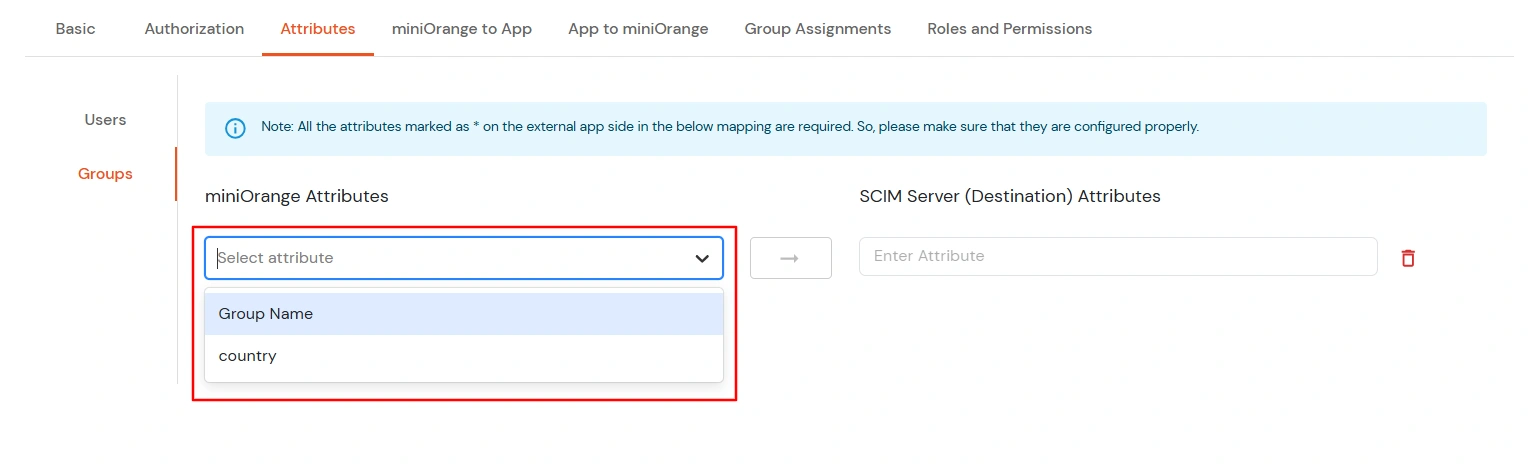
    • miniOrange Identity Platform Admin Handbook: SCIM Provisioning Select miniOrange Attribute from dropdown

    • Click Save & Next when done.

3. miniOrange to App

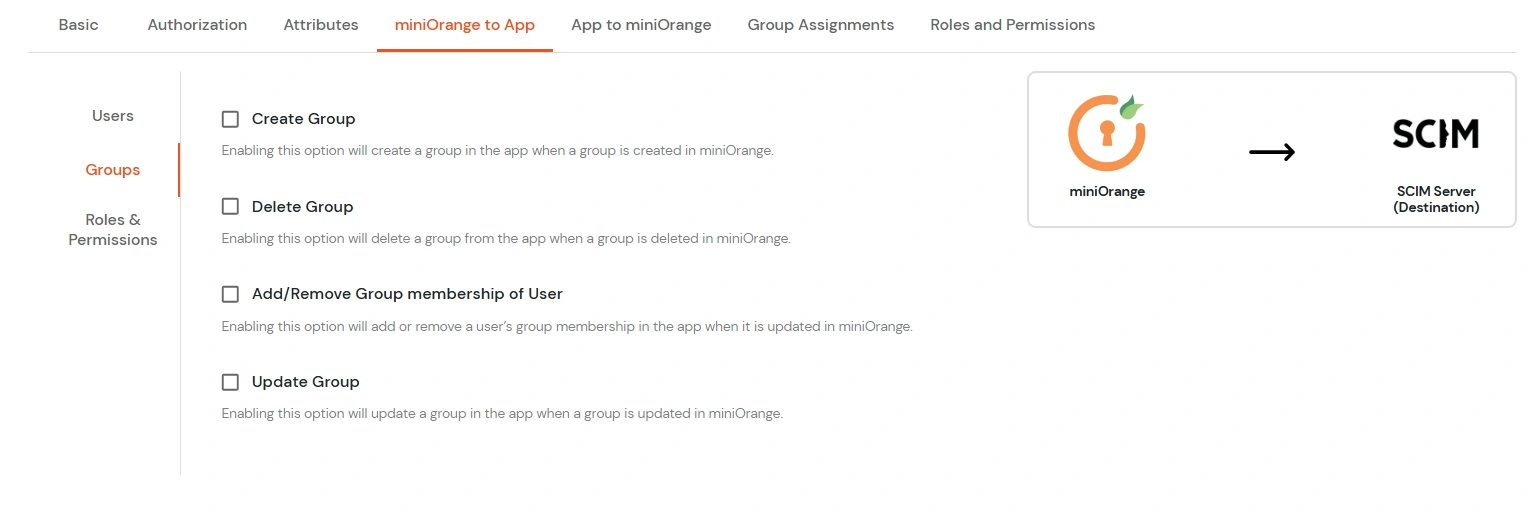
  • In the miniOrange to App tab, there are three sections: Users, Groups, and Roles and Permissions. Each section contains a list of attributes along with their functions. You can enable or disable these attributes as needed.
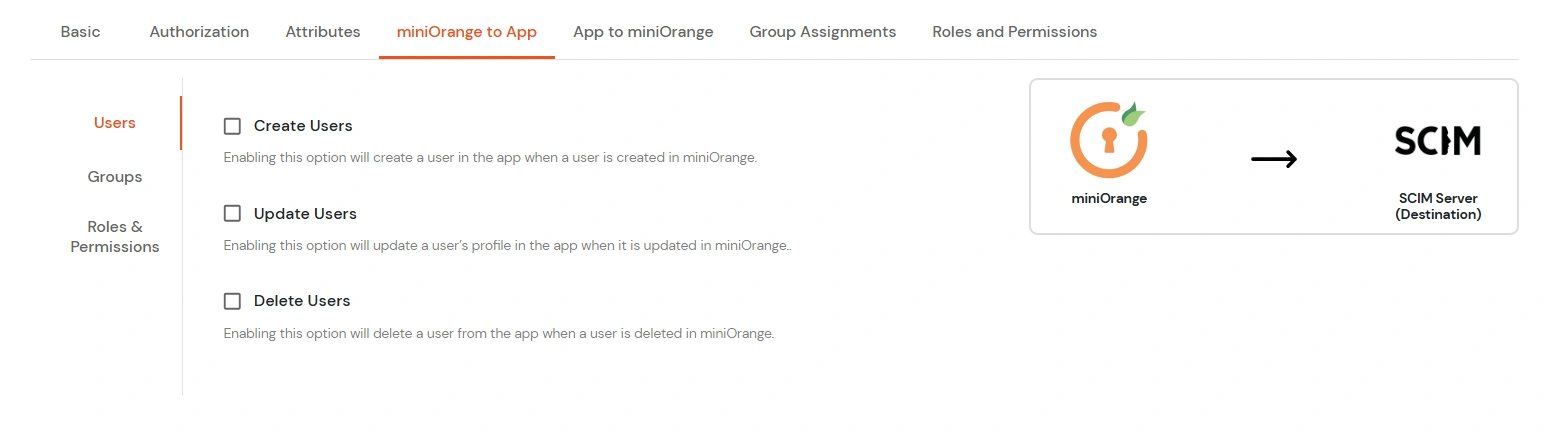
  • miniOrange Identity Platform Admin Handbook: SCIM Provisioning Enable appropriate option for users creation

    Attribute Description
    Users Create Users Enabling this option will create the user in the selected application upon user creation in miniOrange.
    Update Users Enabling this option will update the user profile in the selected application if updated in miniOrange.
    Delete Users Enabling this option will delete the user from the selected application if the user is deleted from the miniOrange.

    miniOrange Identity Platform Admin Handbook: SCIM Provisioning Enable appropriate option for groups creation

    Attribute Description
    Groups Create Group Enabling this option will create the Group in the selected application upon Group creation in miniOrange.
    Delete Group Enabling this option will delete the Group from the selected application if the Group is deleted from the miniOrange.
    Add/Remove Group membership of User Enabling this option will add/remove the Group membership of a user from the selected application if the respective user group membership is updated from the miniOrange.
    Update Group Enabling this option will update the Group in the selected application upon Group updation in miniOrange.

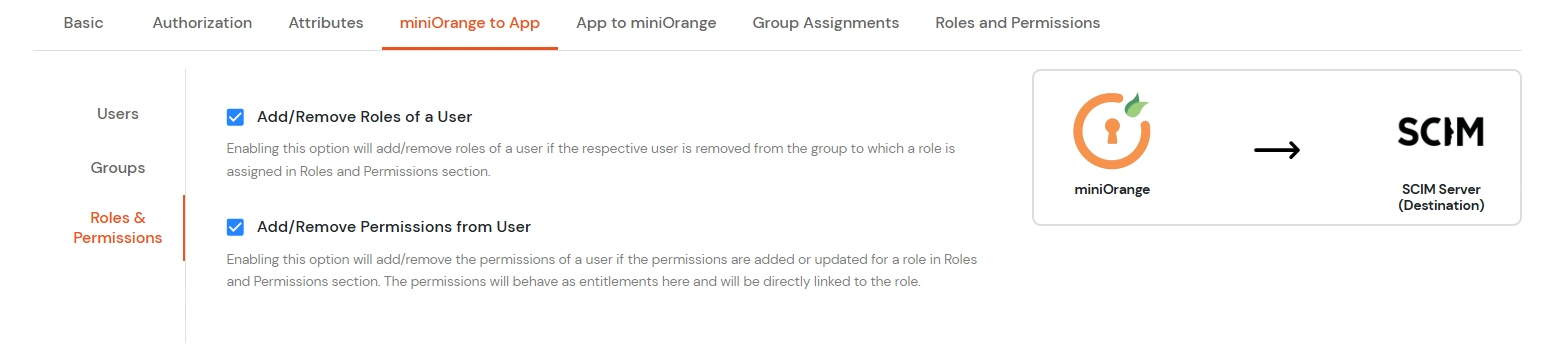
    miniOrange Identity Platform Admin Handbook: Click On Roles and Permissions

    Option Description
    Roles and Permissions Add/Remove Roles of a User Enabling this option will add/remove roles of a user if the respective user is removed from the group to which a role is assigned in the Roles and Permissions section.
    Add/Remove Permissions from User Enabling this option will add/remove the permissions of a user if the permissions are added or updated for a role in the Roles and Permissions section. The permissions will behave as entitlements here and will be directly linked to the role.

  • Click Save to apply these changes.

4. Import Roles and/or Entitlements :

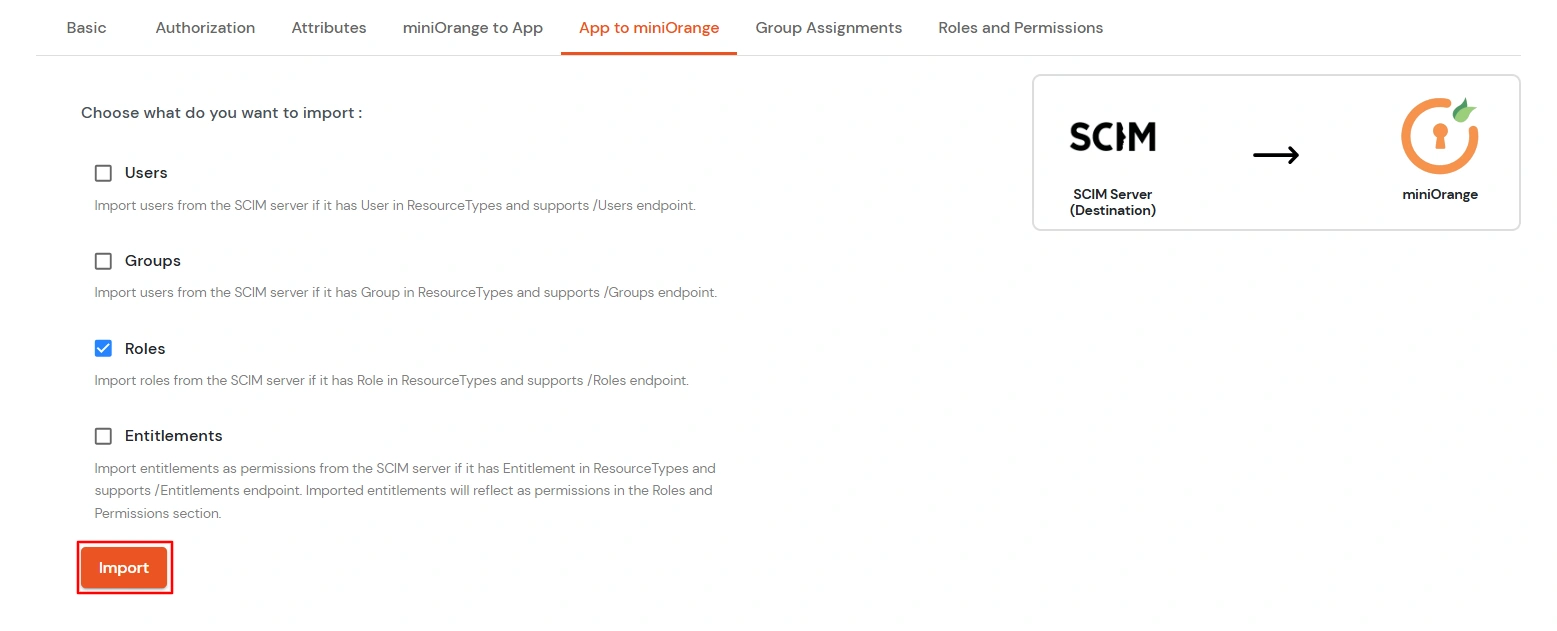
  • If you want to manage users roles and entitlements from the miniOrange dashboard, you will first need to import the roles and entitlements on the SCIM Server.
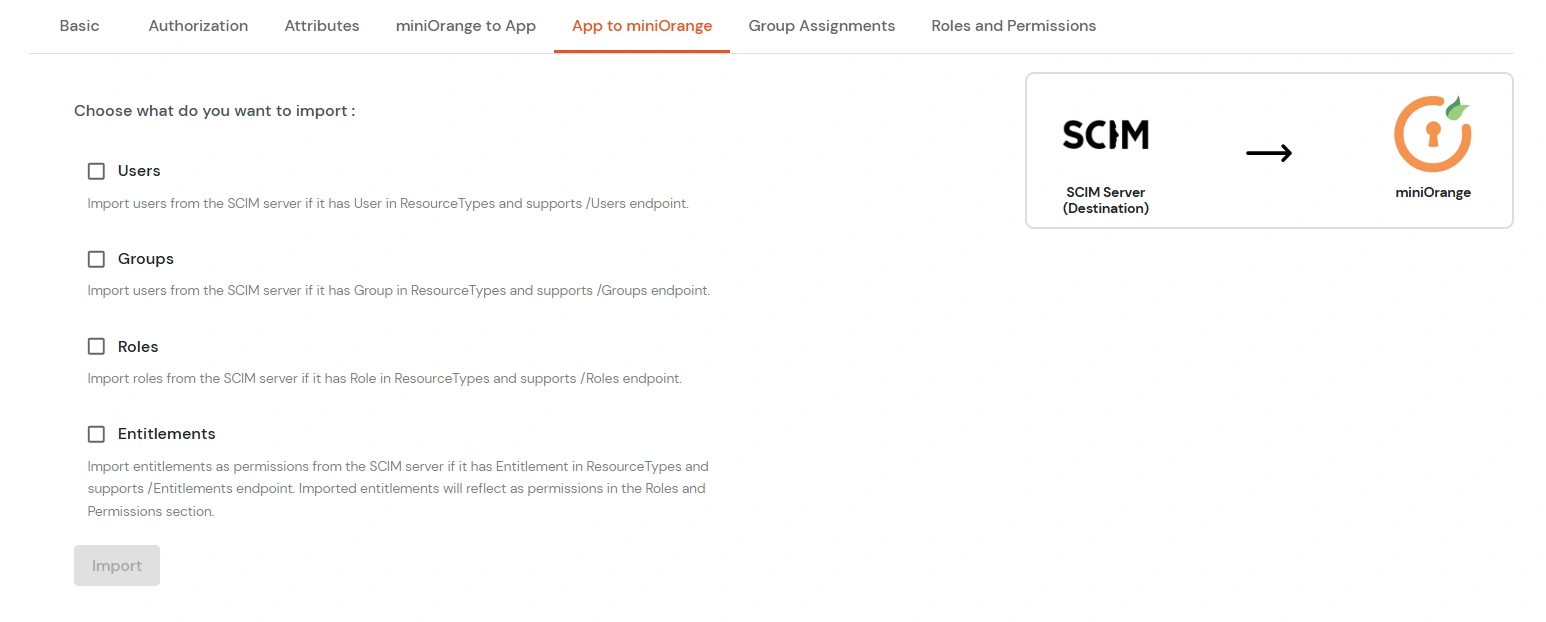
  • miniOrange Identity Platform Admin Handbook: Import Roles Entitlement

    Select the options you want to import from the SCIM server into miniOrange:

    • Users: Imports users from the SCIM server if the User resource type is supported and the /Users endpoint is available.
    • Groups: Imports groups from the SCIM server if the Group resource type is supported and the /Groups endpoint is available.
    • Roles: Imports roles from the SCIM server if the Role resource type is supported and the /Roles endpoint is available.
    • Entitlements: Imports entitlements as permissions from the SCIM server if it has Entitlement in Resource types and supports /Entitlements endpoint . Imported entitlements will reflect as permissions in the Roles and Permissions section.
  • Check the checkbox corresponding to Roles and/or Entitlements(as supported by the SCIM server) and click on the Import button.
  • miniOrange Identity Platform Admin Handbook: Select roles or entitlements and click Import

  • The roles should be imported successfully. You can check the Reports >> Provisioning Reports to check the status.

5. Assign Groups

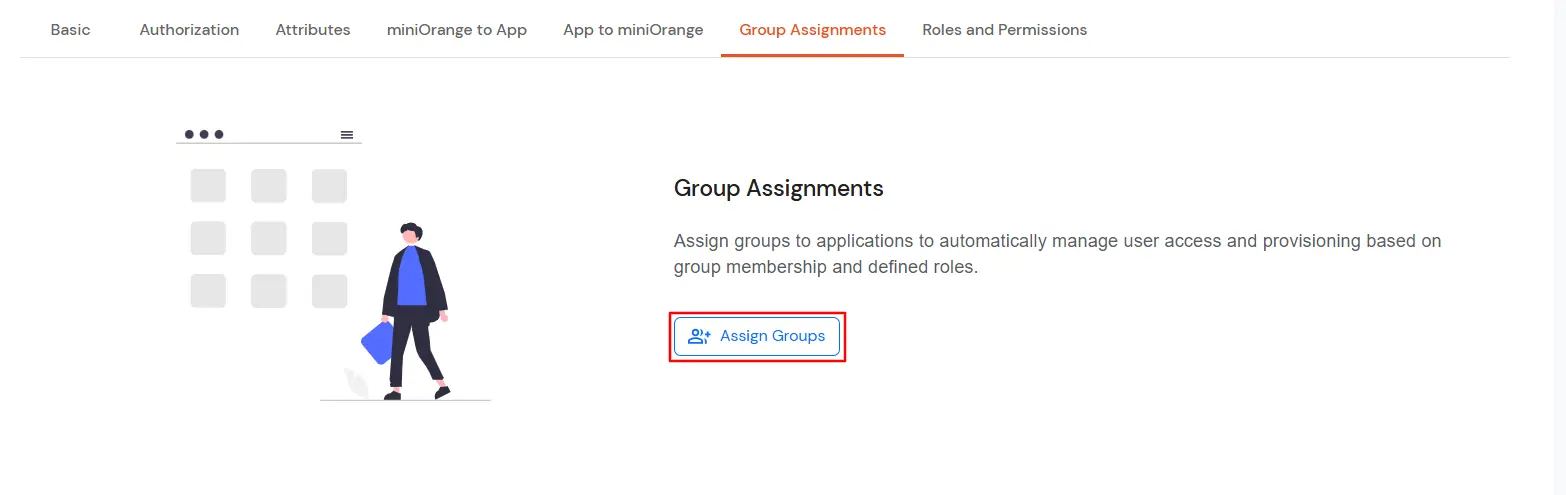
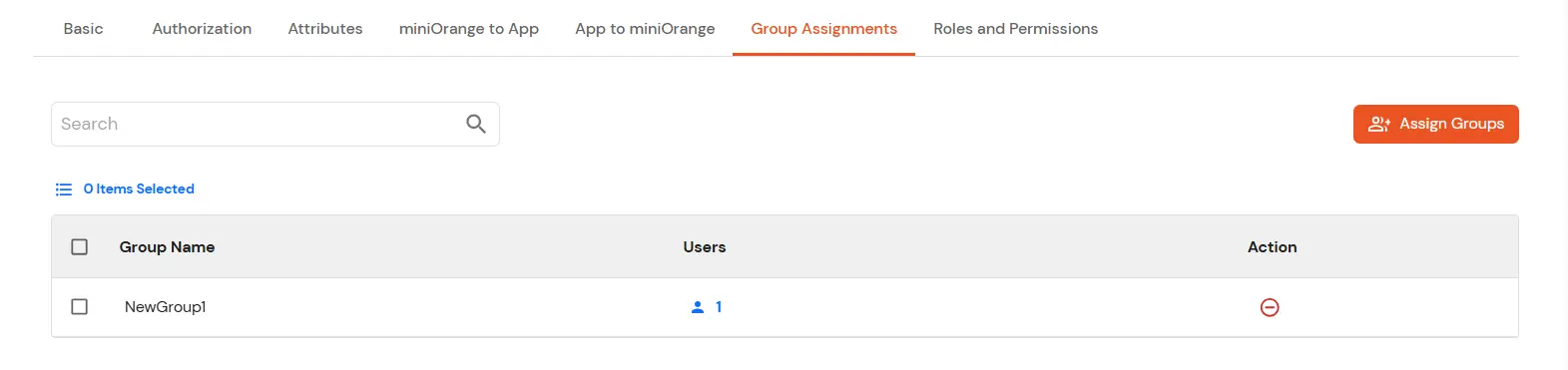
  • Under the Groups Assignment tab, you can assign groups to applications to automate user provisioning. Users are automatically added to or removed from an application based on their group assignments to that application.
  • miniOrange Identity Platform Admin Handbook: Group Assignment Tab

  • Click on the Assign Groups button.
  • miniOrange Identity Platform Admin Handbook: Click On Assign Groups

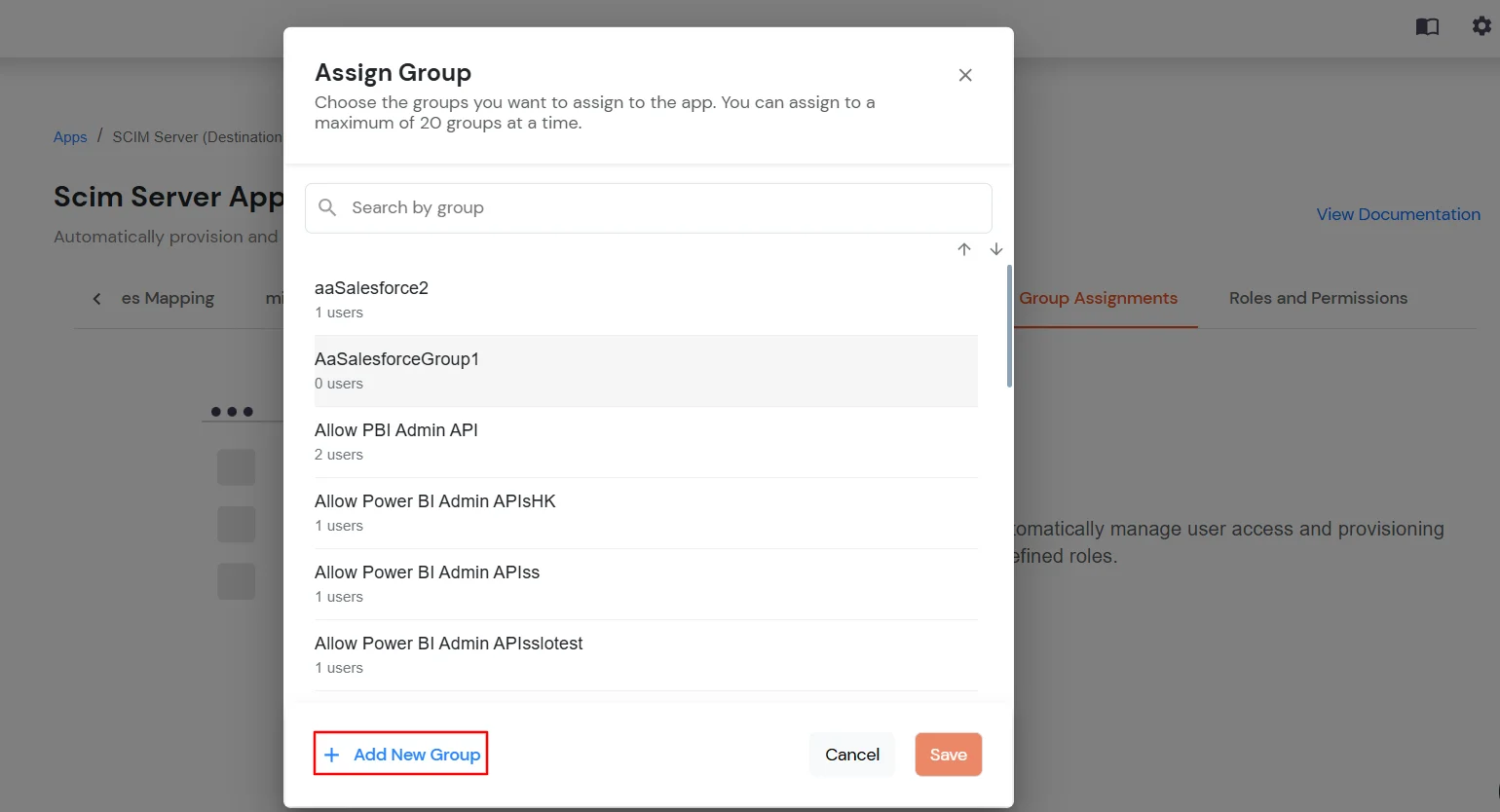
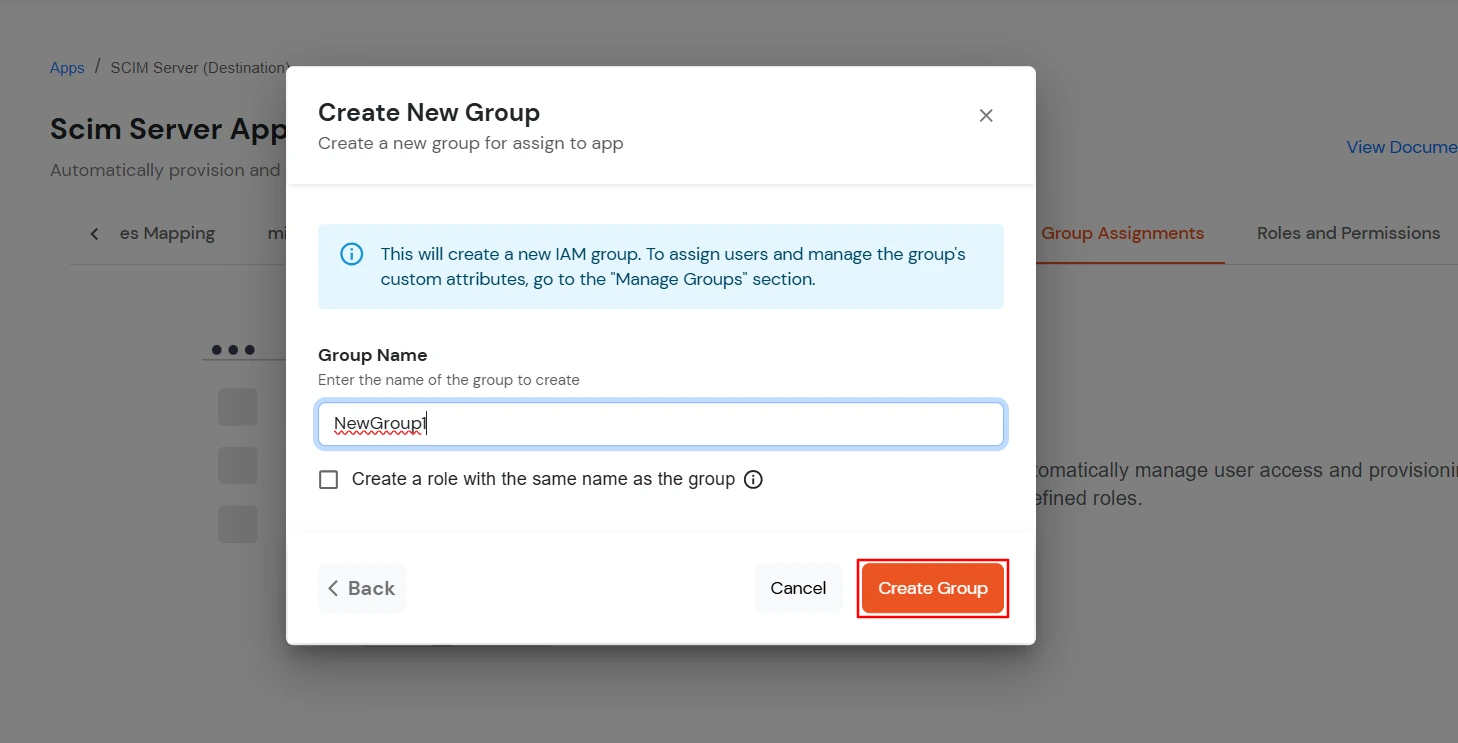
  • Click on Add New Group (optional) to create a new group to assign to your application.
  • Note: This will create a new group in miniOrange. Navigate to the Manage Group section to add members to this group or to add any custom group attribute.

    miniOrange Identity Platform Admin Handbook: Click Create New Group

  • Once you click Create Group, the group will be created and added to the list of groups to be assigned.
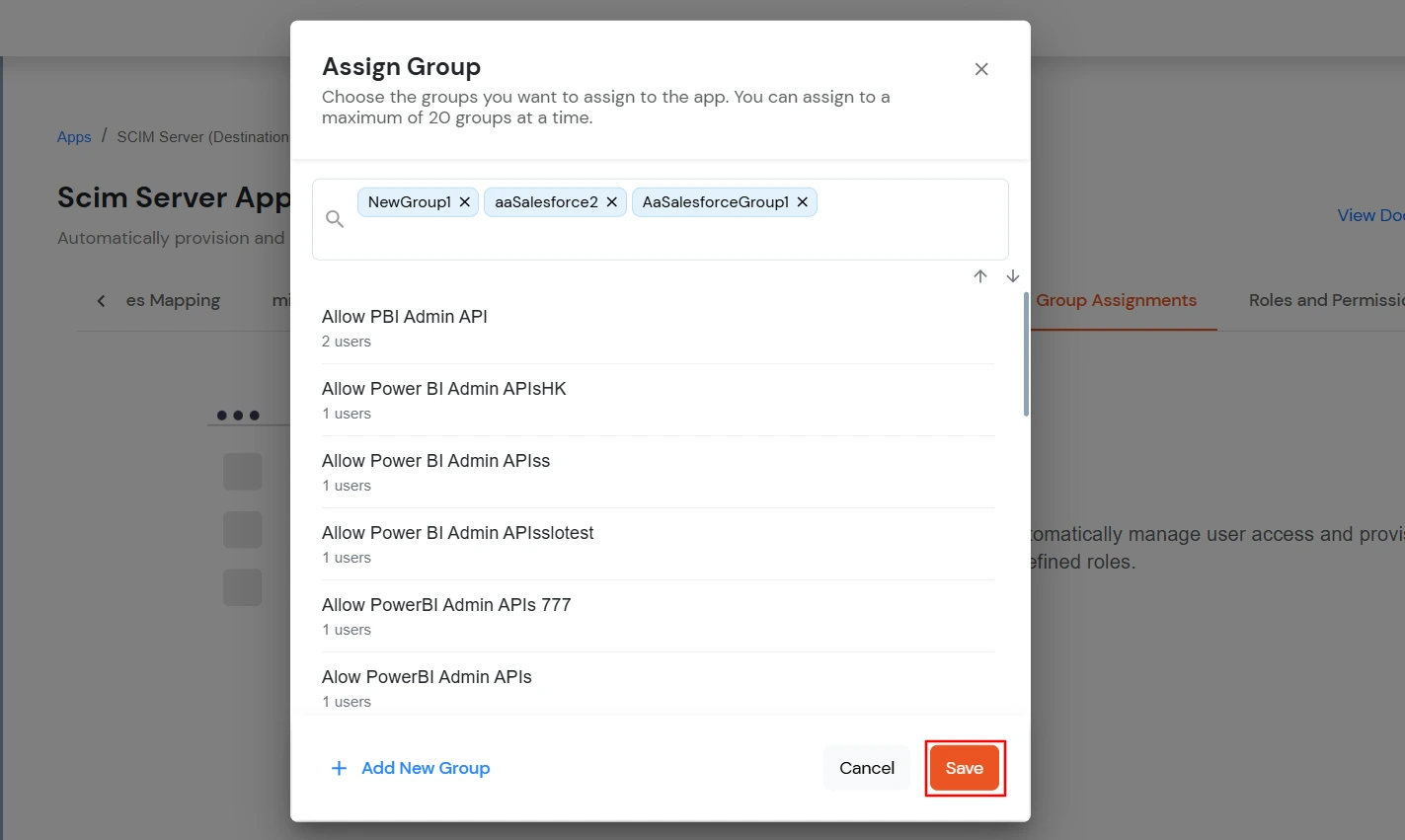
  • Choose the groups you want to assign.
  • miniOrange Identity Platform Admin Handbook: Choose the Groups

  • Once you've selected the groups, click Save to assign them to the app.
  • miniOrange Identity Platform Admin Handbook: Save Group Assign App

6. Roles and Permissions

  • Before configuring Roles, please make sure you have imported Roles and/or Entitlements as stated in Step 4. You will see the already imported roles in the list.
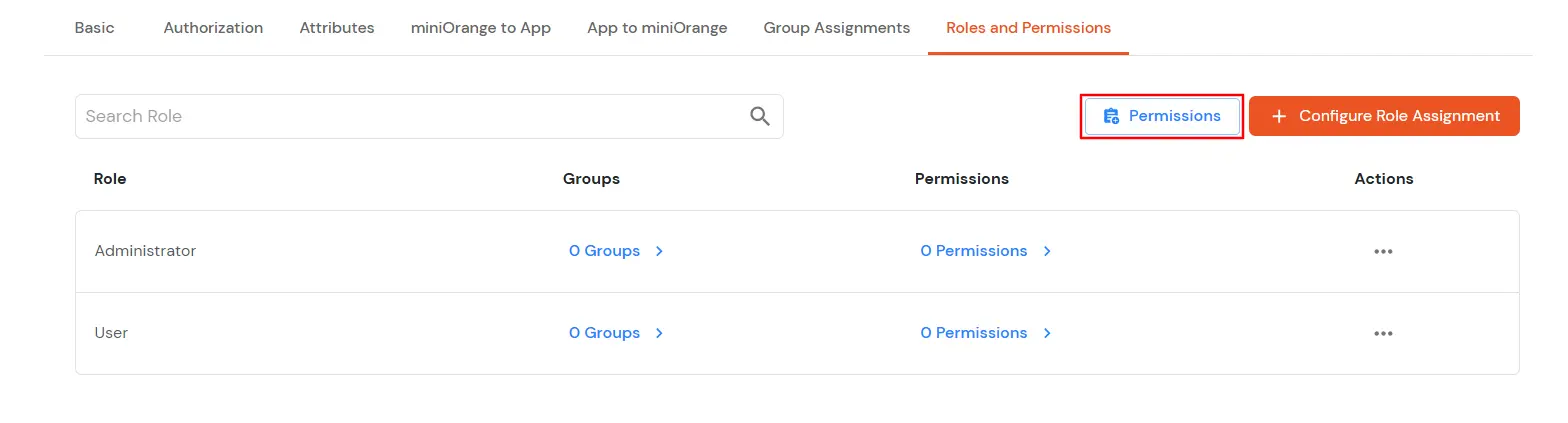
  • Go to the Roles and Permissions Tab and click on the Permissions button.
  • miniOrange Identity Platform Admin Handbook: Roles and Permissions Tab

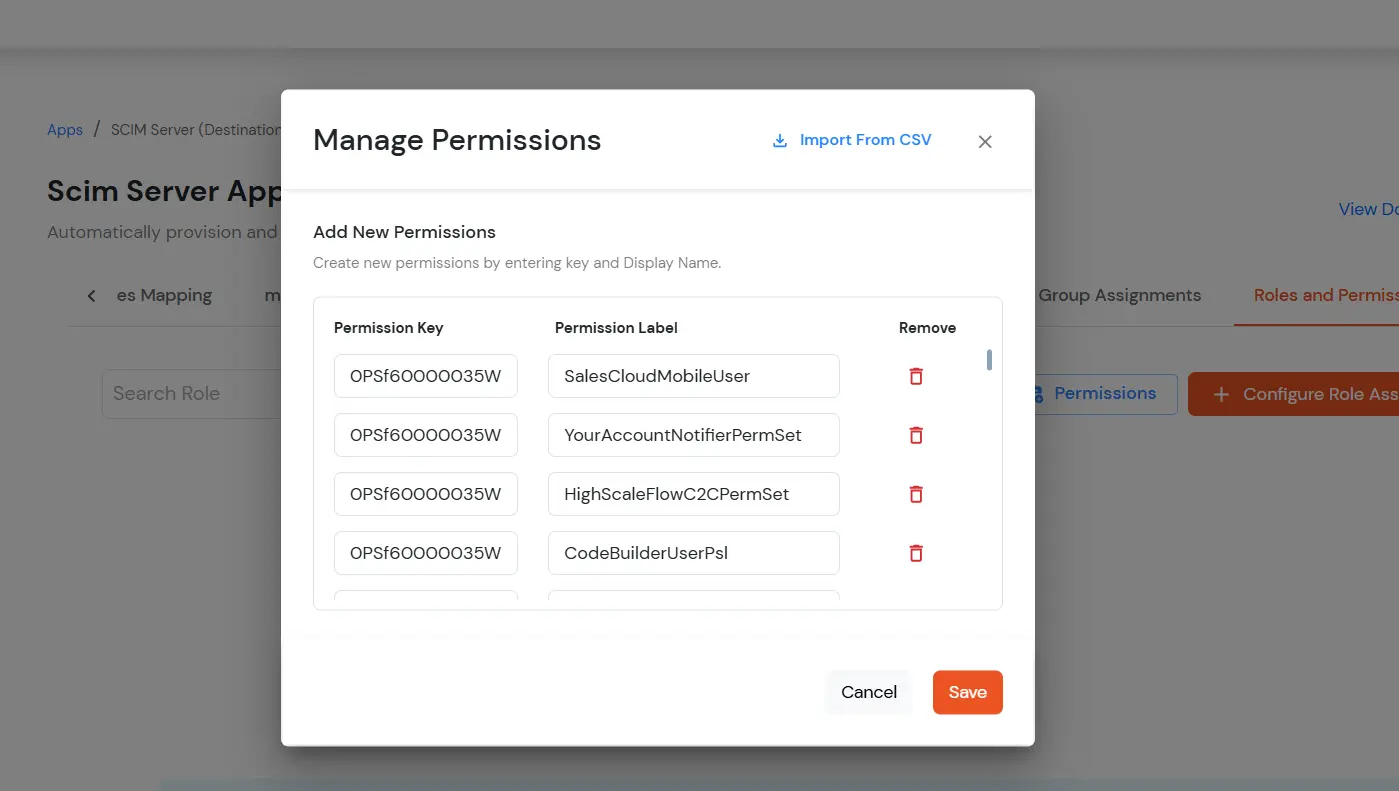
  • You will see the already imported Entitlements as permissions in the list, along with their identifiers as keys.
  • miniOrange Identity Platform Admin Handbook: Imported Entitlements as Permissions

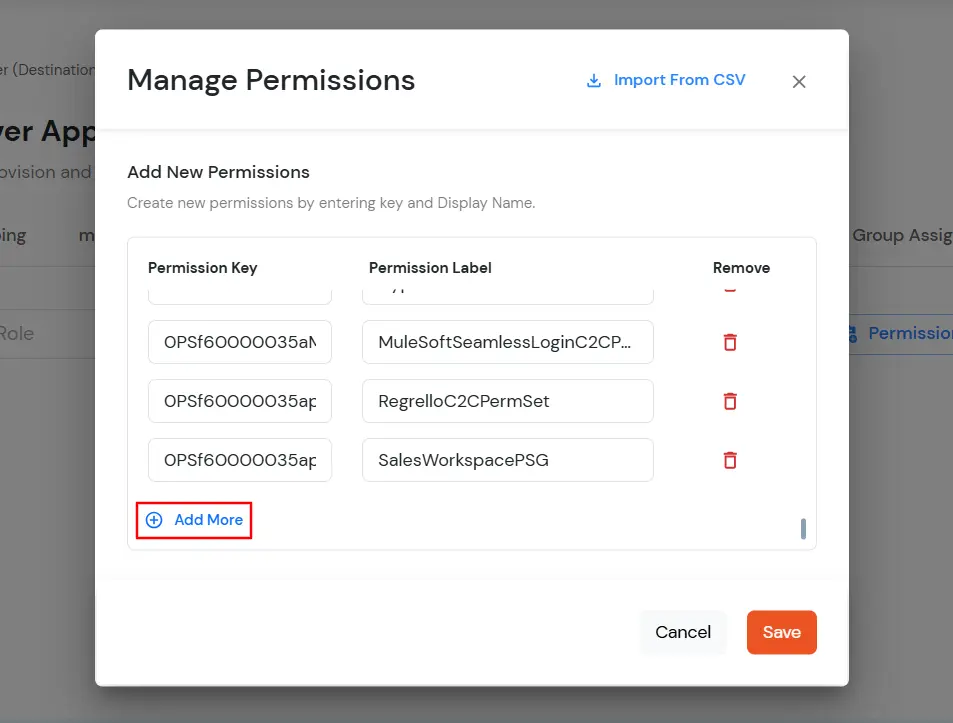
  • If you want to add permissions/entitlements manually, click on the Add More button and add the permission key and label.
  • miniOrange Identity Platform Admin Handbook: Add Permissions Manually

  • Note: The permission key should be such that it could be sent as the entitlement.value in the SCIM call.

  • "entitlements": [ { "value": "<permission key will be sent here>" } ]
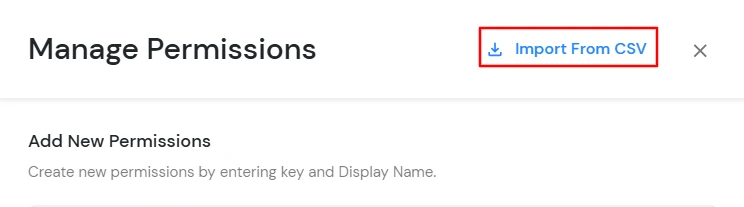
  • You can also import the permissions from a CSV. The CSV should have only 2 fields: key and label, containing the permission key/identifier and permission description, respectively. Click on the Import from CSV button.
  • miniOrange Identity Platform Admin Handbook: Import from CSV Button

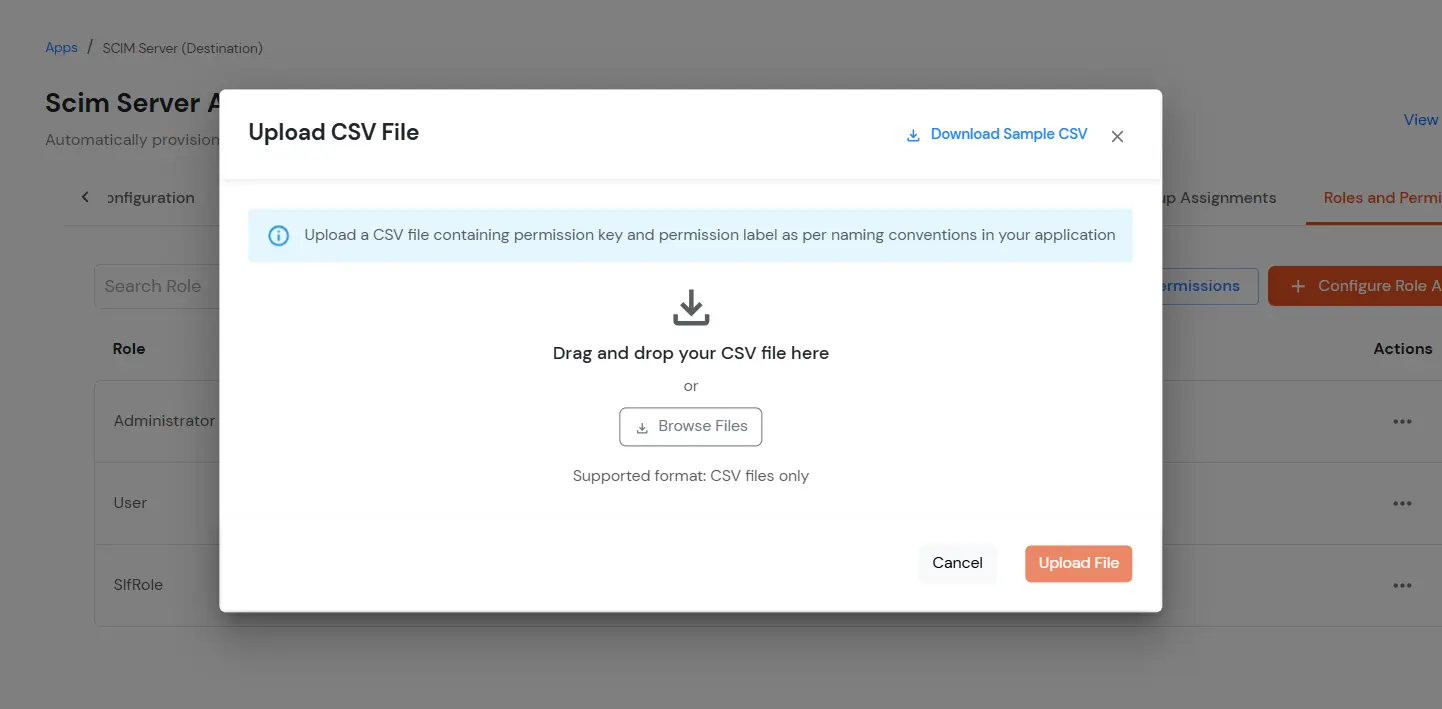
  • Click on Download Sample CSV to view the sample format for importing permissions. [Sample CSV file will be downloaded]
  • To upload the CSV file with permission keys and labels, upload or drag and drop the CSV file here to import permissions from the CSV.
  • miniOrange Identity Platform Admin Handbook: Download Sample CSV

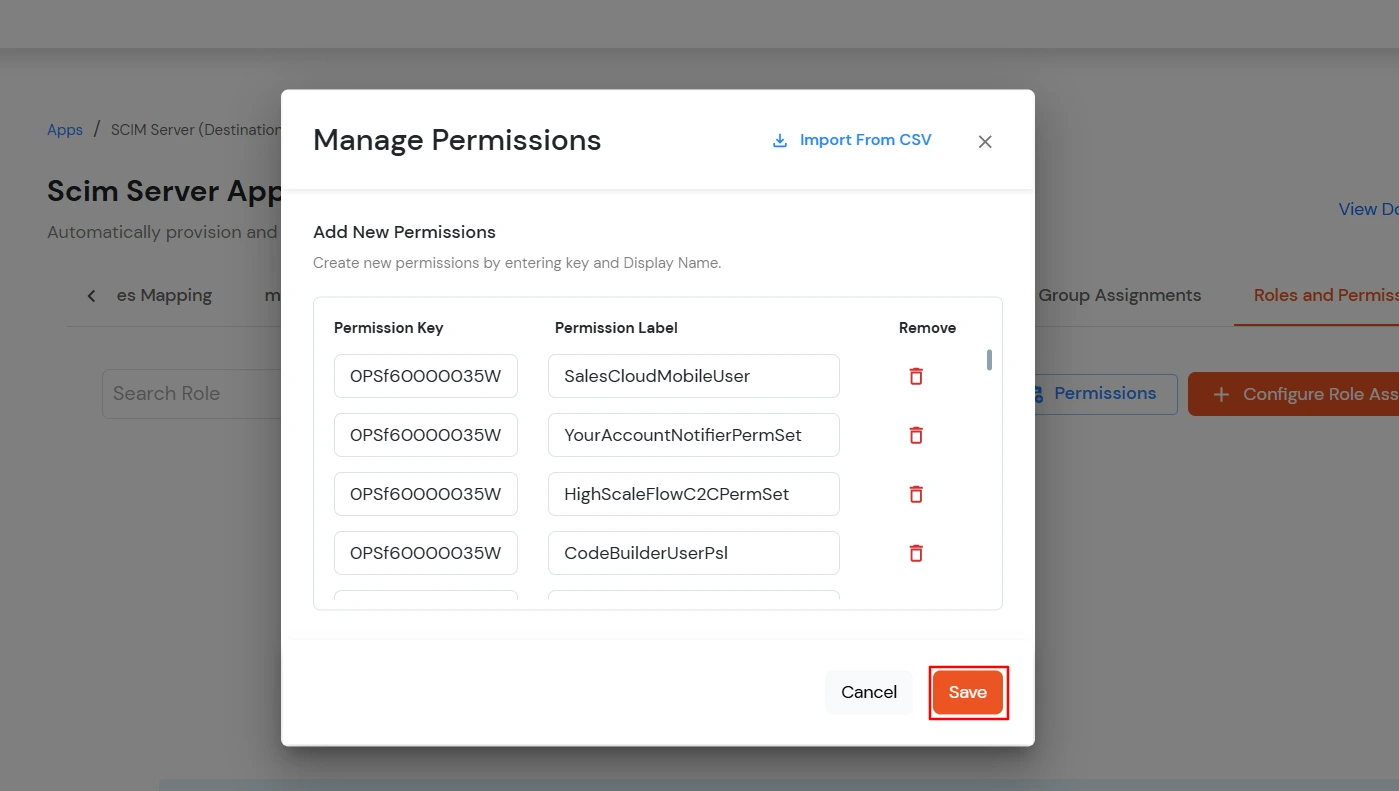
  • Permissions will be imported from the CSV file.
  • miniOrange Identity Platform Admin Handbook: Permissions Imported from CSV

  • Verify the permissions imported from the list and click on Save.
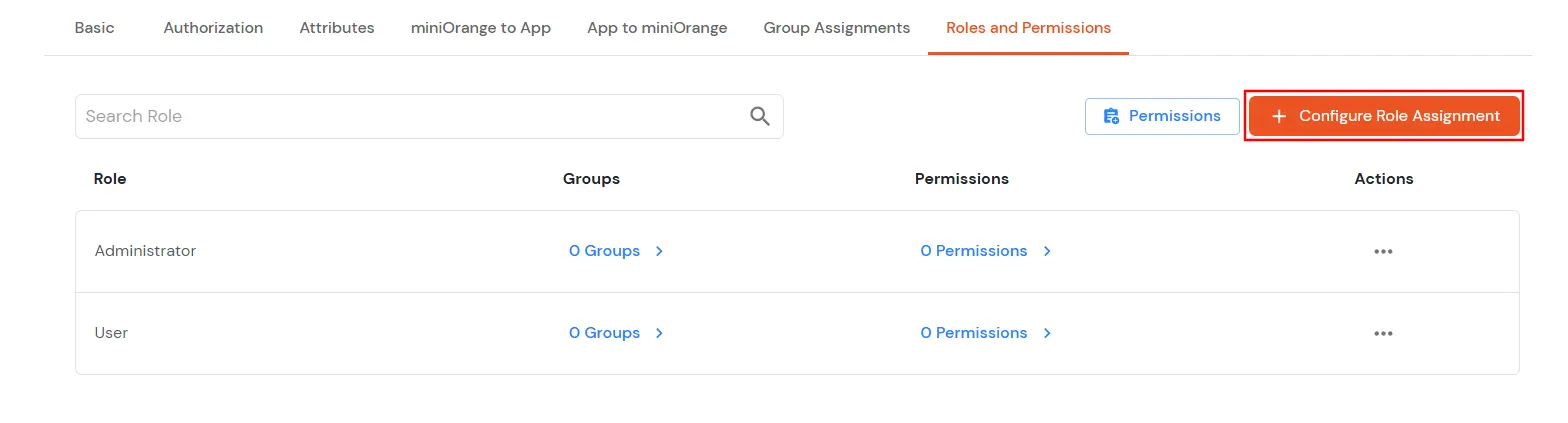
  • Now, click on the Configure Role Assignment button.
  • miniOrange Identity Platform Admin Handbook: Configure Role Assignment Button

  • There are three steps in the role assignment process:
  • Basic Details >> Assign Permissions >> Assign Groups

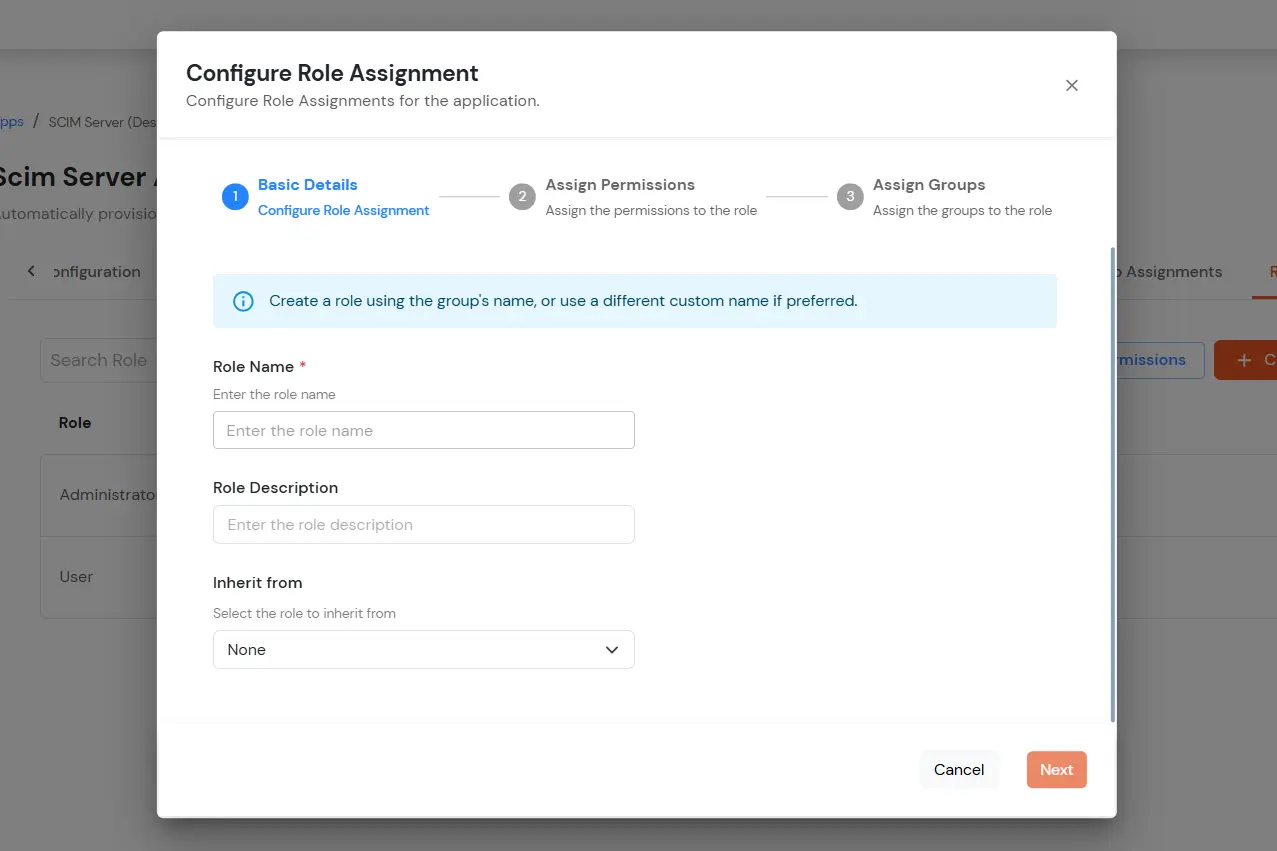
    • Basic Details – Here, you'll be asked to provide a role name and role description. You can either choose a role name from the suggested list (which may match the group names) or create a custom role name. Additionally, you have the option to inherit permissions and groups from previous roles.
    • miniOrange Identity Platform Admin Handbook: Basic Details - Basic Details Role

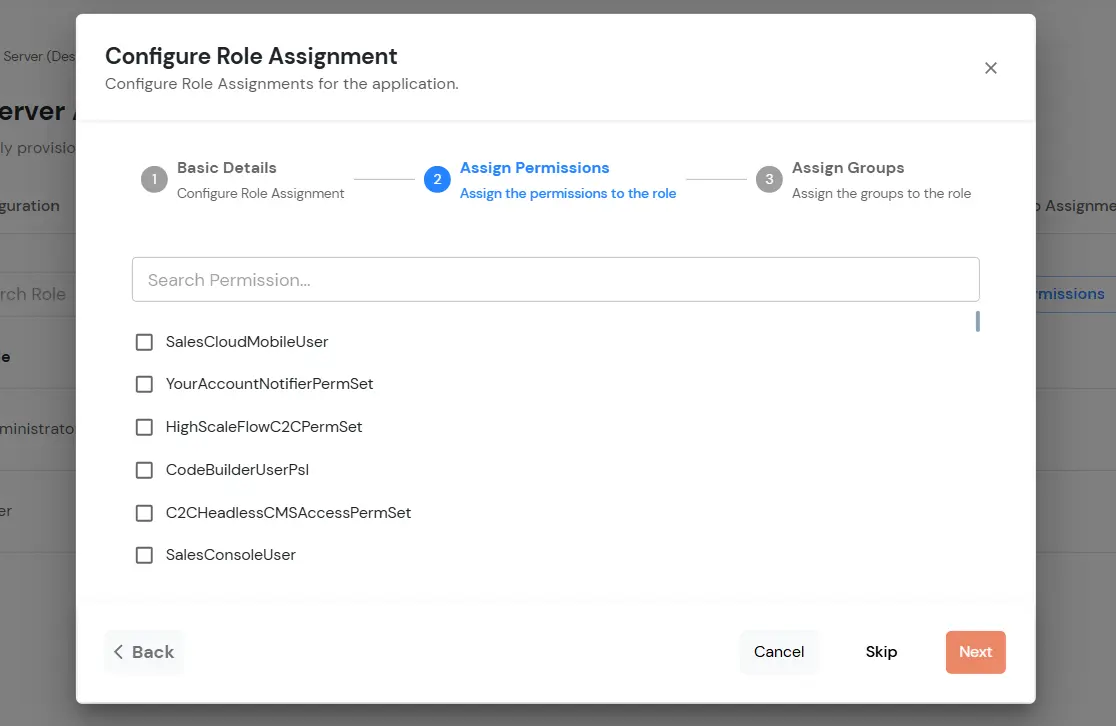
    • Assign Permissions – In this step, you'll see a list of available permissions(entitlements). You can select the entitlements you wish to assign to the role.
    • Note: You can skip this step if the application doesn’t support permissions or entitlements.

      miniOrange Identity Platform Admin Handbook: Assign Permissions Step

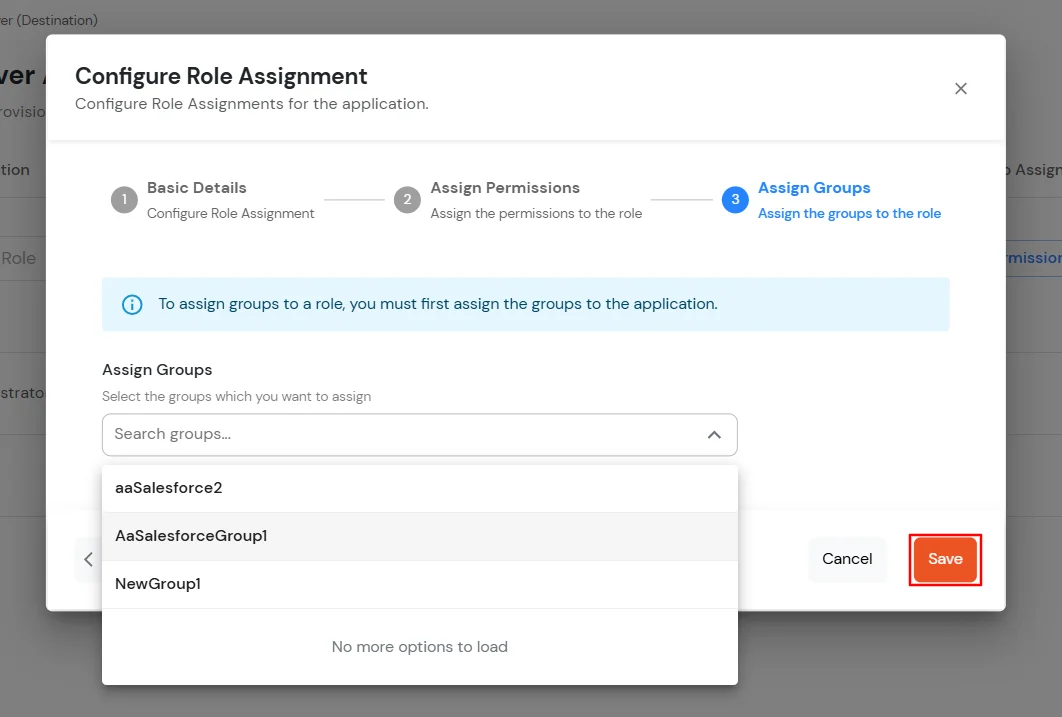
    • Assign Groups – In the final step, you will see a list of groups already assigned to the app. You can then choose which groups to assign to the role. The users of these groups will be assigned to this role.
    • miniOrange Identity Platform Admin Handbook: Assign Groups Step

    • After choosing the groups, click on Save to finalise the role assignment and apply the selected permissions and groups.
    • Once you click Save, you'll see that the new role is configured with the assigned permissions and groups.
    • miniOrange Identity Platform Admin Handbook: Role Configured Successfully

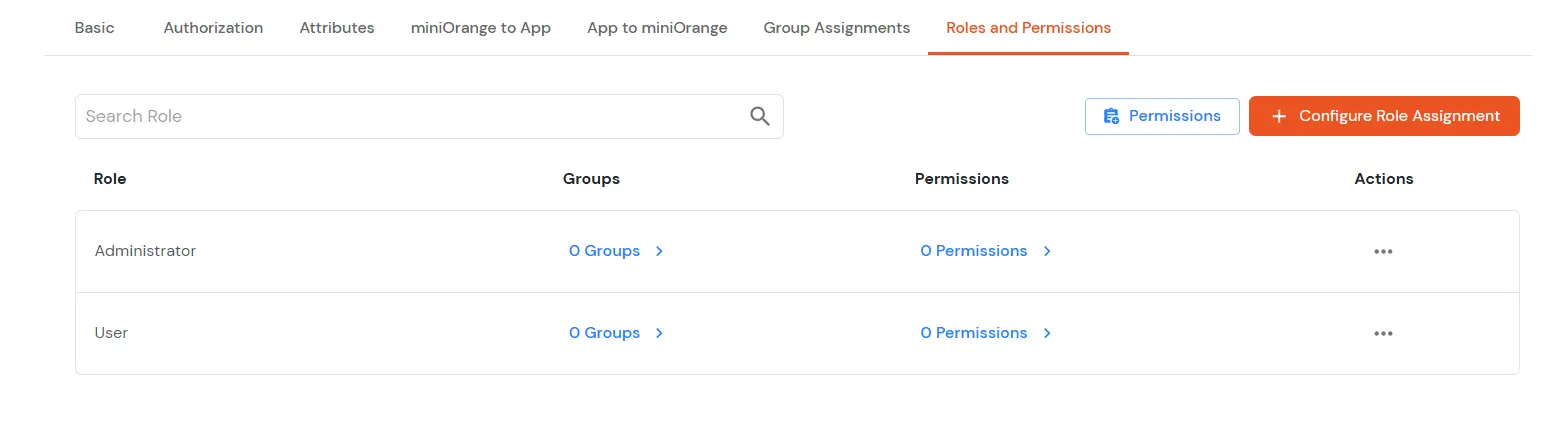
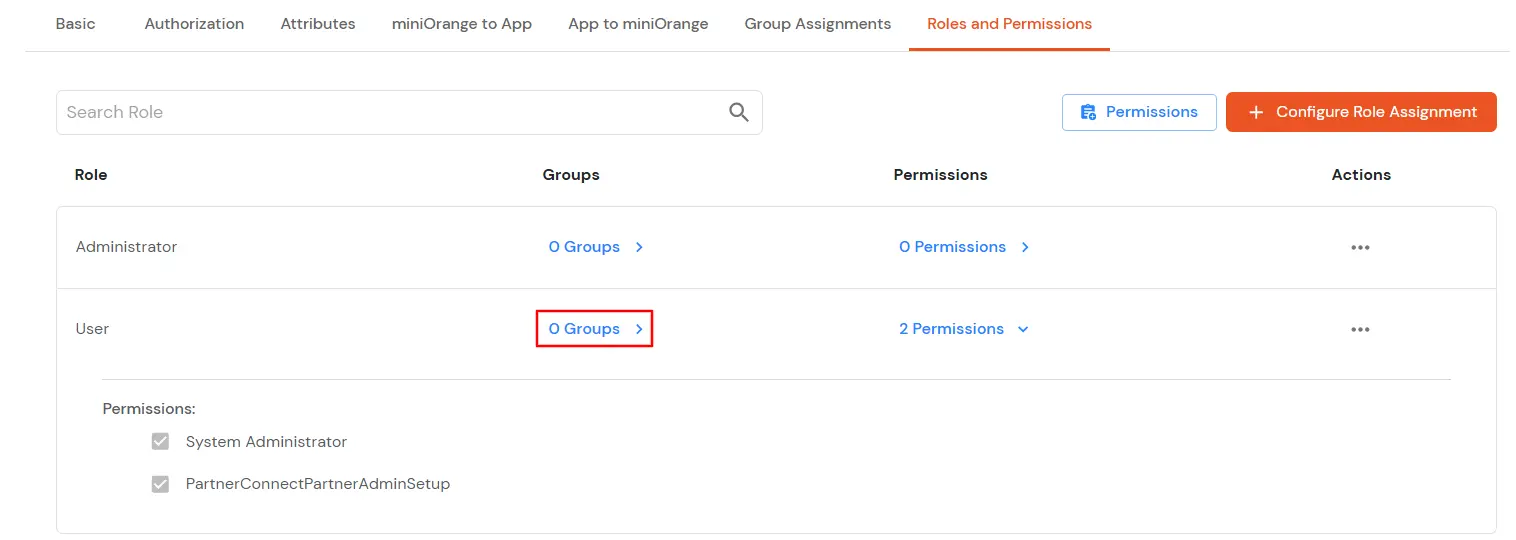
    • You can easily verify the assigned groups and permissions(entitlements) by simply clicking on the Groups or Permissions button next to the respective role
    • miniOrange Identity Platform Admin Handbook: Verify Groups and Permissions Buttons

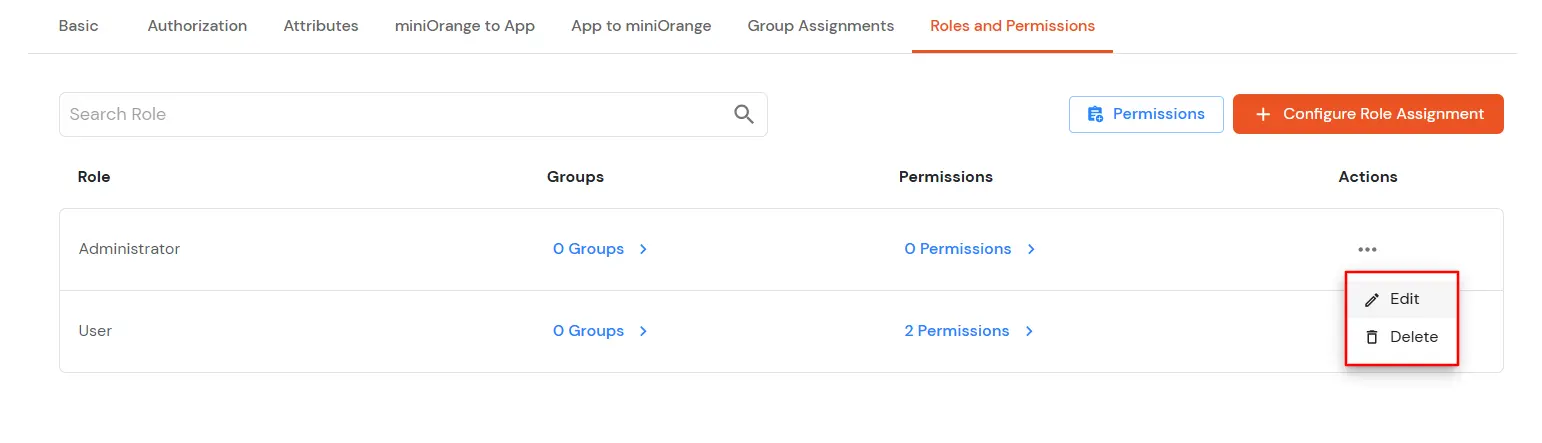
    • To edit or delete the role configuration, click on the Actions menu next to the respective role.
    • Actions Menu for Role

    • You can check all audits to see the status of roles and permissions provisioning in the Reports >> Provisioning Reports section.

7. Add Users

  • Go to Users > View Direct End-Users and click Add User.
  • Enter the Users Details and the user will be created.
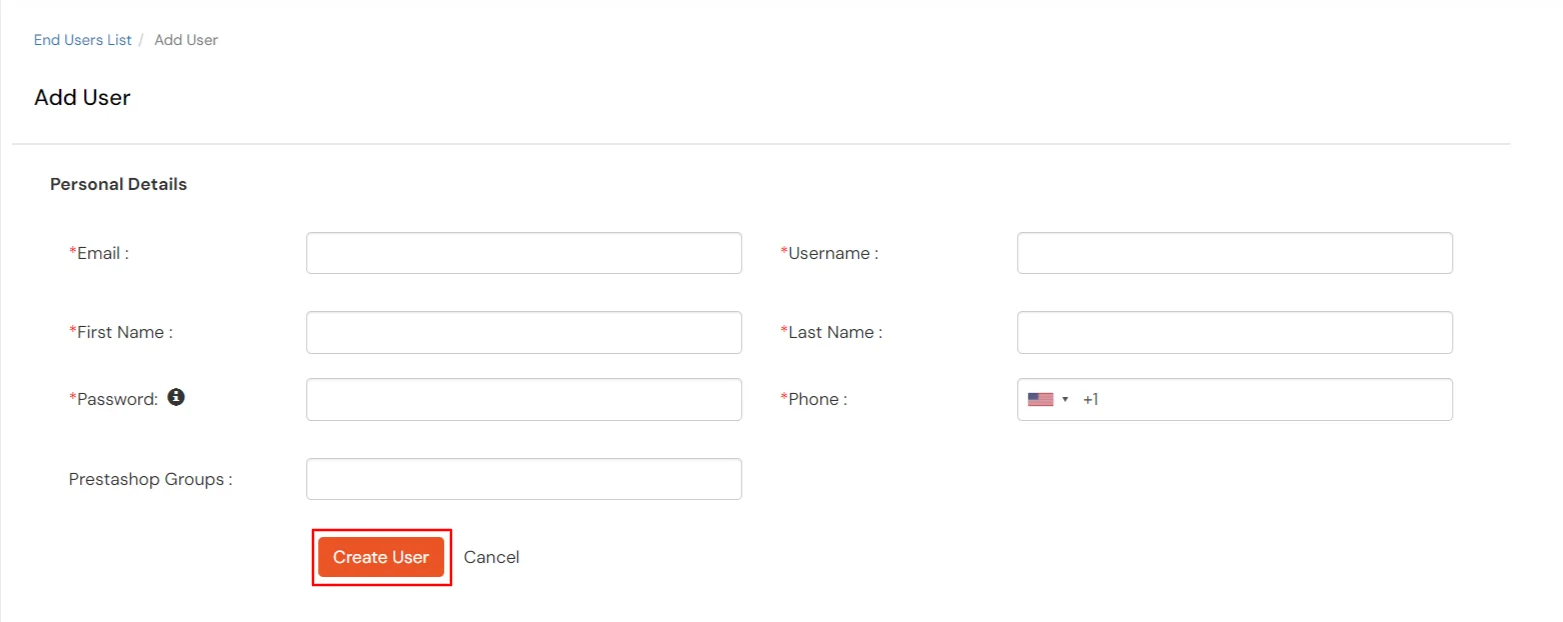
  • miniOrange Identity Platform Admin Handbook: Provisioning Add User

8. Deprovisioning the user

To De-provision any user you can either delete the user from the miniOrange or remove the user from the group associated with the application.

  • Steps to remove a user from the Group
    • Go to the Groups section in the left navigation panel > Manage Groups.
    • Click on the Users field for the group, you have created previously.
    • Select the user you want to remove from the group.
    • Click on Select Action.
    • Select Remove from the Group.
    • Click on Apply.
  • Steps to delete a user in miniOrange
    • Go to the Users section in the left navigation panel > User List.
    • Click on the select option for the user you want to remove.
    • Click on Delete in the drop-down menu.


View Provisioning Reports

How to access Provisioning Reports?

  • Navigate to Reports in the left-hand navigation pane, search for Provisioning, and select Provisioning Report.
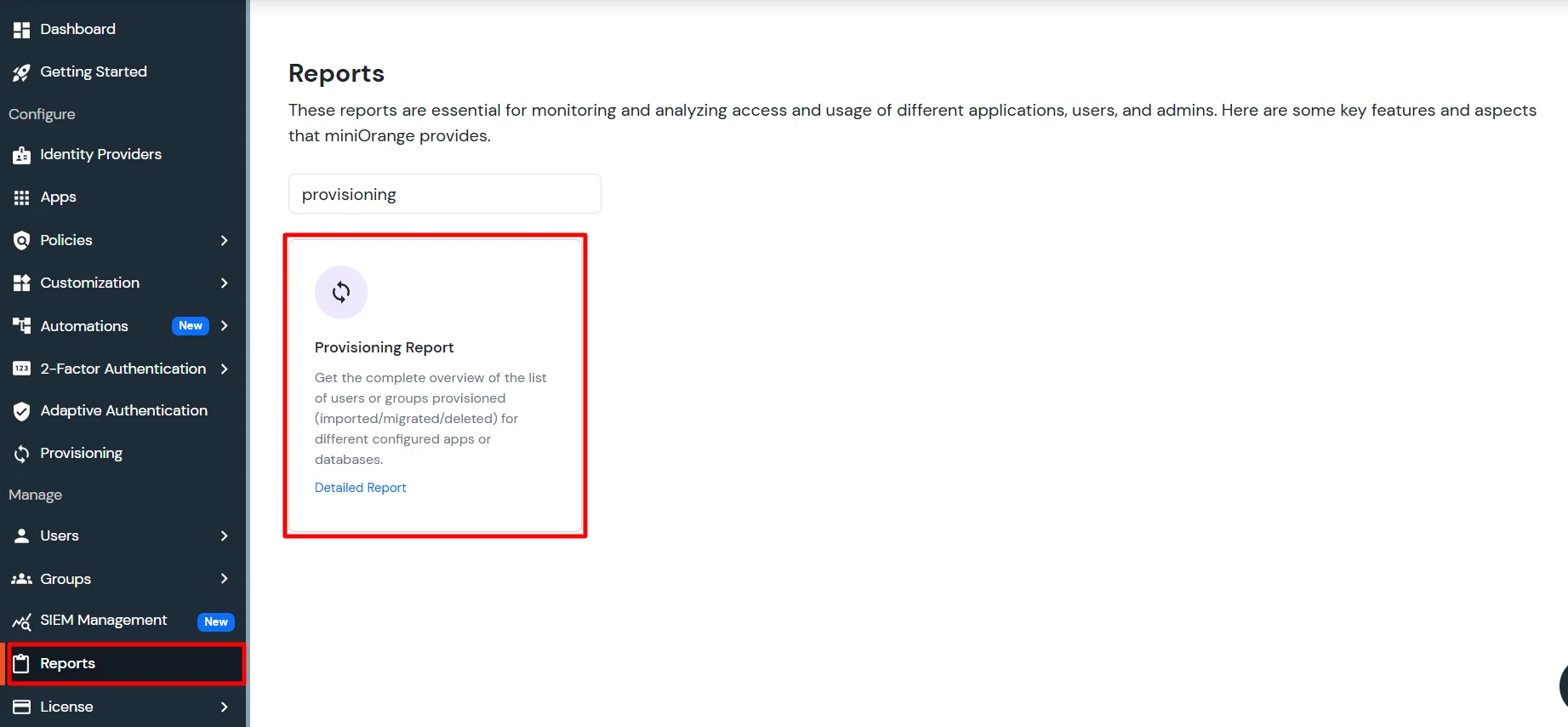
  • Provisioning Report

  • Filter the reports by specifying Enduser Identifier and Application Name criteria. Additionally, choose the desired timespan for the reports. Once done, click on the Search.
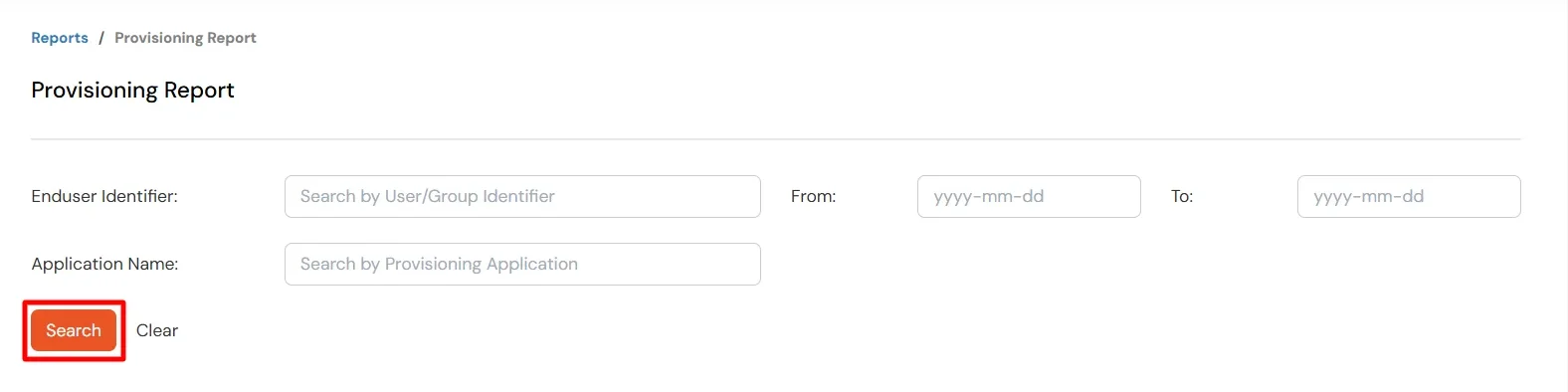
  • Search Provisioning Report

  • Alternatively, you can directly click on Search to retrieve all provisioning reports based on time without applying any specific filters.