Hello there!

Need Help? We are right here!

miniOrange Support
miniOrange Email Support
success

Thanks for your Enquiry.

If you don't hear from us within 24 hours, please feel free to send a follow-up email to info@xecurify.com

Search Results:

×

Database Integration & Management


A secure database environment is essential for effective Privileged Access Management. Databases hold sensitive information, requiring hardened infrastructure, strict authentication, and integration with PAM controls. Proper configuration ensures privileged credentials are protected, access policies are enforced, and audit mechanisms are reliable, strengthening security while maintaining compliance and operational efficiency across critical systems.

Add and Manage Database in PAM Dashboard

In this section, we will understand how to integrate a server or database into the PAM environment. In the miniOrange PAM dashboard, you can configure the following databases:
MySQL Database Configuration

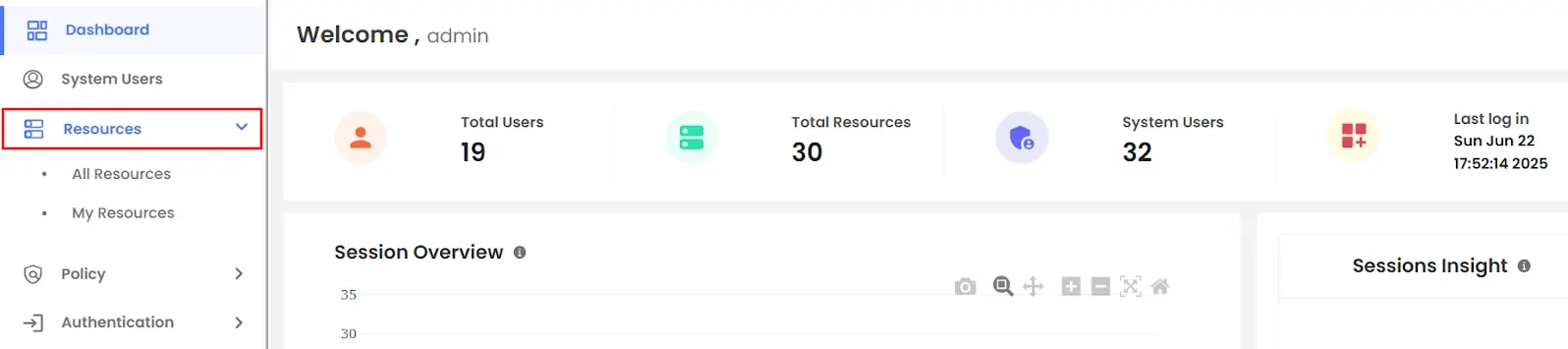
  • Login to your PAM dashboard >> navigate to the Resources section
  • PAM Dashboard Resources Section

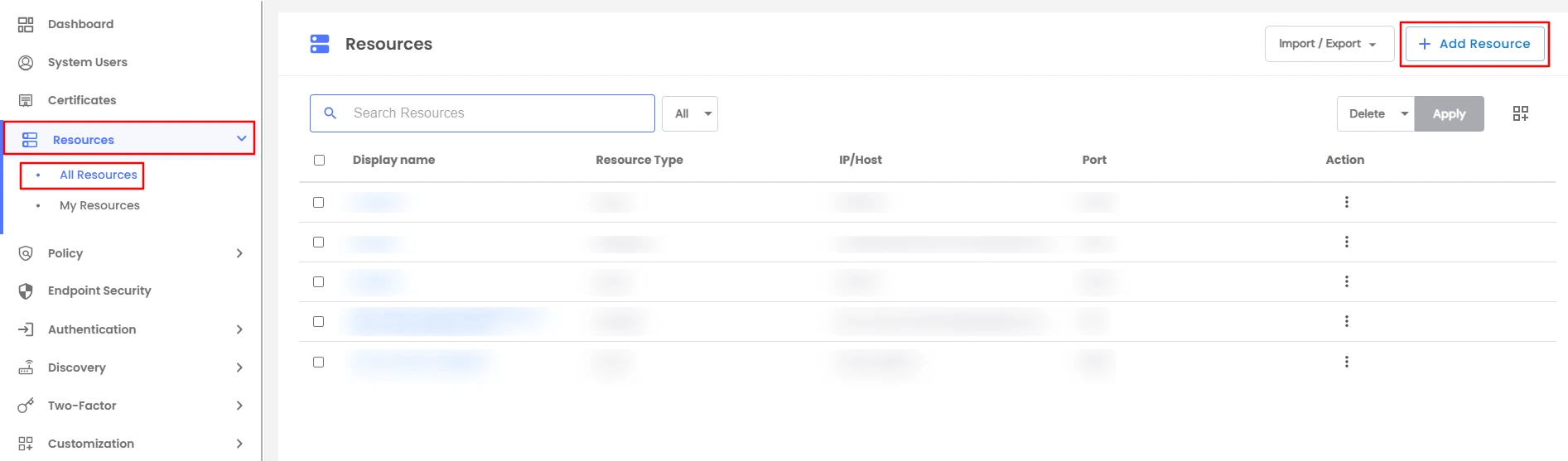
  • Click on All Resources and on the top right, click on the Add Resource button.
  • PAM Add Resource Button

    Note: In 3 simple steps, configure the database. Begin by selecting the MySQL database to integrate.

    Step 1 : Add the general details

    This will include the display name, Port, and IP address.
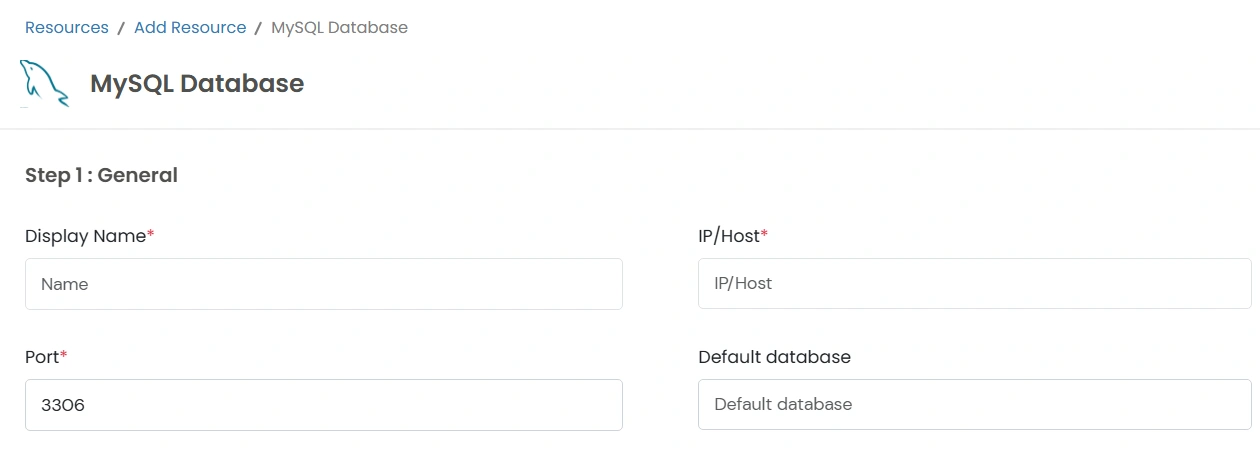
    • Display Name: Provide a descriptive name.
    • Port: Enter the communication port.
    • IP/Host: Specify the IP address or hostname.
    • Default Database: Include the database you want to keep as the default.
    PAM MySQL General Details

    Step 2 : Add credentials

    You will be required to include system users and new credentials details here.

    • System User: Choose an existing system user from the dropdown.
    • To include new credentials, tap on the Add New Credentials button.
    • PAM MySQL Add Credentials

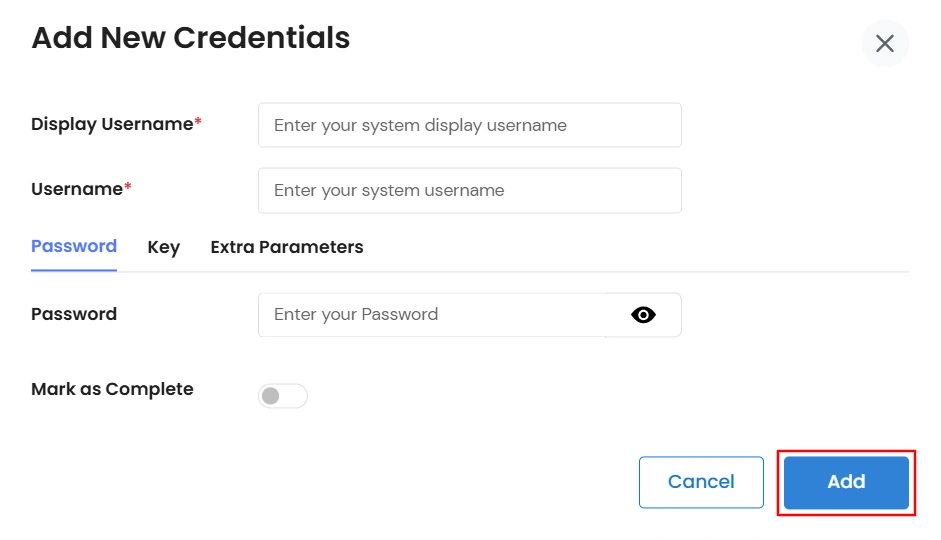
    • A pop-up will open where you are asked to fill in crucial details.
      • Add your system display username and system username
      • You have an option to add a password or a key
      • Enter the password and click on add
      • Add the certificate or token in text or upload the certificate. Include the passphrase and click on the add button.
      PAM MySQL Credentials Popup

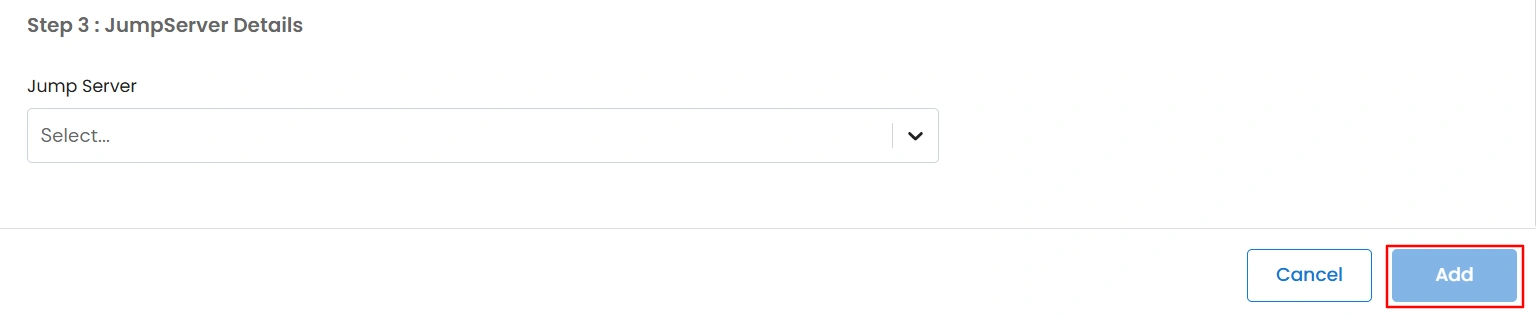
    Step 3 : Add JumpServer Details

    • Select the JumpServer from the drop-down.
    • PAM MySQL JumpServer Details

    • After all the relevant details are added, click on the Add button to configure the database.

PostgreSQL Database Configuration

  • Login to your PAM dashboard >> navigate to the Resources section
  • PAM Dashboard Resources Section

  • Click on All Resources and on the top right, click on the Add Resource button.
  • PAM Add Resource Button

    Note: In 3 simple steps, configure the database. Begin by selecting the PostgreSQL database to integrate.

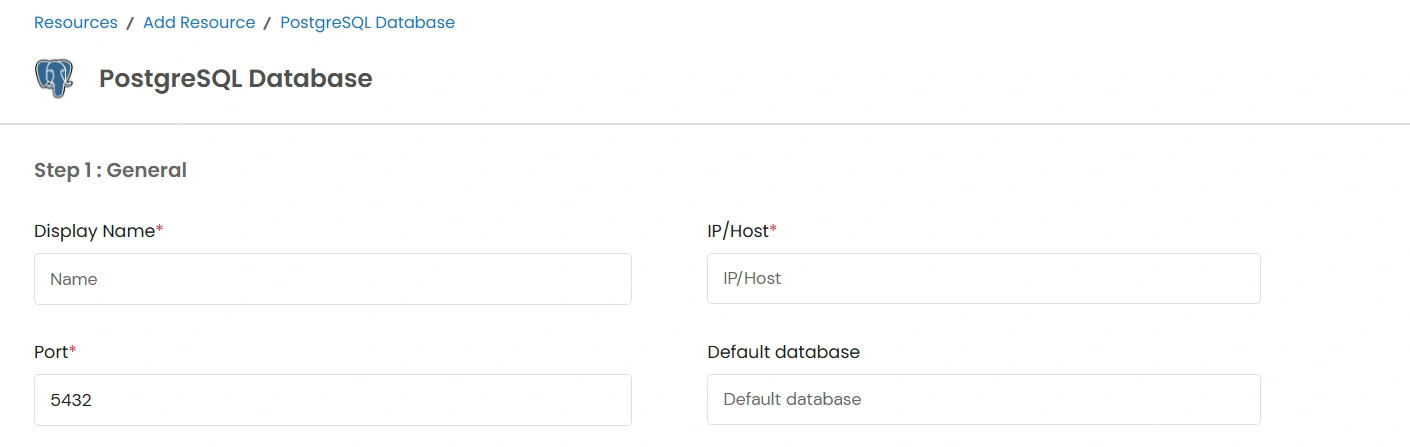
    Step 1 : Add the general details

    This will include the display name, Port, and IP address.

    • Display Name: Provide a descriptive name.
    • Port: Enter the communication port.
    • IP/Host: Specify the IP address or hostname.
    • Default Database: Include the database you want to keep as the default.
    PAM Select PostgreSQL Database

    Step 2 : Add credentials

    You will be required to include system users and new credentials details here.
    • System User: Choose an existing system user from the dropdown.
    • To include new credentials, tap on the Add New Credentials button.
    • PAM PostgreSQL Database Add Credentials

    • A pop-up will open where you are asked to fill in crucial details.
      • Add your system display username and system username
      • You have an option to add a password or a key
      • Enter the password and click on add
      • Add the certificate or token in text or upload the certificate. Include the passphrase and click on the add button.
      PAM PostgreSQL Database Credentials Popup

    Step 3 : Add JumpServer Details

    • Select the JumpServer from the drop-down.
    • PAM PostgreSQL Database JumpServer Details

    • After all the relevant details are added, click on the Add button to configure the database.

MS SQL Database Configuration

  • Login to your PAM dashboard >> navigate to the Resources section
  • PAM Dashboard Resources Section

  • Click on All Resources and on the top right, click on the Add Resource button.
  • PAM Add Resource Button

    Note: In 3 simple steps, configure the database. Begin by selecting the MS SQL database to integrate.

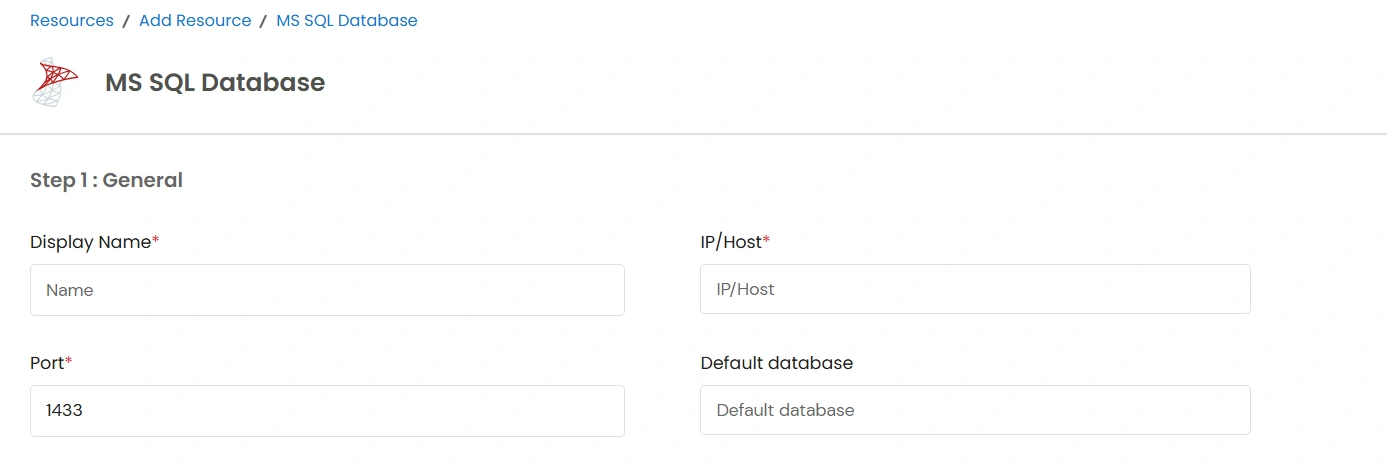
    Step 1 : Add the general details

    This will include the display name, Port, and IP address.

    • Display Name: Provide a descriptive name.
    • Port: Enter the communication port.
    • IP/Host: Specify the IP address or hostname.
    • Default Database: Include the database you want to keep as the default.
    PAM MS SQL Database Add Credentials

    Step 2 : Add credentials

    You will be required to include system users and new credentials details here.
    • System User: Choose an existing system user from the dropdown.
    • To include new credentials, tap on the Add New Credentials button.
    • PAM MS SQL Database Add Credentials

    • A pop-up will open where you are asked to fill in crucial details.
      • Add your system display username and system username
      • You have an option to add a password or a key
      • Enter the password and click on add
      • Add the certificate or token in text or upload the certificate. Include the passphrase and click on the add button.
      PAM MS SQL Database Credentials Popup

    Step 3 : Add JumpServer Details

    • Select the JumpServer from the drop-down.
    • PAM MS SQL Database JumpServer Details

    • After all the relevant details are added, click on the Add button to configure the database.

Oracle Database Configuration

  • Login to your PAM dashboard >> navigate to the Resources section
  • PAM Dashboard Resources Section

  • Click on All Resources and on the top right, click on the Add Resource button.
  • PAM Add Resource Button

    Note: In 3 simple steps, configure the database. Begin by selecting the Oracle database to integrate.

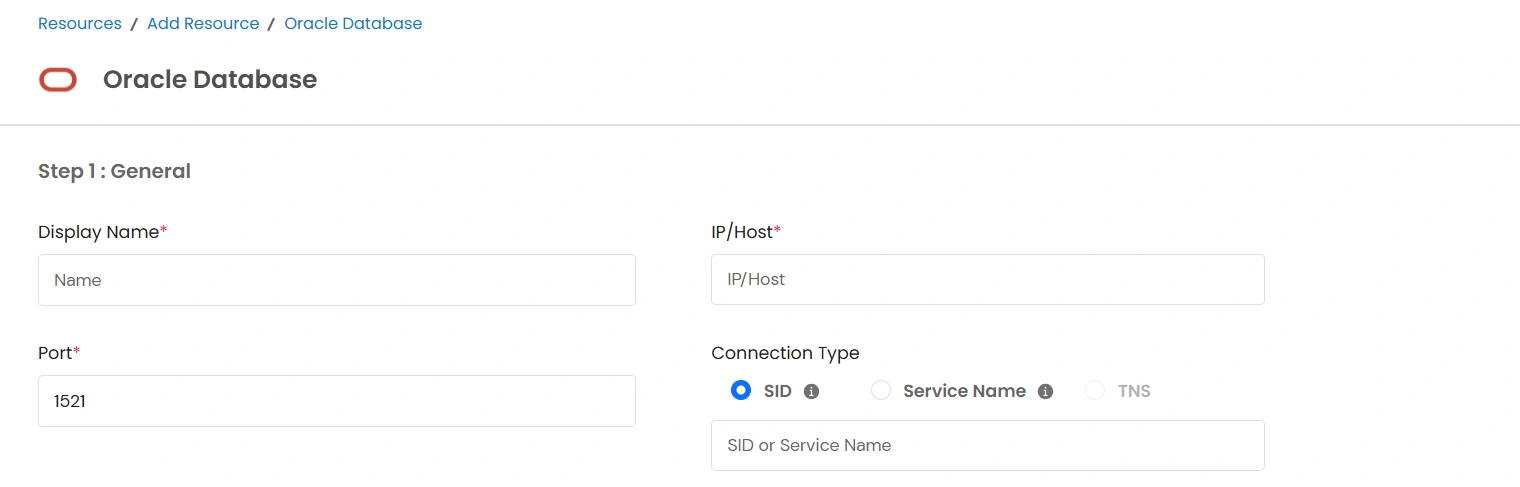
    Step 1 : Add the general details

    This will include the display name, Port, and IP address.
    • Display Name: Provide a descriptive name.
    • Port: Enter the communication port.
    • IP/Host: Specify the IP address or hostname.
    • Connection Type: Choose from SID, Service Name, or TNS.
    PAM Oracle General Details

    Step 2 : Add credentials

    You will be required to include system users and new credentials details here.

    • System User: Choose an existing system user from the dropdown.
    • To include new credentials, tap on the Add New Credentials button.
    • PAM Oracle Database Add Credentials

    • A pop-up will open where you are asked to fill in crucial details.
      • Add your system display username and system username
      • You have an option to add a password or a key
      • Enter the password and click on add
      • Add the certificate or token in text or upload the certificate. Include the passphrase and click on the add button.
      PAM Oracle Database Credentials Popup

    Step 3 : Add JumpServer Details

    • Select the JumpServer from the drop-down.
    • PAM Oracle Database JumpServer Details

    • After all the relevant details are added, click on the Add button to configure the database.

SAP HANA Database Configuration

  • Login to your PAM dashboard >> navigate to the Resources section
  • PAM Dashboard Resources Section

  • Click on All Resources and on the top right, click on the Add Resource button.
  • PAM Add Resource Button

    Note: In 3 simple steps, configure the database. Begin by selecting the SAP HANA database to integrate.

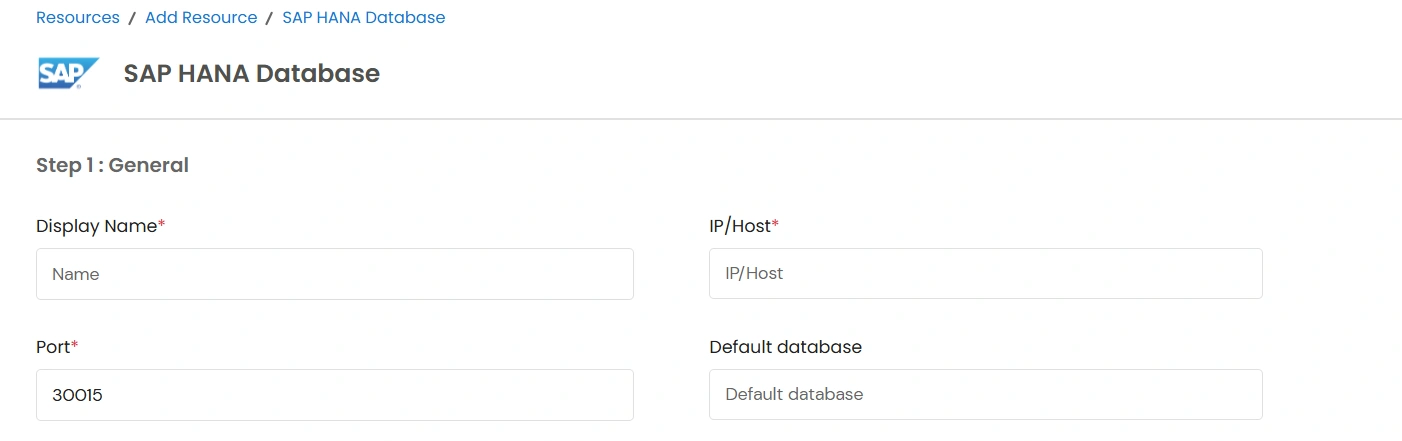
    Step 1 : Add the general details

    This will include the display name, Port, and IP address.
    • Display Name: Provide a descriptive name.
    • Port: Enter the communication port.
    • IP/Host: Specify the IP address or hostname.
    • Default Database: Include the database you want to keep as the default.
    PAM SAP HANA General Details

    Step 2 : Add credentials

    You will be required to include system users and new credentials details here.

    • System User: Choose an existing system user from the dropdown.
    • To include new credentials, tap on the Add New Credentials button.
    • PAM SAP HANA Database Add Credentials

    • A pop-up will open where you are asked to fill in crucial details.
      • Add your system display username and system username
      • You have an option to add a password or a key
      • Enter the password and click on add
      • Add the certificate or token in text or upload the certificate. Include the passphrase and click on the add button.
      PAM SAP HANA Database Credentials Popup

    Step 3 : Add JumpServer Details

    • Select the JumpServer from the drop-down.
    • PAM SAP HANA Database JumpServer Details

    • After all the relevant details are added, click on the Add button to configure the database.