Introduction
Discover how miniOrange CASB and MDM solutions help schools secure their learning environments. By restricting apps, managing devices, and scheduling access, our solution ensures students stay focused while providing administrators with centralized control over devices and policies.
Problem Statement
A school with around 300 students is facing the following challenges:
- Students are accessing Google Drive and Docs from unauthorized devices and home networks, posing risks of data breaches and distractions.
- Students had access to non-educational apps and websites during learning hours, which led to distractions and reduced productivity.
- Teachers found it difficult to maintain students' focus during learning periods, especially with multiple devices connected to the internet and few options to restrict unnecessary access dynamically.
- The school needed help to lock Chromebooks in specific organizational units (OUs) to only a handful of apps or websites.
Requirements
- Limit access to applications strictly to their Chromebooks and PCs within the school’s network.
- Schedule time-based app or website restrictions, like limiting Google Docs usage to specific hours.
Solution
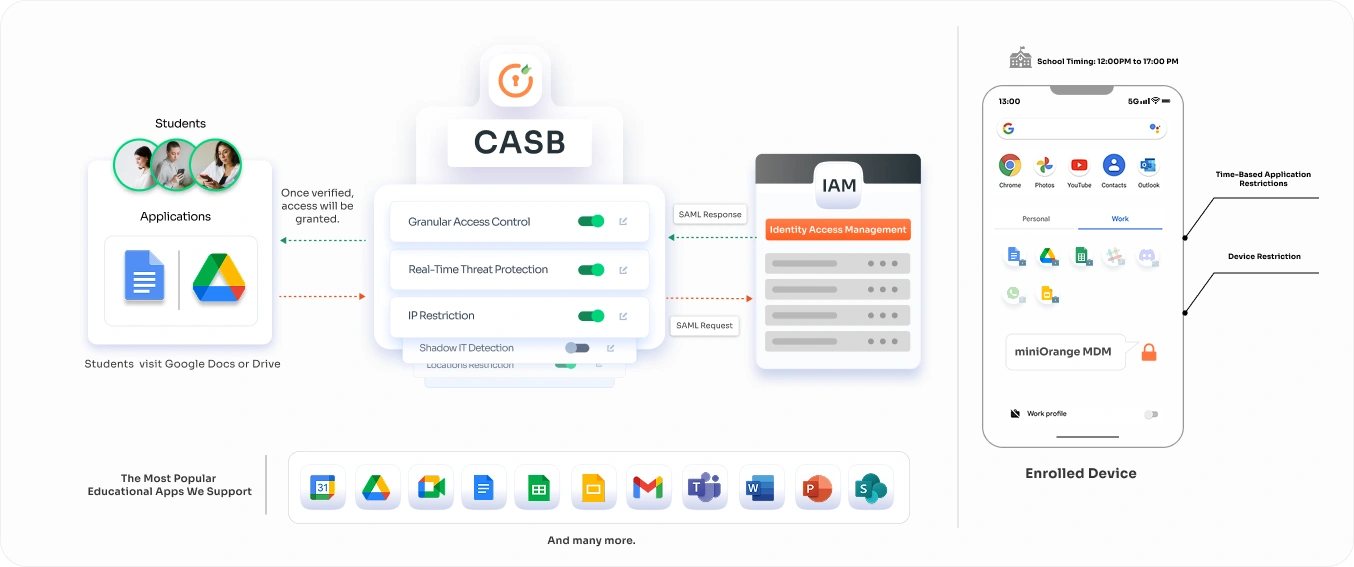
miniOrange provided the school with its CASB & MDMsolutions loaded with IP Restriction features. The security solution could easily integrate with the school’s managed Chromebooks and Education GSuite environment. This addressed the school’s specific needs with the following features:
Improved Security
Unauthorized access to corporate applications is completely blocked on Android, iOS, and macOS devices, reducing the risk of data breaches.
- During math lessons, students could only access Google Sheets and relevant educational websites.
- All other apps and sites were blocked, ensuring distractions were minimized.
Device Enrollment and Management
- MDM enables the school to register and manage all Chromebooks and PCs used by students.
- Each device is enrolled in the MDM platform, ensuring it complies with security and access policies.
Time-Based Application Restrictions
Schedule app and website access based on the school timetable. For instance:
- Google Docs was accessible only during designated periods for collaborative assignments.
- Entertainment or social media apps were entirely blocked during school hours.
Device Restriction
- Define policies to allow access to Google Drive and Docs only from MDM-enrolled devices.
- Unauthorized or unmanaged devices, such as personal smartphones or home computers, are automatically denied access, even if they connect to the school network.
Enhanced Monitoring and Reporting
The miniOrange solution offers detailed monitoring capabilities, giving administrators insights into device usage. This helps identify potential misuse and provides actionable reports for teachers.
Simplified Management
The intuitive miniOrange dashboard allows administrators to configure and manage restrictions across all 50 Chromebooks easily.
Easy Integration
Seamlessly integrates with the school’s existing GSuite setup, minimizing additional technical overhead or training.
Outcomes
- Better Security: With miniOrange CASB and MDM, the school establishes a robust framework that ensures sensitive educational data is accessible only within the boundaries of the school’s network and on authorized devices. This minimizes the risk of data breaches, such as students accidentally sharing or downloading confidential files on unsecured devices or networks.
- Improved Compliance: By enforcing IP and device-based restrictions, the school aligns itself with educational and data protection regulations, such as FERPA (Family Educational Rights and Privacy Act) in the United States. Compliance ensures that student data and academic materials remain secure and are not exposed to unauthorized individuals.
- Increased Productivity: Restricting access to Google Drive and Docs outside school ensures students engage with these tools in a controlled learning environment. This reduces distractions that could arise from unrestricted usage at home, where students might misuse school resources or share files unnecessarily.
- Simplified Centralized Management:The miniOrange solution provides a single, unified dashboard to manage all security policies. Administrators can easily enforce and update policies, monitor access patterns, and address any anomalies in real-time. This saves time and effort, allowing IT staff to focus on other critical tasks.
- Compatibility with Infrastructure:The solution seamlessly integrates with the school’s existing Google Workspace and device management systems, requiring no overhaul of infrastructure. This ensures a smooth transition with minimal disruption to teaching and administrative activities.The miniOrange solution provides a single, unified dashboard to manage all security policies. Administrators can easily enforce and update policies, monitor access patterns, and address any anomalies in real-time. This saves time and effort, allowing IT staff to focus on other critical tasks.
- Tailored User Access Control : By enrolling devices into the miniOrange MDM, the school can ensure that only specific student devices can access Google Workspace applications. This includes granular control to provide teachers or staff with expanded permissions while maintaining strict access limits for students.
- Cost-Effective Security:
Implementing a combined CASB and MDM solution eliminates the need for multiple standalone tools. This reduces operational costs while delivering comprehensive security features tailored to the school’s specific requirements.
- Detailed Visibility and Reporting : Administrators gain access to detailed reports on who accessed Google Apps, when, and from which devices or locations. This audit capability helps in identifying potential security gaps and ensures transparency in how school resources are utilized.
Secure Student Devices with CASB & MDM for Safer Digital Learning.
Ensure only authorized users and managed devices can access school resources.
Start Free Trial
Book a Demo
Conclusion
By deploying miniOrange CASB and MDM, the school not only enhances its digital security but also fosters a focused and secure educational experience tailored to modern-day learning requirements.