
The most common first move in a modern cyberattack isn't a zero-day exploit or a piece of custom malware. It's a username and a password.
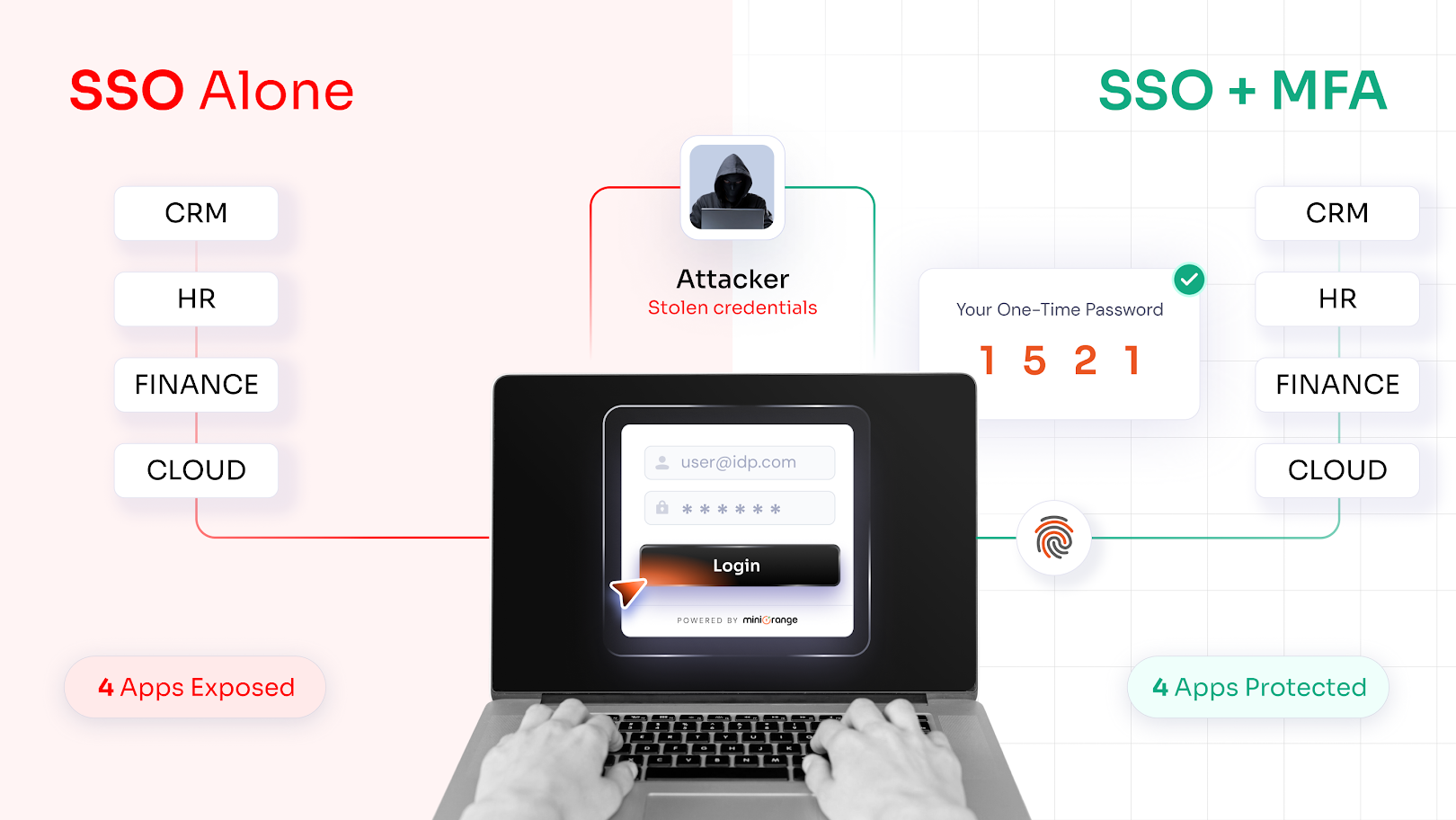
Attackers know that credential theft is the fastest path into an enterprise network. And when an organization implements Single Sign-On (SSO), that path gets shorter. One stolen credential equals access to dozens of applications.
More than 30 million infostealer logs were found circulating across the dark web, carrying not just login credentials but cookies and active session tokens. All of which were collected silently from compromised devices. And SSO alone was never designed to stop credentials that were already gone.
This is where Multi-Factor Authentication (MFA) comes in. And why it belongs inside every security infrastructure to secure SSO. But first, let's go deep on what SSO is.
What is Single Sign-On (SSO)?
Single Sign-On (SSO) solution is an authentication method that lets users log in once and gain access to multiple connected applications without re-entering credentials. Employees authenticate through a central Identity Provider (IdP), and that one verified session carries them across every connected system.
For enterprise IT teams, SSO is less about convenience and more about control. One place to manage access. One place to revoke and audit access.
How Single Sign-On Works in Modern Identity Systems
When a user logs in through SSO, the Identity Provider (Okta, Azure AD, miniOrange, or similar) verifies identity and issues an authentication token. Every connected Service Provider (SP) accepts that token without requiring a separate login.
The communication between IdP and SP runs on three core protocols:
- SAML (Security Assertion Markup Language): Used primarily for enterprise applications. The IdP sends a signed XML assertion confirming the user's identity to the SP.
- OAuth 2.0: Handles authorization rather than authentication. It's usually used in API-based access flows.
- OpenID Connect (OIDC): Built on top of OAuth, it adds an identity layer. Standard for modern web and mobile applications.
These SSO protocols are what make centralized authentication across hundreds of applications actually work.
What SSO Security Does Well, and Where It Falls Short
The benefits of Single Sign-On for enterprises are well-documented.
SSO reduces password fatigue, cuts helpdesk tickets, and gives IT a centralized dashboard for managing who has access to what. Employees stop juggling ten different logins. Productivity goes up, and access management becomes traceable.
But that centralization is exactly where the risk lives.
If an attacker gets hold of a user's SSO credential (through phishing, credential stuffing, password reuse, or an infostealer), everything connected with that credential is compromised. It includes every system, every dataset, and every workflow until the IT team detects the intrusion and revokes access.
SSO is also particularly exposed to session hijacking. This is because SSO relies on tokens and cookies to maintain an authenticated session across applications. Attackers who steal those tokens can replay them and move through connected systems without ever needing the user's password.
A secure SSO is a productivity multiplier. At the same time, a compromised SSO session is a force multiplier for attackers. So to secure single sign-on, MFA is critical.
What is Multi-Factor Authentication (MFA)?
A Multi-Factor Authentication (MFA) solution requires users to verify their identity beyond a password. After the primary credential clears, the system asks for one or more additional proofs before granting access.
The root logic of MFA is straightforward: even if an attacker has your password, they still can't get in without something only you have, or something you are. Let's understand this better...
Understanding the Three Authentication Factors
Multi-factor authentication draws from three categories:
- Something You Know: Passwords, PINs, security questions
- Something You Have: Authenticator apps, hardware tokens, mobile devices
- Something You Are: Fingerprints, facial recognition, other biometrics
Any two or more of these factors, combined, make up MFA methods that would secure single sign-on.
Where MFA Falls Short on Its Own
MFA without SSO creates friction at scale. Ask any IT admin who's rolled out MFA application by application.
All would say that eventually, employees start finding workarounds fast. They stay logged into shared devices. They reuse sessions. They quietly skip the application where MFA is required, because those are easier, and nobody told them not to.
The result is inconsistent coverage. Some applications are protected. Others aren't. And hackers go for the gaps.
This is why MFA and SSO aren't competing choices. They address different sides of the same problem. SSO handles authentication convenience. MFA handles authentication security.
And that's how you secure SSO in your organization.
Popular MFA Methods Used to Secure SSO
To strengthen identity verification and reduce unauthorized access risks, modern SSO implementations rely on Multi-factor authentication (MFA) methods that add multiple layers of security beyond passwords:
| MFA Methods | How it Works | Best Used For |
|---|---|---|
| One-Time Password (OTP) | Time-sensitive code via app, SMS, or email | Standard enterprise logins |
| Push Notifications | Approve/deny prompts on a mobile device | High-frequency users |
| Hardware Security Tokens | Physical device generating one-time codes | Privileged access, high security rules |
| Biometric Authentication | Fingerprint or facial scan | Device-level verification |
| Passwordless Authentication | Passkeys | Modern SSO login flows |
Here's How MFA Strengthens SSO Security
When MFA layers into an SSO security framework, the single point of access stops being a single point of failure.
1. Closes the Door on Credential-Based Attacks
Those 30 million infostealer logs don't just contain passwords. They contain session cookies, saved browser credentials, and active authentication tokens. When an attacker replays those credentials against an SSO login, MFA stops them cold. The password might be valid. The second factor isn't in the log.
Credential stuffing, brute force, and password spraying; these attacks only work if a correct password means access. MFA removes that assumption.
2. Neutralizes Phishing and Account Takeover
Phishing campaigns increasingly target SSO login pages specifically because the payoff is higher. After all, one set of credentials would unlock everything. But with MFA active, especially when supported by a phishing-resistant MFA solution, an employee who enters their password on a convincing fake login page still doesn't hand over full access. The attacker can't complete the second factor, and the attack stalls.
3. Enables Adaptive and Risk-Based Authentication
Not every login carries the same risk. For example, an employee accessing the CRM from their usual device on the office network is an everyday pattern. But the same employee logging in from an unfamiliar country at 2 am is an anomaly.
Adaptive MFA and risk-based authentication methods read those signals (device address, location, behavior, time of access) and respond accordingly.
- Every day pattern = token issues immediately.
- Unusual pattern detected = MFA prompt triggered.
The security adjusts to the situation instead of treating every login identically.
4. Builds the Foundation for Zero Trust Architecture
Zero Trust Architecture (ZTA) runs on one principle: never trust, always verify. SSO + MFA operationalizes that at the identity layer. Every login is confirmed. Every access event is tied to a verified identity. No implicit trust based on network location alone. For organizations moving toward Zero Trust Architecture, this combination is the starting point.
How to Secure SSO with Multi-Factor Authentication?
Before we see the steps to secure SSO with MFA, let's see what the full SSO + MFA authentication flow looks like once it's in place.
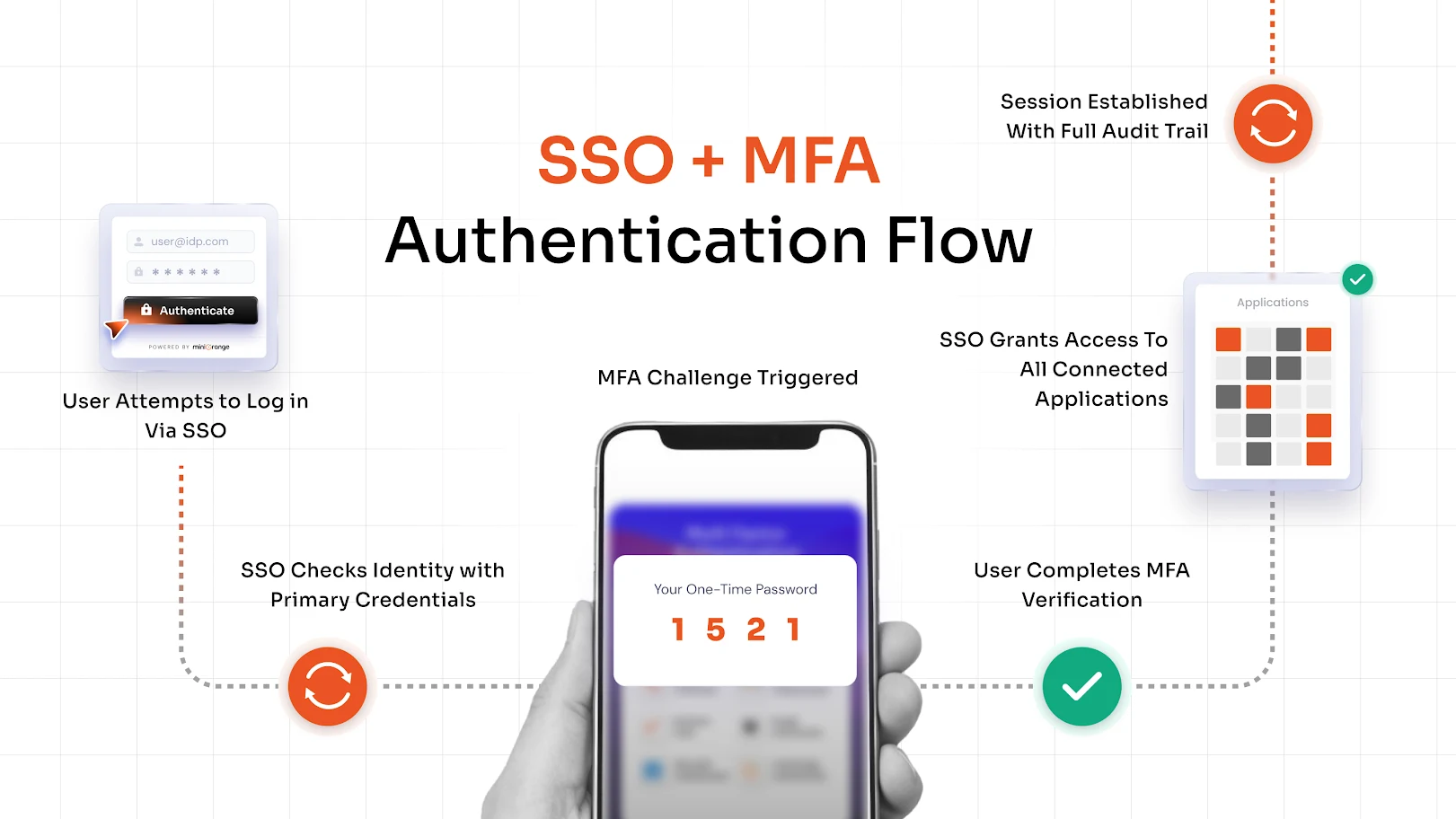
Step 1: Integrate MFA with Your Identity Provider
Your IdP is where MFA configuration starts. Enable MFA at the IdP level, so it applies consistently across every application in your SSO ecosystem. This is because configuring MFA one-by-one on every app is slower, creates gaps, and is harder to audit.
Step 2: Enforce MFA for Critical Applications
You don't have to roll out MFA everywhere on day one. Start with high-value targets like cloud infrastructure consoles, financial systems, HR platforms, and anything holding sensitive or regulated data. Enforce there first, then expand.
You can also enforce MFA selectively. For example, enforce it for external users or contractors accessing internal systems. This way, there won't be any friction for employees on trusted, managed devices. This kind of granular control is exactly what makes MFA practical at enterprise scale.
Step 3: Implement Adaptive Authentication Policies
Define what "high risk" looks like for your organization (unusual login location, unrecognized device, access outside business hours) and configure policies to trigger MFA in those scenarios. Adaptive and risk-based authentication policies protect without over-burdening users who are logging in under normal conditions.
Step 4: Enable Passwordless Options
Passwordless single sign-on solutions like passkeys remove the credentials from the equation, so these options are for organizations that want to move beyond passwords entirely.
Here, MFA verifies identity without needing to create, store, or expose passwords. This means there are fewer credentials in circulation, which means fewer credentials to steal.
5 Best Practices to Secure SSO with MFA
Here are 5 practical SSO best practices you should follow to secure SSO with MFA.
- Enforce MFA for high-risk logins first. Executive accounts, IT admin accounts, and privileged roles are high-value targets for hackers. Protect those before everything else.
- Apply least privilege access. SSO makes it easy to connect every user to every application. But users should access only what their role requires, nothing more.
- Use secure authentication protocols. SAML, OAuth 2.0, and OIDC are the standards. Ensure your SSO configuration enforces them and drops legacy protocols like NTLM or basic auth.
- Monitor and audit access logs regularly, not just when something goes wrong. Which means, you'll have to configure alerts and schedule audits to show dormant accounts, over-privileged roles, and unusual patterns before they become incidents.
- Train users on identity security risks. MFA fatigue attacks (where attackers send repeated authentication prompts until a tired user approves one) are documented and increasing. Users need to know what a legitimate prompt looks like and what to do when one shows up unexpectedly.
Choosing the Right SSO and MFA Solution
Your IT team already has the moving parts for this, such as directories, cloud apps, on-premise systems, legacy tools, etc.
And so, the system that you choose needs to work inside that. Which means, you need a system that provides a secure single sign-on solution along with strong MFA to protect your enterprise applications and user identities.
Key Features to Look For in a Secure SSO and MFA Solution
- Single Sign-On across both cloud and on-premise applications
- Support for SAML, OAuth 2.0, and OpenID Connect
- Multiple MFA methods like One-Time Passwords (OTP), Push Notifications, Biometric Authentication, Hardware Tokens, and more.
- Adaptive and risk-based authentication policies
- Centralized identity and access management dashboard
- Directory integration with Active Directory and LDAP
- Passwordless authentication support
Why Organizations Choose miniOrange for SSO and MFA
miniOrange delivers secure SSO and MFA in a single platform. This way, your organization is not patching together separate tools and hoping they integrate cleanly.
Key capabilities:
- Enterprise-grade SSO enables one login across all connected applications
- Strong MFA with OTP, push notifications, biometrics, and hardware token support to secure SSO
- Passwordless authentication for modern login flows
- Adaptive authentication policies built for Zero Trust security models
- Integrations with enterprise directories, cloud platforms, and legacy applications
- Centralized dashboard for Identity and Access Management (IAM) across user types: employees, partners, vendors, and customers
If your organization is managing the access complexity that comes with scale, multiple applications, mixed user types, and hybrid infrastructure, miniOrange is built for exactly that environment.
Conclusion
Most enterprises have SSO. But fewer secure single sign-on with multi-factor authentication. That gap is where credential-based attacks succeed & where a strong identity security framework is built.
Those 30 million infostealer logs aren't a distant statistic. They're active and circulating attack material right now. SSO alone doesn't stop that. But a verified second factor does.
SSO gives your employees one login for everything. MFA makes sure that the login belongs to who it claims to be. Together, they turn authentication from a convenience feature into a genuine security layer, which, for any organization operating under today's threat landscape, is no longer a nice-to-have.
FAQs
What is Secure Single Sign-On (SSO)?
Single Sign-On is an authentication method that lets users log in once and access multiple applications through a central Identity Provider. When paired with MFA and adaptive policies, it becomes a secure access layer rather than just a convenience feature.
How does SSO enhance secure authentication?
A secure single sign-on centralizes authentication. This means access management, revocation, and audit logging all happen in one place. When MFA is layered in, that single entry point is both frictionless for users and verifiable for IT teams.
Why is SSO security important for organizations?
It's important because SSO is a single point of access. If those credentials are compromised without additional protection, an attacker gains entry to every connected application in one move. MFA ensures a stolen password alone isn't enough to complete that attack.
What is a secure passwordless Single Sign-On solution?
A passwordless single sign-on solution removes the traditional password from the login flow entirely. Identity is verified through passkeys, biometrics, or hardware-bound authenticators.
About the Author

Content Writer
Stutee writes about cybersecurity and identity security, covering technologies such as MFA, IAM, PAM, and endpoint management. Her work focuses on translating what products do into why audiences should care, ensuring technical depth does not come at the cost of readers clarity.
Leave a Comment