

A one-time password (OTP) is a temporary code that verifies your identity for a single login or transaction. A system generates it on request, accepts it once, and expires it within seconds or minutes.
OTP authentication is the process of using that code as proof it's really you. You've likely done it today: a banking app sends 6 digits, you type them in, and the code is dead a minute later.
This guide explains how OTP authentication works, the different types of OTPs, how they are delivered, and the security risks organizations should consider when using them.
OTPs and Static Passwords: Key Differences and Where They Are Used
A regular password stays the same until you change it. An OTP is created fresh for each attempt and stops working the moment it's used or its timer runs out.
That's the reason for the name. Each code belongs to one login attempt, so an attacker who grabs it later has nothing to replay. A stolen static password keeps working until someone notices and resets it, and that's a real problem: Verizon's 2026 Data Breach Investigations Report found stolen credentials in 39% of breaches once you count every stage of an attack, from the first foothold to lateral movement.
You run into OTPs in banking and payment approvals, password resets, checkout confirmations, VPN and cloud app logins for remote teams, and sign-ups where a service verifies your phone number or email.
How OTP Relates to 2FA and MFA
OTP and 2FA/MFA refer to different parts of the authentication process.
An OTP is one authentication factor, something you have, that provides a temporary verification code. 2FA and MFA are policies that require two or more authentication factors, and an OTP can be one of them.
A login that asks for your password and then a code from an authenticator app is 2FA, with the OTP as the second factor. Add a fingerprint check, and you have MFA with three factors. Plenty of MFA setups use no OTP at all, such as a password plus a FIDO2 security key.
How Does OTP Authentication Work?
Every OTP flow follows the same 5 steps, regardless of which method carries the code.
- User enters username & triggers OTP: You enter your username and password, or begin a sensitive action such as a payment.
- The system generates an OTP: The server creates a short code, usually 6 to 8 digits, with a cryptographic algorithm.
- The OTP reaches you: It arrives by SMS or email, appears in an authenticator app, or shows on a hardware token.
- You enter the code: Depending on the method and policy, it stays valid anywhere from 30 seconds to a few minutes.
- The server validates it: It checks that the code matches, hasn't been used, and hasn't expired. A valid code grants access. A wrong or expired one is denied, and you can request another.
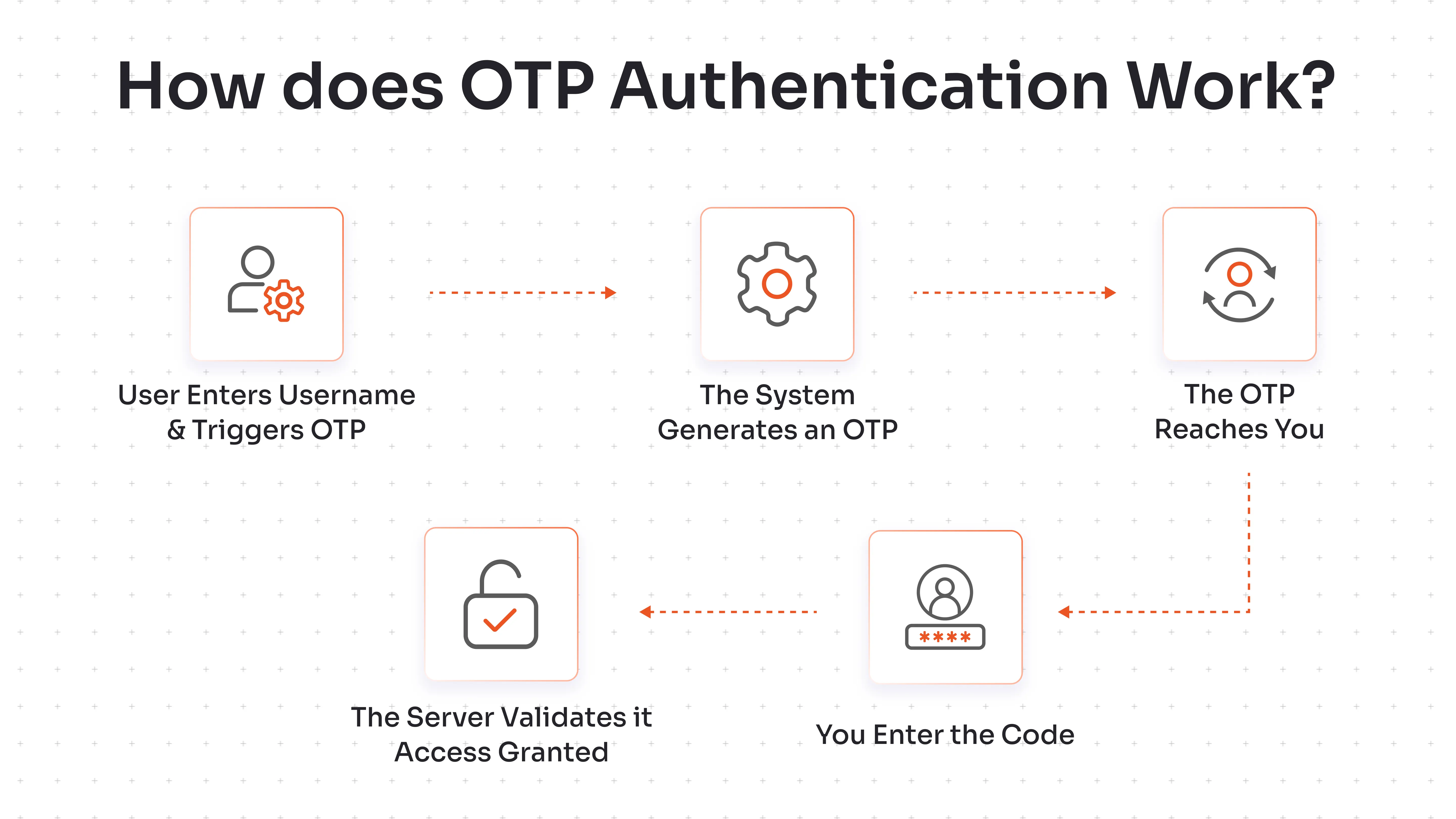
Authenticator apps and tokens handle step 3 a little differently. When you enroll, the server and your device share a secret key. Both run the same algorithm on that key, so your device can produce a valid code offline, and the server can check it without a message ever being sent.
What Are the Different Types of OTPs?
OTP types describe the algorithm that produces the code. Two open standards cover most real-world deployments.
Time-Based One-Time Password (TOTP)
Time-Based One-Time Password (TOTP) combines a shared secret with the current time to generate a code that changes at a fixed interval, usually every 30 seconds. It's defined in RFC 6238.
Authenticator apps such as Google Authenticator generate these codes on your phone, offline. The server and device need clocks that roughly agree, so servers typically accept a small window of neighboring codes to absorb drift.
HMAC-Based One-Time Password (HOTP)
HOTP combines the shared secret with an 8-byte counter that goes up by 1 each time a code is generated. The algorithm is defined in RFC 4226.
There's no timer, so an HMAC-Based One-Time Password (HOTP) code stays valid until it's used. Hardware tokens with a button are the classic example: press it, get the next code. The server keeps its own counter and accepts a short look-ahead window in case the token was pressed a few times out of sync.
Here's how the two compare:
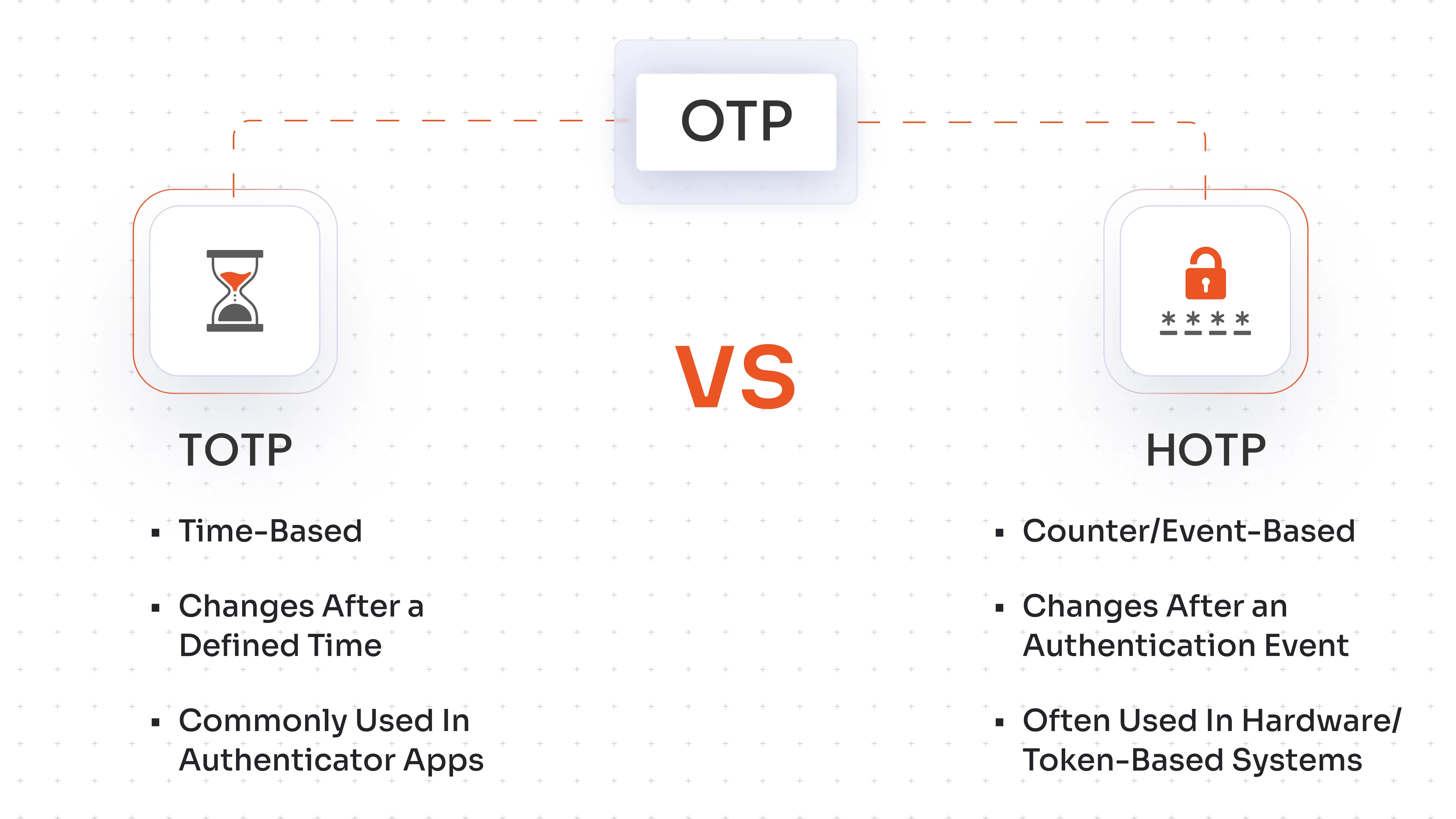
TOTP's short window gives attackers less time to reuse a stolen code, which is why most authenticator apps default to it.
How Are OTPs Delivered?
TOTP and HOTP describe how a code is made. Delivery describes how it reaches you. The two are separate choices: an SMS can carry a code the server generated, and an authenticator app makes TOTP codes on the phone itself.
| Method | Main Advantage | Security Consideration |
|---|---|---|
| SMS | Easy to use | SIM swapping/interception risks |
| Convenient | Depends on email account security | |
| Authenticator App | Doesn’t rely on SMS | Can still be targeted by phishing |
| Hardware Token | Dedicated authentication device | Requires device management |
SMS is the most familiar option and needs nothing installed. Its grip is loosening, though: Juniper Research forecasts that global business (A2P) SMS traffic, a category that includes OTP messages, will fall from 1.9 trillion in 2023 to below 1.5 trillion by 2029, as enterprises move authentication to channels such as APIs and RCS. The code also travels over the carrier network, so a SIM swap or an intercepted message hands it to an attacker. Carrier Do Not Disturb settings can also block codes that aren't registered as transactional.
Email OTPs are only as safe as the mailbox. If an attacker controls the inbox, they control the code, and the inbox is often where password resets land too.
Authenticator apps and hardware tokens produce codes locally, so nothing travels over the carrier network. A fake login page can still collect an app code, and tokens need someone to buy, ship, and replace them.
What Are the Benefits of OTP Authentication?
Used well, OTPs give you 5 practical gains:
- Adds another layer of authentication: A correct password alone no longer opens the account when an OTP is required. Passwords can be combined with OTP or other authentication layers.
- Lowers the risk from password-only compromise: Reused, leaked, and guessed passwords stop being enough on their own.
- Uses temporary codes: A code that expires in seconds or minutes gives an attacker a narrow window to replay it.
- Works across different environments: The same methods cover web apps, VPNs, desktop logins, and mobile apps, on any phone that can receive a message or run an app.
- Supports 2FA and MFA workflows: OTP slots in as one factor, so teams can start with admins or remote access and widen the rollout later.
OTPs give stronger protection than password-only authentication. Traditional OTP methods are not inherently phishing-resistant, though, because a code typed into a fake page can be relayed to the real one. The next section covers that limit and others.
What Are the Security Risks and Limitations of OTPs?
OTPs raise the cost of an attack, and attackers have found ways to pay it. Six attack paths matter most:
- Phishing: A phishing attack uses a fake login page to steal your password and OTP, allowing the attacker to use the valid code to gain unauthorized access.
- Man-in-the-middle attacks: A proxy sits between you and the real site, relays your code in real time, and steals the session that results.
- SIM swapping: An attacker uses SIM swapping to persuade a carrier to transfer your number to their SIM, allowing them to receive your SMS verification codes.
- SMS interception: Weaknesses in mobile network signaling, malware that reads messages, and synced copies on other devices can all leak a code.
- Brute-force attempts: A 6-digit code has 1,000,000 possible values. Without a cap on attempts, brute-force attempts make automated guessing a numbers game.
- OTP request abuse: Attackers trigger floods of code requests to run up messaging bills or wear a user down until they give in.
OTPs remain a useful extra layer. But organizations with high-risk authentication requirements should consider phishing-resistant methods such as FIDO2/WebAuthn and passkeys, which bind a login to the genuine website so a fake page has nothing to relay.
How to Use OTPs Securely?
Organizations can reduce the risks associated with OTP authentication by controlling how codes are generated, delivered, and verified. Seven settings and habits narrow the gaps above:
- Set a short validity period: 30 to 60 seconds for TOTP, a few minutes at most for SMS and email codes.
- Limit failed attempts: Lock the account or add delays after 3 to 5 wrong entries.
- Rate-limit OTP requests: Cap requests per account, phone number, and IP address so a flood can't run up costs or wear users down.
- Avoid SMS OTP: Do this for highly sensitive authentication, especially when stronger options exist. Move admin, finance, and remote access logins to an authenticator app or a hardware token.
- Never ask users to share OTPs: No legitimate employee, help desk agent, or bank needs a code read back to them. Say so in security training and in the message itself.
- Monitor unusual OTP activity: Watch for bursts of requests, codes requested from new countries, and repeated failures on one account.
- Consider phishing-resistant MFA for high-risk access: FIDO2/WebAuthn keys and passkeys cover the phishing and MITM gap that OTPs leave open. Our guide to authentication methods compares them.
How miniOrange Supports OTP Authentication
miniOrange Multi-Factor Authentication solution supports OTP alongside 15+ other methods, so each user group gets the method that fits its risk. Users can receive TOTP codes in an authenticator app, HOTP codes from tokens, and SMS or email OTPs, while push notifications, biometrics, and FIDO2/WebAuthn keys cover higher-risk access.
Adaptive MFA policies check IP address, device, location, and time, then allow, challenge, or deny each login. Role-based policies set different methods for different users. The miniOrange Adaptive MFA solution and RBAC solution therefore plug into VPNs, Windows, Linux, and Mac logins, RADIUS, and legacy apps, and reports and audit logs show OTP activity across all of them.
Conclusion
An OTP shrinks the damage a stolen password can do. The code dies on its own, so an attacker gets a narrow window.
Pick the type and channel by risk. Authenticator apps make a solid default, SMS covers users who can't install anything, and hardware tokens or passkeys belong on the accounts a breach would hurt most. Set short expiry, cap attempts, and watch request patterns.
OTPs can't stop a live phishing relay on their own, so pair them with phishing-resistant methods where the stakes are highest.
FAQs
What is an OTP number?
An OTP number is the numeric code a service generates for one login or transaction, usually 4 to 8 digits. You enter it once to prove your identity, and it stops working after use or after a short timer.
What does a one-time password look like?
Usually a 6-digit number such as 482913. Some systems use 4 or 8 digits, and a few mix in letters. It shows up in a text message, an email, an authenticator app, or on a hardware token's screen.
How do I get or locate an OTP password?
Check the channel your account uses: the SMS inbox on your registered phone, the email tied to the account, your authenticator app, or a hardware token's display. If nothing arrives, request a new code, check your spam folder and phone signal, and use a backup code if you've lost access to the device.
What is the difference between TOTP and HOTP?
TOTP creates codes from the current time and changes them every 30 seconds or so. HOTP creates codes from a counter and changes them only when a new code is generated, so each stays valid until used. TOTP is more common in authenticator apps, and HOTP shows up in hardware tokens.
Are one-time passwords completely secure?
No. OTPs are stronger than static passwords alone, but SIM swapping, interception, brute-force guessing, and phishing can still defeat them. Short expiry, attempt limits, and phishing-resistant methods for high-risk accounts narrow those gaps.
Can OTPs be phished?
Yes. A fake login page can collect your password and OTP and relay both to the real site in real time. Traditional OTPs, whether sent by SMS, email, or generated in an app, can't verify which site is asking. FIDO2/WebAuthn and passkeys tie the login to the real website, which is why they're recommended for high-risk access.
Leave a Comment