
Somebody on your team is going to get 40 push notifications on a random Tuesday afternoon and tap "approve" just to make them stop. That's not a hypothetical. It's the most common way attackers get past multi-factor authentication (MFA) today.
This piece is for IT and security leaders evaluating an MFA solution or reassessing the one they already have, because an MFA fatigue attack (also called MFA bombing) is now on their radar.
If you're trying to figure out whether your current push-notification-style authentication holds up, or what to actually require from a vendor, keep reading. You'll walk away knowing how these attacks work, what stops them, and what to prioritize when you're comparing options.
What is MFA Fatigue or MFA Bombing?
MFA fatigue, also called MFA bombing, push bombing, or notification bombing, is a social engineering attack.
An attacker who already has a valid username and password sends repeated MFA push notifications to a target's phone, hoping the person taps "approve" out of confusion, habit, or plain exhaustion. This shows that, to an extent, MFA fatigue attacks target the person holding the phone, not the math behind the token.
MITRE ATT&CK tracks this attack as technique T1621, Multi-Factor Authentication Request Generation. Security teams also call it MFA spamming or a push notification fatigue attack.
Different name, same idea: wear someone down until they make one mistake.
Why Are MFA Fatigue Attacks Rising, and Why Do They Work
Push notifications got popular because they're fast. One tap beats typing a 6-digit code. That's exactly why attackers like them, too.
But here are three things that are driving the increase.
- Single sign-on (SSO) solutions are now the default for most companies, so one approved prompt can open the door to dozens of connected apps, not just one login.
- Stolen credentials are cheap. Initial access brokers sell usernames and passwords on criminal forums for a few dollars a batch, so attackers rarely need to phish a password from scratch.
- Hybrid work means employees expect odd-hour logins from unfamiliar devices, so a prompt at 11 pm doesn't automatically read as suspicious anymore.
The "why it works" part comes down to human psychology.
Many times, people assume repeated prompts mean a glitch, not an attack. Some simply “approve” to make the buzzing stop. Others get a call from someone posing as IT support, and social pressure does the rest.
But a successful approval is rarely the finish line for the attacker.
Common next moves: registering a new device as a trusted MFA method so future logins skip the prompt, moving into SSO-connected apps, pulling data, or setting up ransomware. The first account is just the entry point. What it connects to is the real prize, and in most breaches, that's Slack, email, internal tools, or a database of customer records sitting one hop away.
How does an MFA Fatigue Attack Work?
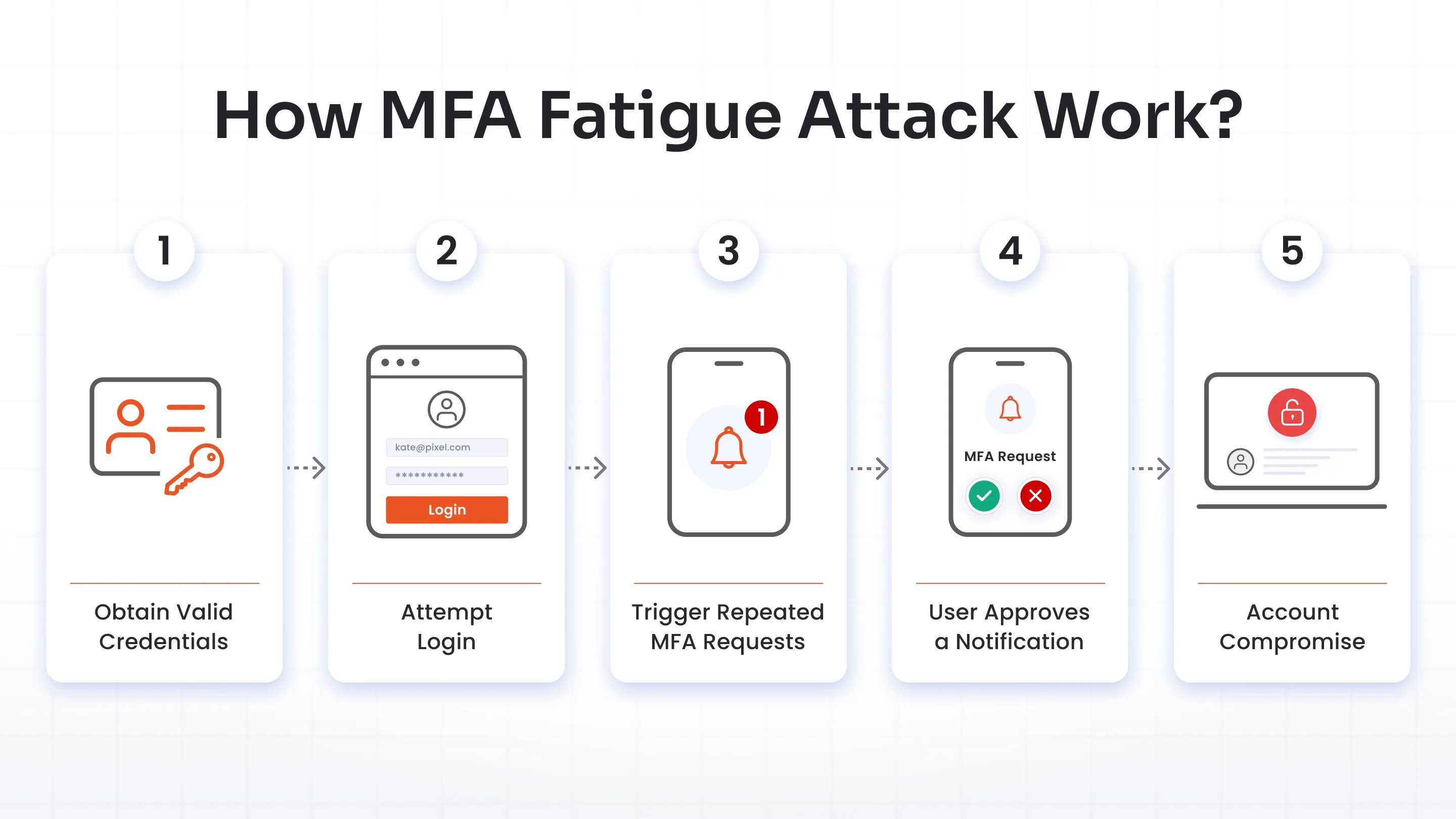
The MFA fatigue attack chain follows a predictable pattern. Five steps, start to finish.
1. Obtain Valid Credentials
The attacker needs a working username and password first. Sources vary: a previous data breach, a phishing email, credential stuffing against a leaked password list, or a straight-up purchase on a dark web marketplace. This part rarely requires much skill. Stolen credentials are a commodity now.
2. Attempt Login
The attacker plugs the stolen credentials into the real login page. Password checks out. MFA kicks in, and a push notification lands on the victim's phone.
3. Trigger Repeated MFA Requests
This is where the "bombing" happens. Attackers mix volume, timing, and social engineering differently depending on the target. Sometimes it’s pure repetition; sometimes one well-placed phone call does more than a hundred prompts ever could.
4. User Approves a Notification
One tap. That's all it takes. The victim might do it by accident, out of habit, or because they believe the person on the phone.
5. Account Compromise
The attacker is in. From here, they can register their own device for future logins, move into connected systems through SSO, and start doing whatever the compromised account's permissions allow.
Common Techniques Used in MFA Bombing Attacks
MFA bombing rarely shows up as one clean technique. It's usually a combination.
1. Adversary-in-the-middle (AiTM) Phishing
A fake login page sits between the victim and the real service, capturing both the password and the session token in real time. This skips the bombing step entirely and is one reason phishing-resistant MFA solutions matter more than the method alone.
2. SIM Swapping, Where Applicable
For SMS-based MFA, an attacker convinces a mobile carrier to port the victim's number to a new SIM card, redirecting one-time codes straight to a device they control. Less common against app-based push MFA, but still a live risk for any account still using SMS as a factor.
3. Credential Stuffing
Attackers launch credential stuffing attacks by testing previously breached username and password combinations against a target's login page. Since many users reuse passwords across multiple accounts, successful logins provide attackers with valid accounts that they can then target with MFA bombing.
4. Push Notification Bombing
The classic version. High-volume, repeated prompts are sent in a short window until the victim approves one out of frustration or a mistaken tap.
5. Social Engineering
The attacker launches a social engineering attack by posing as IT, security, or a trusted vendor via phone, text, or chat, convincing the victim to approve one more MFA prompt to stop the notifications.
Real-World Examples of MFA Fatigue Attacks
Let’s take a few examples of what MFA fatigue attacks could do to your organization.
Uber’s Lapsus$ Case, 2022
September 2022, Lapsus$. Reports indicate that the contractor’s credentials were likely purchased on the dark web.
- Entry point: Contractor credentials, purchased from an earlier breach. No phishing needed.
- The trick: Push notifications for over an hour, then a WhatsApp message posing as Uber IT, asking for one approval "to make it stop."
- What broke: No rate limit, no lockout, no alert to the security team.
- Result: Access to internal tools, Slack, an employee's HackerOne account, and Uber's invoice system.
Midnight Blizzard, 2023
In the Midnight Blizzard case, the attackers used compromised Microsoft 365 tenants to send Teams messages that impersonated technical support, then tried to get targets to enter a code into Microsoft Authenticator
- Entry point: Compromised small-business Microsoft 365 tenants, renamed to look like technical support teams.
- The trick: A Teams message asking the target to enter a code into their authenticator app, framed as a routine support ticket.
- What broke: Trust in a familiar, everyday tool. No volume of prompts required, just one convincing message.
- Result: Confirmed impact at fewer than 40 organizations, mostly government agencies, IT service providers, and NGOs.
Apple’s 2024 Case
The March 2024 incident was reported as repeated Apple password-reset prompts followed by a spoofed call from “Apple Support” asking the victim to share a code.
- Entry point: A bug in Apple's password reset rate limiting, letting an attacker fire off unlimited prompts.
- The trick: Over 100 system-level alerts in some cases, followed by a call spoofed to show "Apple Support," asking the victim to read back a one-time code.
- What broke: Rate limiting on the reset flow, plus the victim's trust in caller ID.
- Result: Full account takeover for anyone who reads back the code. Apple patched the underlying bug by the end of the month.
Three different targets, three different playbooks. What ties them together: nothing stops an attacker from sending prompt after prompt until someone breaks.
How to Detect MFA Fatigue Attacks Early
Detection usually beats hoping every employee makes the right call under pressure at 11 pm.
Start with your identity provider's logs
A spike in MFA requests for one account in a short window, especially outside normal hours or from an unfamiliar location, is the clearest early signal.
Tune your SIEM and pair it with UEBA
Most Security Information and Event Management (SIEM) Platforms can be tuned to flag this pattern directly, and pairing that with User and Entity Behavior Analytics (UEBA) helps separate a genuine anomaly from someone who just travels a lot for work.
Build a TDIR that’s quick at what it does
Logging the spike is one thing. Having a documented path for someone to investigate it right away, as part of Threat Detection, Investigation, and Response (TDIR), is what stops the account from being used before the attacker moves further in.
Map detection rules to MITRE ATT&CK T1621
It gives your team a consistent way to name, track, and tune for this pattern specifically, instead of treating every alert as one-off noise.
How to Prevent MFA Fatigue and MFA Bombing Attacks
Prevention here works in layers. No single control closes every gap.
Number Matching
Instead of a single "approve or deny" tap, the user has to enter a code shown on the login screen into their authenticator app. It kills blind-tap approvals, since there's nothing to type without seeing the real login attempt first.
Rate Limiting and Lockouts
Cap how many MFA requests can hit one account in a given window, then lock or flag the account after a threshold. This is the exact control that was reportedly missing, or at least not working correctly.
Context-Aware, Risk-Based Authentication (RBA)
Not every login attempt deserves the same scrutiny. Risk-based authentication (RBA) looks at signals like device, location, and time of day, and steps up authentication requirements or blocks the attempt outright when something looks off, rather than firing an identical prompt every single time.
FIDO2 and WebAuthn for Privileged Accounts
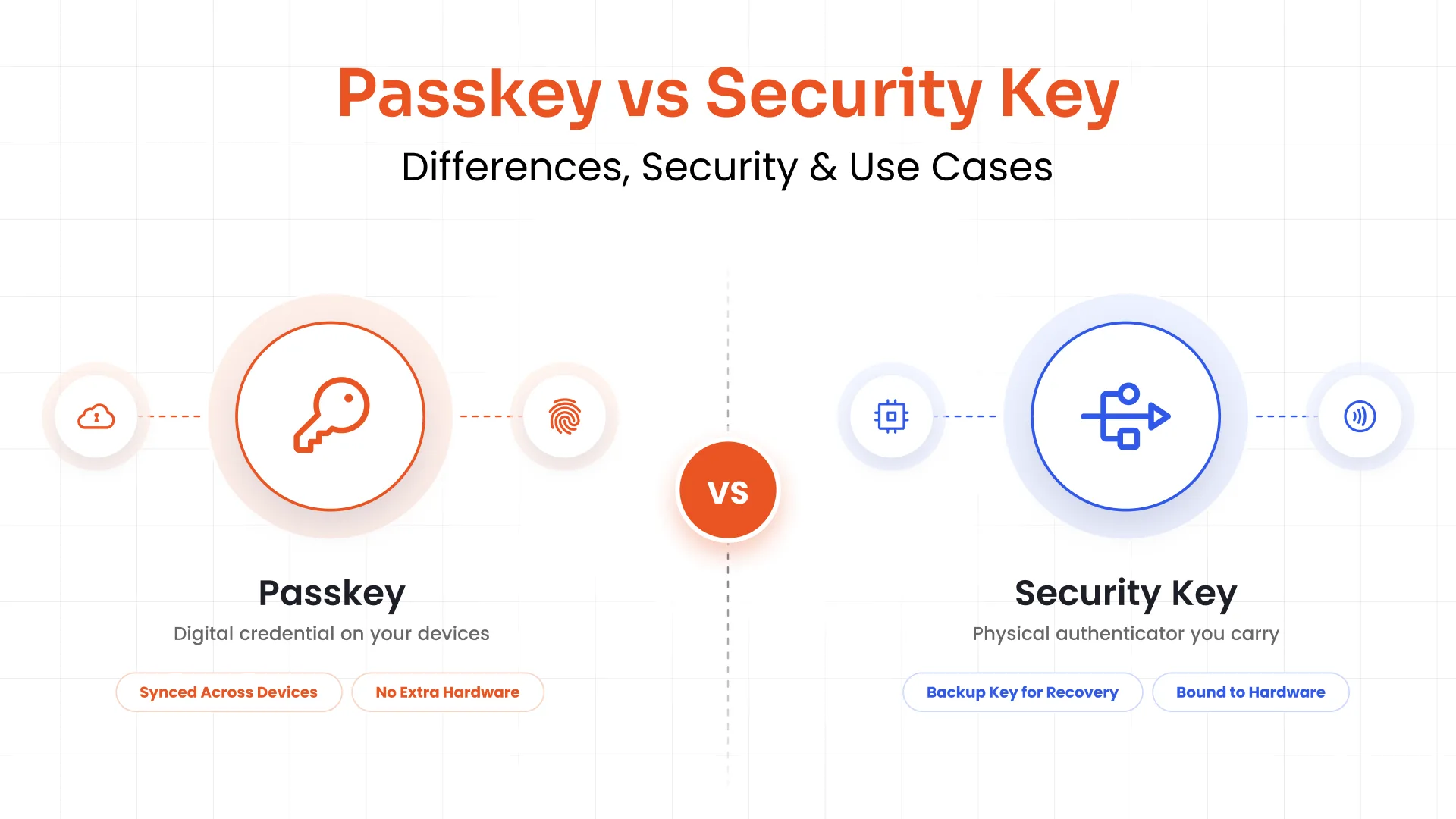
Possession-based credentials like security keys can't be approved by mistake the way a push notification can. Rolling these out for admins and anyone with privileged access management (PAM) rights first gives you the biggest risk reduction for the smallest deployment lift.
Least Privilege and System Hardening
Even a successful MFA fatigue attack does less damage when the compromised account can't reach much. Applying the principle of least privilege, keeping systems patched through regular vulnerability management, and segmenting web-based access to sensitive apps all shrink what one bad approval actually costs you.
Response Protocol for Employees
Give people one clear instruction: never approve a push notification you didn't request. If prompts keep coming, deny them, report them to security immediately, and don't accept a call "confirming" the issue. The best practice would be to put this in onboarding and repeat it during security awareness training.
Why Phishing-Resistant Authentication Methods are the Future
Push notifications aren't going away, and for most day-to-day logins, a hardened version (number matching plus rate limiting) is still a reasonable fit.
But for anything privileged, phishing-resistant methods are where the industry is heading, and where NIST SP 800-207's zero trust guidance points too: verify explicitly, every time, regardless of network location.
Here's how the common authentication methods stack up on the trade-offs that actually matter to a buyer:
| Method | Resists MFA Bombing | Resists AiTM Phishing | Setup Effort | Best Fit |
|---|---|---|---|---|
| SMS OTP | No | No | Low | Low-risk accounts and accounts/files |
| Basic push (approve/deny) | No | No | Low | Low-risk accounts only |
| Push with number matching | Yes | No | Low | General workforce |
| Risk-based authentication (RBA) | Partial | Partial | Medium | Layered on top of other methods |
| FIDO2/WebAuthn security key | Yes | Yes | Medium | Admins, privileged access, PAM |
| Biometrics (Device-bound) | Yes | Yes | Medium | High-security workforce logins |
FIDO2 and WebAuthn hold up against both bombing and AiTM phishing attacks. That's also the direction passwordless authentication is heading, and it's worth exploring on its own if you're rethinking your authentication strategy end to end.
This is where an MFA solution needs to do more than check a box on a Request for Proposal (RFP). And exactly for that, miniOrange's MFA solution supports number matching, risk-based authentication, and FIDO2 out of the box, and connects to your existing SSO and PAM setup rather than asking you to rebuild your identity stack around it.
Conclusion
MFA still works. But now, the version you're running is what matters. Basic push notifications without number matching or rate limits are the weak link attackers count on. It takes number matching for general use, phishing-resistant methods like FIDO2 for privileged accounts, risk-based checks in between, and a workforce that knows what a spike in MFA requests actually looks like.
Build toward that, and one tired employee tapping the wrong button prevents account takeover attacks before it starts. Get a 30-day free trial and see for yourself!
FAQs
Why can push notifications be riskier than some other MFA methods?
Basic push notifications, unlike other MFA methods, only need one tap to approve, with no code to enter and no check on how many prompts a user has already received. That makes accidental or pressured approval easy.
What makes MFA fatigue attacks possible even if a user has set a strong, unique password?
MFA fatigue doesn't rely on guessing or cracking a password. The attacker already has valid credentials, usually stolen elsewhere, and MFA is the only barrier left standing between them and the account.
What is the difference between MFA fatigue, MFA bombing, and push bombing?
They're the same attack under three names. MFA fatigue describes the effect on the victim; MFA bombing and push bombing describe the method: flooding a target with repeated authentication requests.
If I think I'm under an MFA attack, what is the first thing I should do?
Deny every prompt you didn't request, don't answer or trust a call "confirming" the issue, and report it to your security team immediately so they can lock the account and investigate.
Can number matching and FIDO2 completely prevent MFA fatigue attacks?
Number matching removes the blind-tap risk, and FIDO2 removes it entirely since there's no code or approval to intercept or trick. Neither replaces good detection and a rate-limiting policy behind them.
About the Author

Content Writer
With a background in Journalism and extensive experience in SaaS and cybersecurity content writing, Chaitali Avadhani has contributed to creating various forms of impactful content pieces across multiple verticals. At miniOrange, her role is to craft SEO-friendly and lead-generating content around Identity and Access Management (IAM) products and cybersecurity as a whole.
Leave a Comment