

Single Sign-On (SSO) is both an identification and authentication mechanism that allows a user to log in once with a single set of credentials and access multiple independent applications and systems. Instead of requiring separate credentials for each application, SSO uses a centralized authentication service, typically an Identity Provider (IdP), to verify the user's identity and provide access to authorized applications.
SSO acts as a single source of truth for authentication and is a key part of a federated identity system. It provides a consistent way to manage user authentication across an application suite, while allowing organizations to control access from a central point.
As organizations rely on more applications across cloud, on-premises, and hybrid environments, managing separate authentication processes for every application can create unnecessary friction and administrative overhead. Single sign-on addresses this by centralizing authentication while allowing users to move between authorized applications without repeatedly entering their credentials.
Single Sign-On vs. Traditional Login
| Factor | Traditional Login | Single Sign-On (SSO) |
|---|---|---|
| Number of credentials | Users must maintain separate usernames and passwords for each application, increasing cognitive load | Users rely on a single set of credentials for all connected applications |
| User experience | Users are repeatedly prompted to log in, interrupting workflows and causing friction | Users log in once and move between applications without interruption |
| Password management | Frequent password resets, forgotten credentials, and support tickets are common | Fewer password-related issues, reducing dependency on resets and support |
| Security risks | High likelihood of password reuse and weak password practices across apps | Centralized authentication allows stronger policies and better monitoring (when configured properly) |
| Session handling | Each application creates and manages its own session independently | A single authenticated session is shared across multiple applications |
| IT overhead | IT teams spend significant time handling password resets and access issues | Reduced administrative burden due to centralized authentication and fewer login issues |
Why is Single Sign-On Important?
As organizations adopt more cloud-based and SaaS applications, the number of logins per user increases significantly. Employees often switch between tools throughout the day, which means repeated authentication requests and constant interruptions.
This creates three major challenges:
- User friction: Frequent logins slow down workflows
- Security gaps: Users fall back on weak or reused passwords
- Operational overhead: IT teams handle a high volume of password-related issues
SSO authentication addresses these challenges by introducing a single, consistent authentication layer. Instead of interacting with multiple login systems, users authenticate once and gain access across applications, making the overall experience faster and more reliable.
Benefits of Single Sign-On
- Reduced Password Fatigue: With fewer credentials to manage, users are less likely to reuse passwords or rely on insecure methods to remember them. This improves both usability and overall security posture.
- Faster Access to Applications: SSO eliminates repeated login prompts, allowing users to move seamlessly between tools. This is especially valuable in environments where users interact with multiple systems throughout the day.
- Improved Productivity: Time spent entering credentials, recovering passwords, or dealing with login issues adds up. SSO login removes these interruptions, enabling users to stay focused on their work.
- Centralized Access Control: Authentication is handled from a single system, making it easier to manage user access. IT teams can enforce consistent policies, monitor activity, and control permissions more effectively.
How Does SSO Work?
Single sign-on (SSO) works by establishing a trusted relationship between a central authentication system and multiple applications.
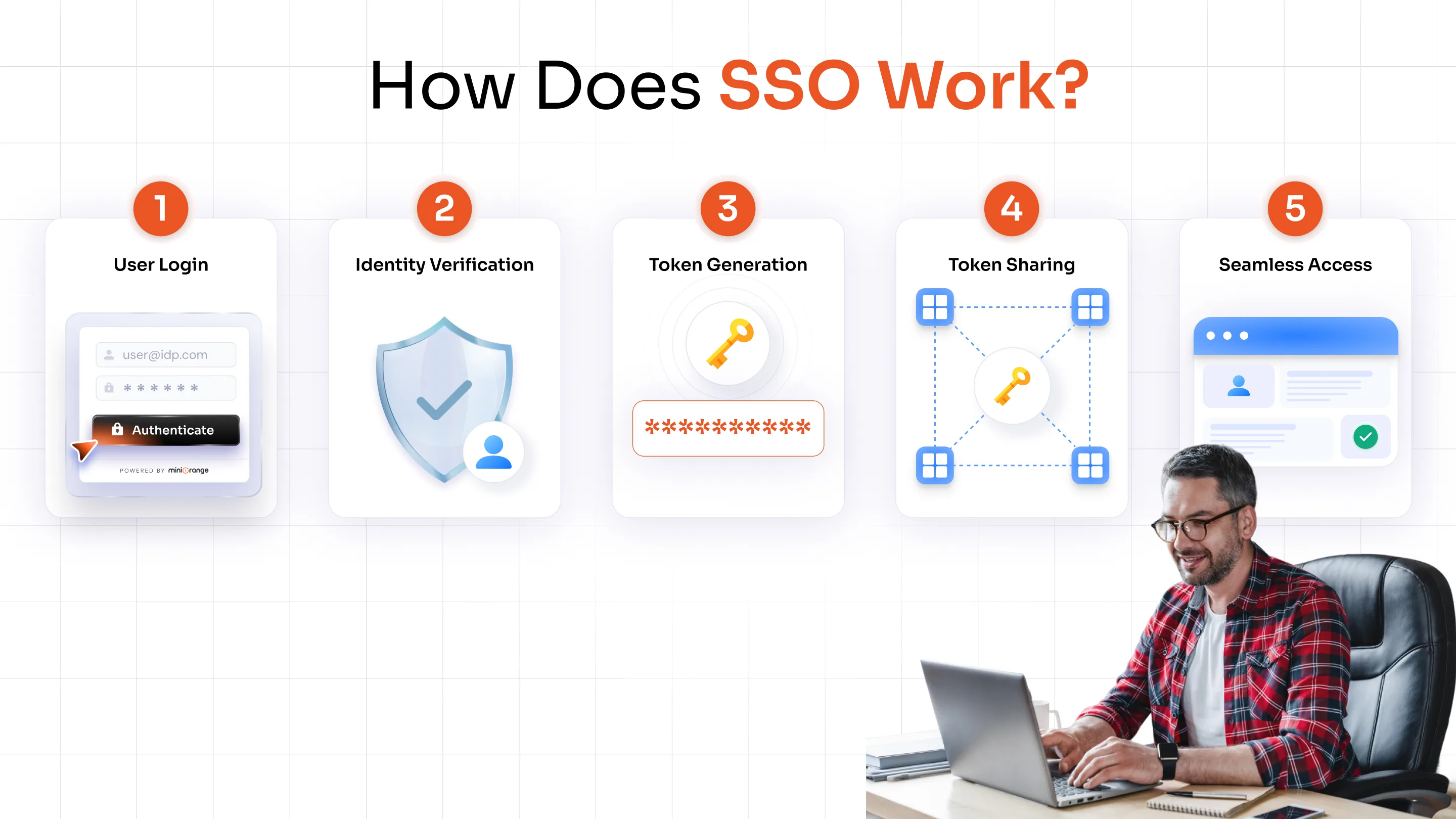
Here’s a simplified breakdown:
1. The user logs in through a central system (Identity Provider)
2. The system verifies the user’s identity using credentials
3. A secure authentication token is generated
4. This token is shared with other connected applications
5. The user gains access without needing to log in again
Although this process involves multiple steps behind the scenes, it happens quickly and seamlessly from the user’s perspective.
What is an SSO Token?
A Single Sign-On token is a secure piece of data that confirms a user has already been authenticated.
Instead of sending login credentials to every application, the Identity Provider issues this token after successful login. When the user tries to access another application, the token is presented as proof of identity.
Applications trust this token and grant access accordingly.
Key characteristics of an SSO token are as follows:
- It is secure and tamper-resistant
- It is time-bound and expires after a session ends
- It eliminates the need to repeatedly share credentials
Two Common SSO Flows: IdP-Initiated vs. SP-Initiated
While the core concept of SSO remains the same, the authentication process can begin in different ways depending on how users access applications.
IdP-Initiated SSO Flow
In this approach, the authentication process starts with the Identity Provider.
- The user logs in through a central portal or dashboard
- From there, they select the application they want to access
- The Identity Provider sends a trusted authentication response to the application
- The application grants access without requiring another login
This flow is commonly used in environments where users access multiple tools from a single internal portal.
SP-Initiated SSO Flow
In this approach, the process starts with the application itself.
- The user tries to access an application directly
- The application redirects the user to the Identity Provider
- The user logs in
- The Identity Provider verifies the user and sends authentication back to the application
- The user is granted access
This flow is widely used in SaaS applications where users begin from the app login page.
Single Sign-On Protocols: SAML, OAuth, and OIDC
Single Sign-On does not work on its own; it relies on standard protocols to securely exchange authentication information between systems.
These SSO protocols define how identity is verified and shared between the Identity Provider and Service Providers.
The three most commonly used protocols are:
SAML (Security Assertion Markup Language)
SAML is one of the oldest and most widely used protocols for implementing SSO, especially in enterprise environments.
It works by exchanging authentication data in the form of XML-based assertions between the Identity Provider and the application.
Where it is commonly used:
- Enterprise applications
- Legacy systems
- Internal business tools
What makes SAML important:
- Strong standard for enterprise authentication
- Enables secure communication between systems that may not be directly connected
- Widely supported across enterprise software
At a high level, SAML allows an identity provider to tell an application:
“This user has already been verified, grant access.”
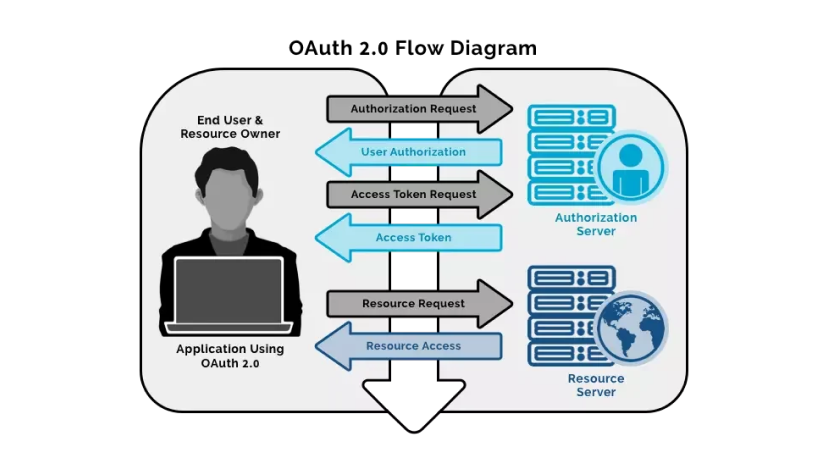
OAuth 2.0
OAuth is not strictly an authentication protocol: it is an authorization framework. It allows applications to access specific user data without sharing login credentials.
Example:
When you allow an app to access your Google Drive or contacts, OAuth is used to grant limited permissions.
Key idea:
- OAuth answers: What can this app access?
- Not: Who is the user?
OpenID Connect (OIDC)
OpenID Connect is built on top of OAuth 2.0 and adds an authentication layer. It allows applications to verify user identity while still leveraging OAuth’s authorization capabilities.
Where it is commonly used:
- Modern web applications
- Mobile apps
- Cloud-based platforms
Why it matters:
OIDC enables SSO in modern environments where speed, scalability, and API-based communication are important.
Types of Single Sign-On
Single Sign-On is not a one-size-fits-all solution. The way SSO is implemented can vary depending on the type of users, applications, and environments involved. While the core idea remains the same, the underlying setup and use cases differ.
Understanding these variations helps clarify how SSO fits into different real-world scenarios.
Enterprise SSO
Enterprise SSO is designed for organizations that need to manage access across multiple internal systems and business applications. In a typical workplace, employees use several tools throughout the day, such as HR platforms, CRMs, communication tools, and internal dashboards.
Without SSO, each of these systems would require a separate login, creating inefficiencies and increasing the risk of poor password practices. Enterprise SSO solution solves this by centralizing authentication through a single identity system.
Social Login (Social SSO)
Social SSO is commonly used in consumer-facing applications where ease of access is a priority. Instead of creating a new account, users can log in using existing identities from platforms like Google or Facebook.
This approach reduces friction during sign-up and login, which is especially important for applications that want to improve user adoption and reduce drop-offs. From a user’s perspective, it removes the need to remember yet another password.
Federated SSO
Federated SSO solution extends the concept beyond a single organization. It allows users from one domain to access applications in another without needing separate credentials.
This is commonly seen in partnerships between organizations, educational institutions, or service providers. For example, a user from one company may be able to access a partner’s system using their existing login credentials.
Cloud-Based SSO
Cloud-based SSO is designed for modern environments where applications are hosted across multiple cloud platforms. As organizations increasingly adopt SaaS tools, managing access across distributed systems becomes more complex.
It also provides a centralized authentication layer that works across these environments, regardless of where the applications are hosted. It allows users to securely access cloud applications from anywhere, without needing to log in multiple times.
SAML-Based SSO
SAML-based SSO refers software to implementations that use the SAML protocol to handle authentication between systems. It is most commonly used in enterprise environments where applications support standardized authentication methods.
In this setup, authentication information is exchanged in a structured format, allowing different systems to trust each other without directly sharing credentials. This makes it possible to connect a wide range of applications under a single authentication framework.
SAML-based SSO is especially relevant for organizations that rely on legacy systems or require strong compliance and security standards, as it provides a reliable and widely supported method.
SSO vs. MFA vs. OAuth
These three terms are often used together, but they solve very different problems within authentication and access management. Understanding how they differ helps avoid confusion and ensures the right approach is used in the right context.
| Factor | Single Sign-On (SSO) | MFA (Multi-Factor Authentication) | OAuth |
|---|---|---|---|
| Primary purpose | Simplifies user access across multiple applications | Strengthens identity verification | Grants limited access to resources |
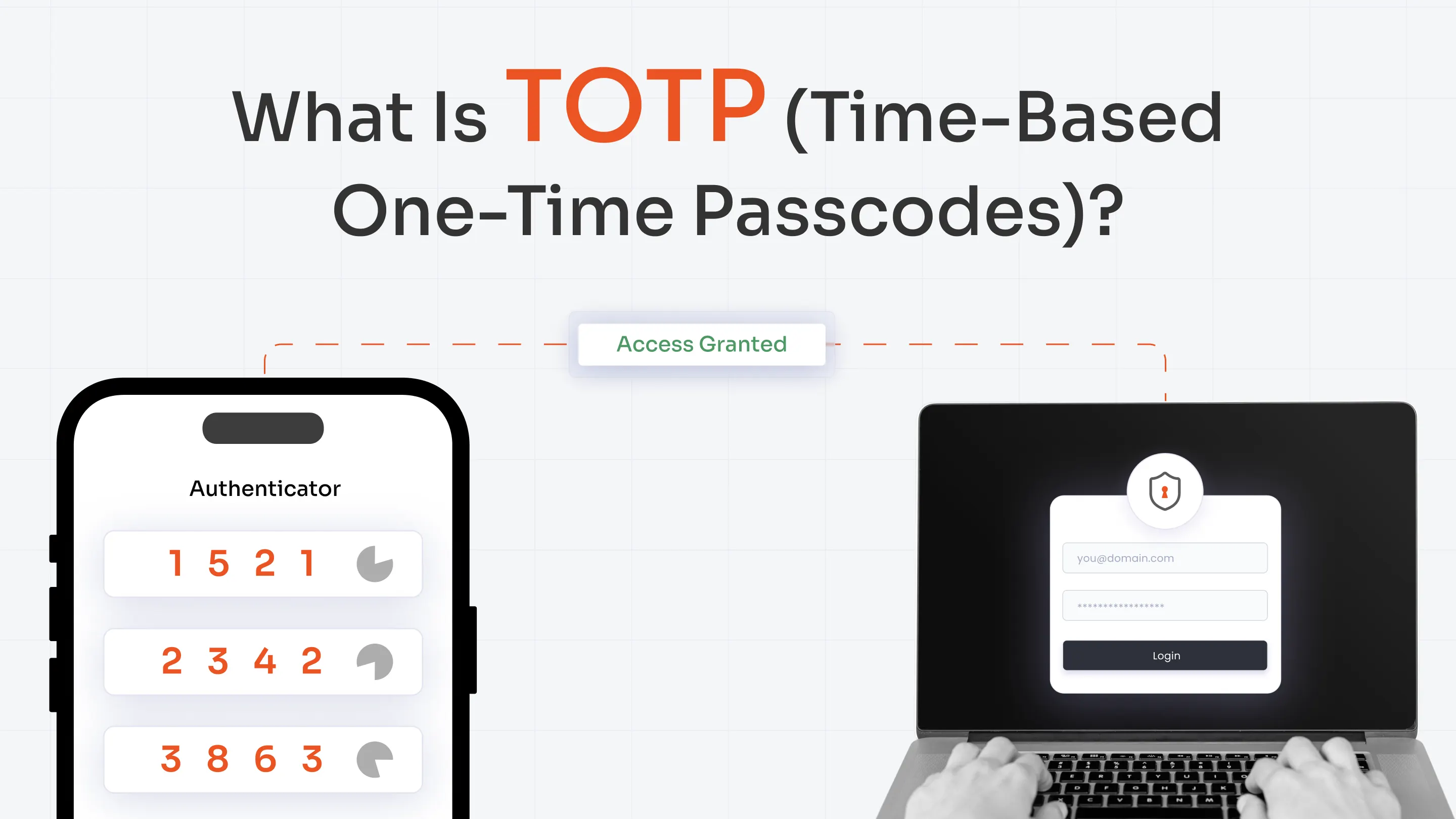
| Core function | Allows one login for multiple apps | Requires multiple forms of verification (e.g., password + OTP) | Allows apps to access user data without sharing credentials |
| Focus area | Authentication convenience | Authentication security | Authorization |
| User experience | Reduces login friction | Adds an extra step during login | Enables seamless access between services |
| Credential usage | One set of credentials reused across apps | Uses additional factors beyond credentials | Does not share user credentials with third-party apps |
| Dependency | Relies on a central identity provider | Works alongside authentication systems like SSO | Often used with OIDC for authentication |
| Common use case | Accessing multiple work apps with one login | Securing login with OTP, biometrics, or device-based verification | “Login with Google” or granting app permissions |
| Role in security | Improves usability and centralizes control | Adds strong protection against unauthorized access | Limits what third-party apps can access |
Real-World Examples of SSO
Understanding Single Sign-On becomes much easier when you look at how it is used in everyday scenarios. From personal apps to workplace systems, SSO powers many of the seamless login experiences users rely on daily.
Using a Google Account Across Multiple Services
One of the most familiar examples of SSO is a Google account. After logging in once, users can access multiple services like Gmail, Google Drive, YouTube, and Google Docs without being prompted to log in again.
Google verifies the user’s identity and creates a session that is trusted across all its services. This eliminates repeated authentication and allows users to move between applications effortlessly, making the experience smooth and uninterrupted.
Accessing Workplace Applications
In many organizations, employees use multiple tools throughout the day—such as email platforms, HR systems, CRMs, and collaboration tools. Without SSO, each of these would require a separate login.
With SSO in place, employees log in once through a central portal and gain access to all authorized applications. This not only saves time but also reduces login-related issues, allowing employees to focus on their work instead of managing credentials.
Logging into Apps Using Social Accounts
Many websites and apps offer options like “Login with Google” or “Continue with Facebook.” This is another form of SSO, often referred to as social login.
Instead of creating a new account, users authenticate through an existing platform. The application trusts the external identity provider to verify the user, making the login process faster and reducing friction during sign-up and onboarding.
Accessing Multiple SaaS Tools in a Cloud Environment
Organizations that rely on multiple cloud-based tools often use SSO to manage access across these platforms. Once users log in, they can switch between different SaaS applications without needing to re-enter credentials.
This is especially useful in modern work environments where teams rely on a combination of tools hosted across different platforms. SSO ensures a consistent login experience while simplifying access management at scale.
Is SSO Truly Secure? A Closer Look
SSO is often seen as both a convenient tool and a security solution. In reality, it plays a role in both, but its effectiveness depends on how it is implemented.
How SSO Improves Security
SSO strengthens security in several ways:
- Reduced password exposure: Users enter credentials fewer times, lowering the risk of interception
- Centralized control: Authentication policies can be enforced from one place
- Better visibility: IT teams can monitor access patterns across applications
- Fewer weak passwords: Users are less likely to reuse or simplify passwords
Potential Risks of SSO
While SSO improves usability, it introduces a key consideration:
- A single compromised login could grant access to multiple applications
This makes the Identity Provider a critical security component that must be protected.
Best Practices for Secure SSO
To ensure best practices for SSO is secure, organizations typically:
- Combine SSO with multi-factor authentication (MFA) Solution
- Enforce strong password policies
- Monitor login activity and anomalies
- Implement session timeouts and access controls
Common Challenges of SSO
While SSO simplifies access and improves user experience, it also comes with certain challenges that organizations need to consider before implementation.
Single Point of Failure
Since multiple applications rely on one authentication system, any compromise at that level can impact access across all connected services. If credentials are exposed, it could grant broader access than in traditional login setups.
Increased Dependency on Identity Provider
With centralized authentication, the identity provider becomes a critical component of the entire access system. If it experiences downtime or performance issues, users may be unable to access multiple applications at once.
Integration Complexity
Integrating across multiple applications, especially in environments with a mix of legacy and modern systems, can be challenging. Not all applications support the same protocols, which may require additional configuration.
Initial Setup and Configuration Effort
Setting up SSO involves configuring identity providers, connecting applications, defining access policies, and ensuring secure communication between systems.
Limited Visibility Without Proper Monitoring
Although authentication is centralized, organizations may lack visibility into user activity across applications if monitoring is not properly implemented.
Over-Reliance on a Single Authentication Layer
Relying only on a single authentication layer without additional controls can create vulnerabilities, especially if that layer is compromised.
How to Choose the Right SSO Solution
Selecting the right Single Sign-On approach depends on your applications, user behavior, and security needs. Instead of a one-size-fits-all setup, it’s about aligning SSO with how your environment actually works.
Consider Where Your Applications Are Hosted
The first step is understanding whether your applications are primarily cloud-based, on-premise, or a mix of both. If your organization relies heavily on modern SaaS tools, a cloud native SSO approach using protocols like OpenID Connect is typically more suitable. These environments are designed for scalability and remote access.
On the other hand, if you use legacy or enterprise systems, SAML-based SSO is often a better fit because it is widely supported across traditional applications.
Understand How Users Access Applications
User behavior plays a key role in determining the right SSO flow. If users typically start from a central dashboard or internal portal, an IdP-initiated approach provides a smoother experience by allowing them to log in once and then select applications.
In case users directly access applications, especially SaaS tools, an SP-initiated flow is more practical, as it allows authentication to begin from the application itself.
Evaluate the Number of Users and Applications
As the number of users and applications grows, managing access becomes more complex. Organizations with multiple teams, tools, and roles benefit from centralized authentication, as it simplifies user provisioning, access control, and onboarding or offboarding processes.
A scalable SSO solution ensures that as your organization grows, access management remains consistent and manageable without increasing operational overhead.
Factor in Security Requirements
Security should always be a core consideration when implementing SSO. If your organization handles sensitive data or requires strict compliance, SSO should not be used alone. It should be combined with additional security measures such as multi-factor authentication, session controls, and monitoring.
Plan for Integration and Flexibility
Finally, it’s important to choose an SSO approach that integrates well with your existing ecosystem and can adapt over time.
Your SSO solution should support a wide range of applications, protocols, and environments. As your technology stack evolves, the system should be flexible enough to accommodate new tools without requiring major changes.
Single Sign-On: The Foundation of Security
Single Sign-On (SSO) simplifies how users access applications by replacing multiple logins with a single, trusted authentication process. Instead of managing separate credentials for every tool, users can move seamlessly across systems after logging in once.
Beyond convenience, SSO helps reduce password fatigue, improves productivity, and introduces a more consistent way to manage access. At the same time, it gives organizations better visibility and control over authentication.
As applications continue to grow across cloud and on-prem environments, SSO becomes an essential part of modern access management. When implemented correctly and combined with additional security measures, it creates a balance between usability and protection.
FAQs
What is the difference between SSO and MFA?
SSO allows users to log in once and access multiple applications, while MFA adds extra verification steps, such as OTPs or biometrics, to confirm identity. One simplifies access, while the other strengthens security.
What does “Login with SSO” mean?
It means you sign in once through a central identity provider, and that authenticated session is used to access multiple connected applications without repeated logins.
Is SSO the same as SAML?
No, SSO is a concept that enables one login across applications, while SAML is a protocol used to securely exchange authentication data between systems.
How can SSO security be improved?
SSO security can be strengthened by adding multi-factor authentication, enforcing strong password policies, monitoring login activity, and applying session controls.
What is the difference between SSO and a password manager?
Single Sign-On (SSO) removes the need for multiple logins by creating a single authentication session, while a password manager stores and autofills different credentials for each application.
Does SSO work without the internet?
In most cases, it requires a network connection because authentication depends on a central identity system. However, in some on-premise environments, it can work within a local network.
How does logout work with SSO?
Logout can either apply to a single application or end access across all connected systems. In centralized logout, the identity provider terminates the session everywhere.
Leave a Comment