
Managing multiple logins across business applications is a growing challenge for modern organizations. From cloud tools to internal systems, users often deal with password fatigue, while IT teams struggle with frequent resets and access issues.
Single Sign-On (SSO) solves this by allowing users to access multiple applications with a single, secure login. It simplifies authentication, improves user experience, and reduces the risks associated with password sprawl.
However, SSO is only effective when implemented with the right security practices. Misconfigurations, weak identity controls, or a lack of additional safeguards like Multi-Factor Authentication (MFA) can turn SSO into a potential security risk.
That's why following the right SSO best practices is essential to ensure both secure access and seamless user experience across your organization.
What are SSO Best Practices?
SSO best practices are a set of guidelines that help organizations secure and optimize their single sign-on setup. These practices ensure that authentication is not only seamless but also protected against common security threats.
They typically include:
- Using a reliable Identity Provider (IdP)
- Enforcing Multi-Factor Authentication (MFA)
- Applying role-based access control (RBAC)
- Setting proper session and timeout policies
- Monitoring authentication logs and access activity
By following these best practices, organizations can strengthen security, reduce unauthorized access risks, and deliver a smooth login experience for users.
Common Types of SSO Implementations
Every organization has a different mix of systems, some in the cloud, others on-premises, and a few legacy apps that still run critical operations. That’s why SSO implementation isn’t the same for everyone. Here are the most common types you’ll find in enterprise environments today:
SAML-based SSO
Commonly used in large enterprises for various applications. It relies on XML-based assertions to exchange authentication data between the Identity Provider (IdP) and the Service Provider (SP), ensuring secure access without repeated logins.
OAuth 2.0 / OpenID Connect
Best suited for web and cloud applications. It uses token-based authentication, allowing users to log in through trusted providers like Google or Microsoft without sharing passwords directly.
LDAP-based SSO
Ideal for internal or legacy applications. It authenticates users against existing directories such as Active Directory, making it easier to extend SSO to systems that don’t support modern protocols.
Kerberos-based SSO
Commonly used in Windows domains and on-premise environments. It uses encrypted tickets for user authentication, removing the need for users to re-enter credentials while keeping communication secure within the network.
Regardless of how diverse your IT environment is, miniOrange supports all major SSO protocols, SAML, OAuth, OpenID Connect, LDAP, and Kerberos, ensuring compatibility across both modern and legacy applications. This flexibility helps organizations connect every app under a single, secure identity framework without compromise.
Choosing the right implementation type is the first step toward building a secure and scalable SSO environment.
Comparing SSO Protocols – SAML vs OAuth vs OpenID Connect
Not all SSO systems work the same way. The right protocol depends on where your apps are hosted, how users authenticate, and what kind of access control you need. Here’s a quick comparison of the most common SSO standards used across organizations today:
| Protocol | Best For | Key Strength | Common Use Case |
|---|---|---|---|
| SAML (Security Assertion Markup Language) | Enterprise and business apps | Uses XML-based assertions for secure exchange of identity data between the Identity Provider and Service Provider | Ideal for enterprise tools like Salesforce, SAP, or Oracle |
| OAuth 2.0 | Web, mobile, and API-based applications | Provides secure delegated access using tokens instead of passwords | Common in platforms like Google Workspace, LinkedIn, and GitHub |
| OpenID Connect (OIDC) | Consumer and hybrid login systems | Adds an identity layer on top of OAuth 2.0 for user authentication and profile data exchange | Best for cloud and SaaS apps with social or external logins |
Read our detailed blog “What is the Difference Between SAML, OAuth, and OpenID Connect?” to dive deeper into how each protocol works and when to use them.
Understanding these protocols is essential when planning a secure SSO implementation strategy across different applications.
What Makes an SSO Implementation Successful?
A well-executed SSO implementation is more than just linking applications; it’s about building a secure and scalable identity system that works across the organization. Here are the key factors that make an SSO implementation successful:
Understand your identity flow and application landscape – Map how users access systems, which apps are used, and where identities are stored. This ensures authentication flows stay consistent and efficient.
Integrate with a reliable Identity Provider (IdP) – The IdP is the backbone of your SSO setup. Choose one that supports multiple standards like SAML, OAuth, and OpenID Connect, and integrates easily with your user directories and MFA systems.
Streamline user provisioning and deprovisioning – Automate onboarding and offboarding so access is granted instantly when users join and revoked when they leave. This minimizes manual effort and reduces security risks.
Set consistent session and authentication policies – Define clear rules for session timeouts, MFA requirements, and re-authentication. Consistency in these settings ensures a balance between user convenience and data security.
Monitor authentication health and access logs – Continuously review access logs to identify unusual login attempts or suspicious activity early. Regular audits strengthen visibility and compliance.
When these practices come together, SSO becomes more than a convenience feature; it evolves into a core layer of secure, centralized access management that supports both productivity and protection.

How to Implement SSO Securely (Quick Steps)
While every environment is different, most secure SSO implementations follow these key steps:
- Choose a reliable Identity Provider (IdP)
- Select the right protocol (SAML, OAuth, or OpenID Connect)
- Configure trust, certificates, and metadata correctly
- Enable Multi-Factor Authentication (MFA)
- Define user roles and access controls
- Test authentication flows and monitor logs
Following these steps ensures your SSO implementation is both secure and scalable.
SSO Best Practices to Strengthen Security and Reliability
These SSO best practices also serve as essential guidelines during the implementation phase to avoid security gaps and ensure long-term reliability.
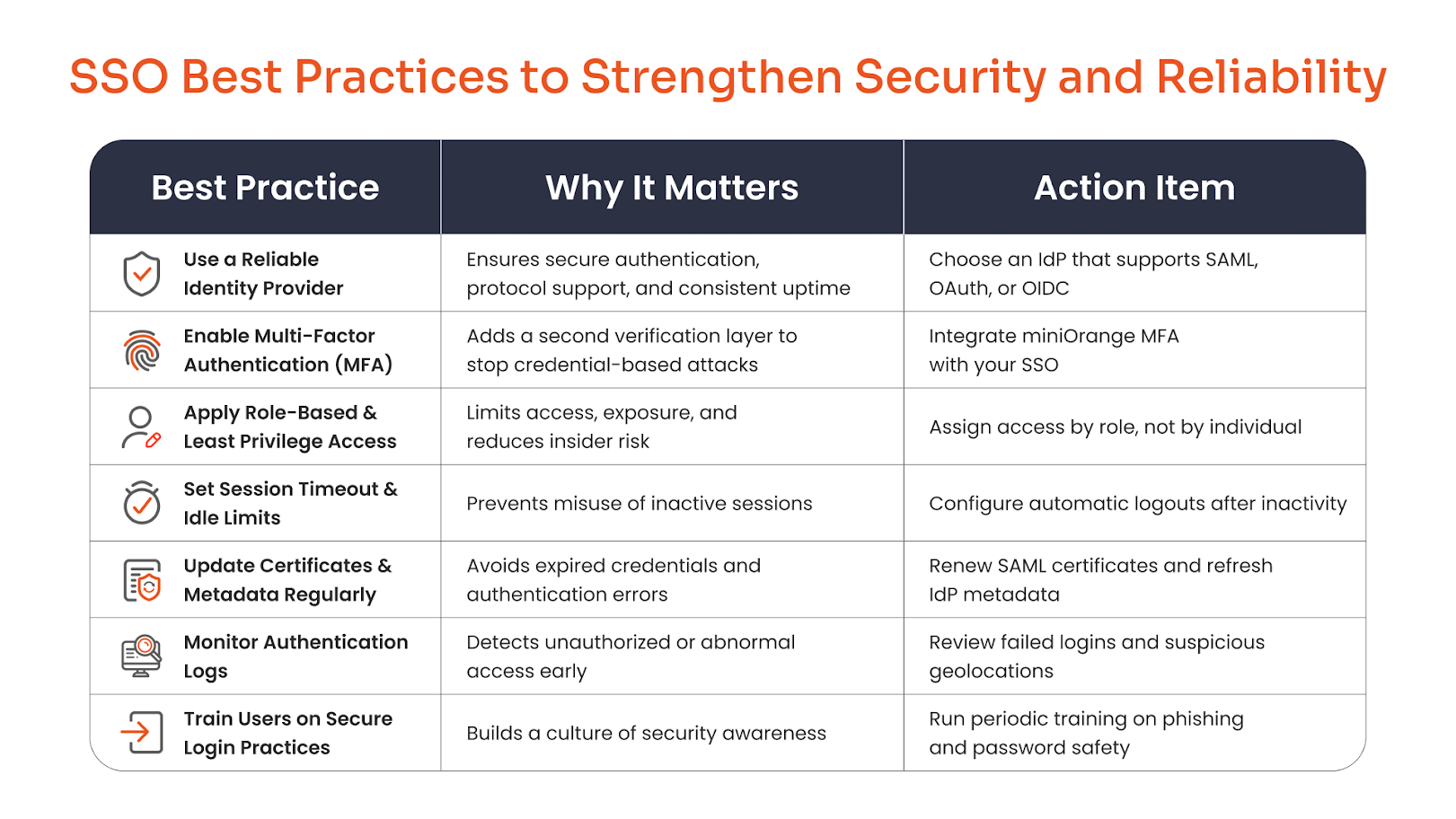
A well-implemented SSO system is only as strong as the practices that support it. Here are key steps every organization should follow to secure and stabilize its Single Sign-On setup.
1. Use a Reliable Identity Provider
Choose a trusted Identity Provider (IdP) that supports modern protocols such as SAML, OAuth, or OpenID Connect (OIDC). A dependable IdP ensures consistent authentication, high uptime, and smooth integration with your existing directory and cloud infrastructure.
2. Combine SSO with Multi-Factor Authentication (MFA)
Pairing SSO with MFA adds an essential layer of protection, especially for admins and privileged users. Even if credentials are compromised, MFA prevents unauthorized access. Explore Multi-Factor Authentication (MFA) solution by miniOrange to strengthen your identity security.
3. Apply Role-Based and Least Privilege Access
Not every user needs access to every application. Apply role-based access control (RBAC) and follow the principle of least privilege to limit permissions only to what’s necessary, minimizing the potential damage from compromised accounts.
4. Set Proper Session Timeout and Idle Limits
Avoid keeping sessions active indefinitely. Configure session timeout and idle limits so users are automatically logged out after inactivity. This helps prevent misuse from unattended or shared devices.
5. Keep Certificates and Metadata Up to Date
Expired or outdated certificates can cause authentication failures and open security gaps. Regularly renew SAML certificates, update IdP metadata, and verify connection integrity to maintain a healthy SSO setup.
6. Monitor Authentication Logs
Track login activity and review authentication logs for anomalies. Spotting failed login spikes or unusual geolocations early helps you act before a potential breach occurs.
7. Train Users on Secure Login Practices
Technology alone isn’t enough; users must know how to protect themselves. Conduct regular awareness sessions on phishing, password hygiene, and MFA adoption to build a culture of secure access.
Common Mistakes to Avoid During SSO Implementation
Avoiding these common mistakes is critical for a successful and secure SSO implementation.
Even the best security tools fail when they’re not configured right, and SSO is no exception. A few oversights during setup can quickly weaken your entire access framework. Here’s what to watch out for:
Misconfigured certificates or time synchronization issues – Expired or mismatched certificates are among the top causes of SSO failure. Also, if your server and IdP clocks aren’t synchronized, authentication requests may get rejected due to timestamp mismatches.
Lack of redundancy or failover IdP setup – Relying on a single Identity Provider can bring everything to a halt if it goes down. Always configure backup IdPs or failover routes to keep authentication running smoothly during outages.
Ignoring user role mapping – Without proper role or group mapping, users may gain unnecessary privileges or lose access they need. Make sure every role in your IdP aligns with the right permissions in your applications.
Not testing SSO for all apps and user groups – Many teams test SSO for a few applications and assume it works everywhere. Run end-to-end tests for every app, department, and user group to uncover hidden misconfigurations before rollout.
Overlooking MFA for admin accounts – Admin accounts are the most targeted in attacks. Failing to enforce MFA here can undo all your security layers. Always pair admin logins with strong MFA methods.
How miniOrange Helps You Build a Secure SSO Environment
Whether you're starting fresh or improving an existing SSO implementation, choosing the right solution plays a crucial role in ensuring security, scalability, and seamless user experience.
Implementing SSO shouldn’t mean spending weeks on custom integrations or endless troubleshooting. miniOrange makes it simple to build a secure, scalable SSO setup that fits right into your existing IT ecosystem.
Pre-built connectors for 5000+ apps and platforms – Connect instantly to popular business tools without writing complex code. miniOrange’s ready-to-use integrations save time and ensure reliability from day one.
Works with any Identity Provider (IdP) – Whether you use Azure AD, Okta, Ping, ADFS, or any other IdP, miniOrange ensures full compatibility. It supports all major protocols, SAML, OAuth, OpenID Connect, and LDAP, for flexible, secure authentication across environments.
Built-in MFA, adaptive access, and conditional policies – Security doesn’t stop at login. miniOrange integrates Multi-Factor Authentication, adaptive risk-based access, and conditional policies to strengthen protection without disrupting user experience.
On-premise, cloud, and hybrid deployment flexibility – No matter where your applications reside, miniOrange fits right in. You can deploy SSO entirely on-premise, in the cloud, or through a hybrid setup that connects both worlds.
24/7 technical assistance for setup and troubleshooting – miniOrange’s expert team is available around the clock to help configure, test, and optimize your SSO environment, ensuring smooth authentication and ongoing compliance.
With miniOrange, organizations can secure access, streamline user experience, and stay compliant, all through a single, unified identity platform.
Fixing these early helps prevent login disruptions, compliance issues, and unauthorized access, turning SSO into a secure gateway rather than a single point of failure.

Conclusion
Following the right SSO best practices isn’t just about simplifying logins—it’s about building a secure, scalable foundation for your organization’s digital access. When implemented thoughtfully, SSO reduces friction for users while significantly lowering the risk of credential-based attacks.
By combining Single Sign-On (SSO) with Multi-Factor Authentication (MFA), organizations can strike a strong balance between user convenience and robust security. This layered approach ensures that even if credentials are compromised, unauthorized access is still prevented.
If you’re aiming to streamline access without compromising on security, now is the time to act.
Get started with miniOrange SSO solutions and create a centralized, secure, and seamless authentication experience for your workforce.
FAQs
What is the most important SSO best practice?
Always use a reliable Identity Provider (IdP) that supports modern protocols and pair it with Multi-Factor Authentication (MFA). Continuous login monitoring and timely certificate updates also help maintain long-term security.
Should I use SSO with MFA?
Yes. MFA adds a critical extra layer of protection against compromised credentials. Even if a password is stolen, MFA ensures that unauthorized users can’t access sensitive systems.
How do I monitor SSO security?
Enable login auditing within your IdP, set up alerts for unusual patterns such as repeated failed logins or unexpected geolocations, and review access logs regularly to catch anomalies early.
What are common SSO mistakes?
Common pitfalls include misconfigured metadata, expired certificates, and untested user role mappings. These small oversights often lead to access issues or potential breaches if not caught in time.
Does miniOrange support all SSO protocols?
Yes. miniOrange supports all major SSO standards, including SAML, OAuth, OpenID Connect, Kerberos, and LDAP, ensuring secure and consistent access across cloud, on-premise, and hybrid environments.
About the Author

Content Writer
Puja More is an experienced Content Writer with almost a decade of expertise in the industry. A certified digital marketer, Puja holds a Bachelor's degree in Computer Science. She adeptly merges technical know-how with creative finesse to produce captivating content, particularly focusing on cybersecurity and technology. Beyond her professional endeavors, Puja thrives on indulging in her hobbies of photography, reading, and culinary experimentation.
Leave a Comment