

Single sign-on (SSO) authentication is a method that allows users to log in once with a single set of credentials and gain access to multiple applications across both cloud and on-premises environments, without needing to re-authenticate for each one.
Users today often face password fatigue due to managing multiple credentials across different applications. Keeping track of multiple usernames and passwords makes login processes time-consuming and increases the chances of weak or reused credentials. SSO authentication solves this by simplifying access across multiple applications in modern IT environments.
Instead of logging in separately to each tool, users authenticate once and move between applications without interruption. This not only improves the user experience but also strengthens security. When combined with Multi-Factor Authentication (MFA), SSO adds an extra layer of protection beyond passwords.
Whether you run websites, develop apps, or manage a business, user authentication is essential for both operational efficiency and security.
What Is the Need for SSO Authentication?
As organizations adopt more SaaS applications, access management becomes complex, with employees juggling multiple logins across tools. This creates both usability challenges and security risks.
Users often experience password fatigue from managing multiple credentials, leading to weak or reused passwords and increased exposure to breaches.
Here are some of the key reasons why SSO authentication is needed:
- Multiple passwords are difficult to manage: Users must remember different credentials for every application, which quickly becomes unmanageable. This often results in password reuse or insecure storage, increasing risk.
- Higher security risks from weak or reused passwords: When the same password is used across systems, a single compromise can expose multiple applications. Weak passwords also make it easier for attackers to gain unauthorized access.
- Productivity loss due to repeated logins: Frequent logins interrupt workflows as users switch between tools. Over time, these delays add up and reduce overall efficiency.
- Increased complexity with SaaS adoption: Modern teams rely on many tools, each with its own authentication flow. This fragmentation makes access harder to control and manage at scale.
- SSO login challenges without centralized access: Without a unified system, users encounter repeated logins and session fatigue across applications. Access becomes inconsistent and harder to manage.
- User frustration and time wasted: Login failures, password resets, and access issues consume time and disrupt work. This also increases dependency on IT support teams.
SSO authentication addresses these challenges by enabling access to multiple applications with a single login, improving both usability and security.
Benefits of SSO Authentication
SSO authentication simplifies access while improving security, user experience, and operational efficiency. By replacing multiple logins with a single authentication process, organizations can streamline access and maintain better control.
Here are the key benefits of SSO authentication:
1. Security Benefits
SSO reduces password exposure by minimizing the number of credentials users need to manage. This lowers the risk of password reuse and credential-based attacks. It also enables centralized authentication, allowing organizations to control access from a single point. This reduces the overall attack surface and improves security visibility.
2. User Experience and Productivity
SSO enables a faster login process by eliminating the need to repeatedly enter credentials. Users can access multiple applications seamlessly, improving workflow continuity. It reduces login friction and ensures smooth navigation across applications. Features like single logout allow users to securely sign out from all connected apps at once, improving control and security.
3. IT and Operational Efficiency
SSO significantly reduces password reset requests, which are a common burden on IT teams. This helps lower support tickets and frees up IT resources. Centralized access management reduces manual effort and improves efficiency. Over time, this leads to cost savings by streamlining operations and reducing overhead.
4. Compliance and Audit
SSO provides detailed audit trails that track user activity and access patterns. This helps organizations maintain accountability and investigate incidents more effectively. It also enables real-time monitoring and improves access visibility across systems. This makes it easier to enforce policies and meet compliance requirements with clear, centralized records.
How Does SSO Authentication Work?
SSO authentication works by establishing trust between systems so that a user can log in once and access multiple applications without repeated authentication. This is achieved through a centralized authentication process that validates the user and shares that verification across connected services.
Core Components
SSO relies on two key components that work together to authenticate users and grant access:
- Identity Provider (IdP): The Identity Provider is responsible for verifying the user’s identity. It authenticates users using credentials such as passwords, biometrics, or MFA and confirms whether the user is valid.
- Service Provider (SP): The Service Provider is the application or service the user wants to access. It relies on the Identity Provider to authenticate users and grant access based on that verification.
SSO Authentication Flow
This authentication flow is based on federated identity principles.
To initiate the access process for a desired application or website, the user follows these steps within the SSO framework:
- The user attempts to access a specific application or website provided by the Service Provider.
- The application or website (Service Provider) directs the SSO request to the Identity Provider (IDP) for authentication.
- The user provides their credentials associated with the Identity Provider to sign in.
- Upon successful authentication by the IDP, a Single Sign-On response is sent back to the Service Provider.
- With the received SSO response, the user is granted access to log in and securely utilize the desired resource or application.
- Within the Service Provider's ecosystem, the user gains the ability to seamlessly access other pre-configured applications or websites through the SSO functionality.
Protocols Used in SSO Authentication
SSO authentication uses standard protocols to securely exchange authentication data between the Identity Provider and Service Providers. These SSO protocols define how identity is verified and how access is granted across systems.
1. SAML (Security Assertion Markup Language) SAML is widely used in enterprise environments, especially for web applications. It works by sending a secure authentication response from the Identity Provider to the application, confirming that the user has been verified without requiring another login.
2. OAuth 2.0 OAuth 2.0 is used to grant applications limited access to user data without sharing passwords. It focuses on authorization, allowing users to give permission to apps to access specific resources securely.
3. OpenID Connect (OIDC) OpenID Connect builds on OAuth 2.0 by adding authentication. It verifies the user’s identity and is commonly used in modern web and mobile applications for secure login.
4. LDAP (Lightweight Directory Access Protocol) LDAP is used to manage and access user information stored in centralized directories. SSO systems often use LDAP to authenticate users based on existing organizational data.
5. WS-Federation WS-Federation is used for identity federation across different systems, especially in enterprise and Microsoft environments. It allows multiple systems to trust a central authentication source.
6. vLDAP (Virtual LDAP) vLDAP provides a unified layer to connect multiple directory services. It enables organizations to manage identities across different systems without consolidating all directories into one.
SSO vs. Traditional Login Systems
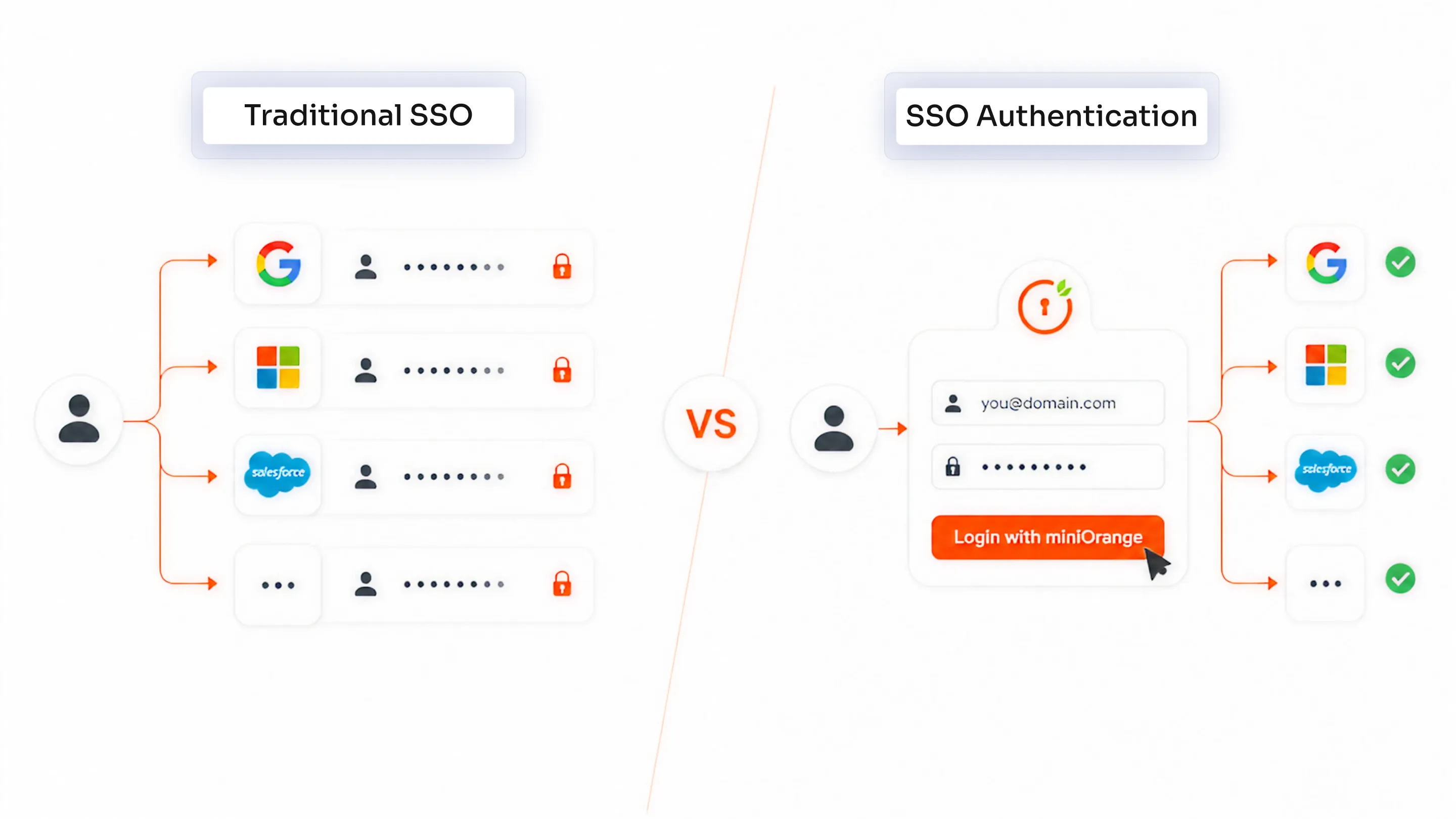
Understanding the difference between single sign-on authentication and traditional login systems helps organizations choose a more secure and efficient approach to access management. This comparison highlights how SSO improves both user experience and security compared to legacy login methods.
| Feature | SSO Authentication (Single Sign-On Authentication) | Traditional Login System |
|---|---|---|
| Login Experience | Users log in once and gain access to multiple applications without repeated authentication. This creates a seamless and uninterrupted user experience. | Users must log in separately to each application, leading to repeated authentication steps and interruptions. |
| Security | Centralized authentication ensures consistent security policies, better control, and easier monitoring of access. | Security is scattered across multiple systems, making it harder to enforce consistent policies and detect threats. |
| Password Management | Reduces the number of passwords users need to remember, lowering the chances of password reuse and weak credentials. | Requires users to manage multiple passwords, increasing the risk of reuse, weak passwords, and credential exposure. |
| Productivity | Improves productivity by eliminating repeated logins and enabling faster access to applications. | Reduces efficiency due to frequent login prompts and time spent managing credentials. |
| Risk Level | Lower risk due to centralized control, reduced password exposure, and improved visibility into user access. | Higher risk due to multiple attack points, inconsistent security, and increased chances of credential compromise. |
| User Experience | Provides a smooth and consistent experience across all applications with minimal friction. | Leads to user frustration due to login fatigue, password resets, and inconsistent access experiences. |
| IT Management | Simplifies user access management with centralized control and fewer support requests. | Increases IT workload due to password resets, access issues, and manual management. |
| Scalability | Easily scales across multiple applications and users with minimal additional effort. | Becomes complex and difficult to manage as the number of applications and users increases. |
Why Does SSO Authentication Matter Today?
Modern organizations rely on a growing number of applications, users, and access points. As work environments become more distributed and digital-first, managing secure and seamless access has become a critical challenge.
SSO authentication addresses this by simplifying access while strengthening security across systems. Here are the key reasons why SSO authentication matters today:
1. Growth of SaaS Applications
Organizations today use multiple SaaS applications for communication, collaboration, and daily operations. Each application typically comes with its own login system, which increases complexity for users and IT teams. Managing separate credentials for every tool becomes inefficient and difficult to scale. SSO simplifies this by providing a single login that works across all applications.
2. Remote Workforce
With remote work becoming common, employees access systems from different locations and devices. This makes it harder to manage secure access using traditional login methods. SSO allows users to securely log in once and access all required applications without repeated authentication. It ensures consistent access while maintaining security across remote environments.
3. Hybrid IT Environments
Many organizations operate in hybrid environments that include both cloud-based and on-premise applications. Managing access across these different systems can be complex and fragmented. SSO bridges this gap by providing a unified authentication mechanism across all environments. This improves both user experience and access control.
4. Increasing Cyber Threats
Cyber threats such as phishing, credential theft, and brute-force attacks are on the rise. Managing multiple passwords increases the chances of weak or reused credentials, which attackers can exploit. SSO reduces this risk by minimizing password usage and enabling centralized security controls. When combined with MFA solution, it provides an additional layer of protection against modern threats.
Future of SSO Authentication
SSO authentication is evolving beyond simplifying logins to becoming a core part of modern identity security. As organizations move towards stronger, more adaptive access controls, SSO is being combined with advanced authentication methods to address emerging security challenges.
Here are some key trends shaping the future of SSO authentication:
Passwordless Authentication
The future of authentication is moving away from passwords. Passwordless authentication methods such as biometrics, passkeys, and security keys allow users to authenticate without relying on traditional credentials. When combined with SSO, this eliminates password fatigue entirely while improving both security and user experience. It also reduces risks associated with phishing and credential theft.
Adaptive MFA
Adaptive multi-factor authentication adds an intelligent layer to SSO by evaluating risk in real time. Instead of applying the same authentication process for every login, it adjusts based on factors like device, location, and user behavior. Low-risk logins remain seamless, while high-risk attempts trigger additional verification. This ensures stronger security without creating unnecessary friction for users.
Continuous Authentication
Authentication is no longer limited to the login stage. Continuous authentication monitors user activity throughout the session to ensure that access remains secure. If unusual behavior is detected, the system can trigger re-authentication or restrict access. When integrated with SSO, this provides ongoing security beyond the initial login.
Seamlessly Implement SSO Authentication in Your Organization with miniOrange IAM
SSO authentication is essential for modern digital environments. As organizations rely on multiple applications and distributed teams, managing access needs to be both secure and simple.
miniOrange IAM helps organizations implement single sign-on authentication with ease by providing a centralized platform for managing user access across applications. It simplifies how users log in while giving IT teams better control over authentication and security.
With miniOrange IAM, users can access multiple cloud and on-premise applications using a single login, reducing password fatigue and improving productivity. At the same time, centralized authentication ensures that access policies are applied consistently, improving visibility and reducing security risks.
The platform also supports advanced security features such as multi-factor authentication (MFA), adaptive authentication, and integration with existing directories. This allows organizations to strengthen security while maintaining a seamless user experience.
By combining simplified access, improved security, and centralized control, miniOrange IAM enables organizations to manage identity and access more efficiently at scale.
Leave a Comment