
A passkey is a digital credential built to replace your password entirely, not just add a second step on top of it. Technically, it's what the FIDO Alliance calls a "FIDO credential": a pair of cryptographic keys created specifically for passwordless sign-in.
The FIDO Alliance, the industry body behind the standard, now counts more than 5 billion active passkeys worldwide, and 68% of enterprises are deploying, piloting, or rolling out passkeys for employee sign-in.
Instead of proving who you are by typing something a hacker can steal from a data breach or a phishing page, you prove it by holding a private key that never leaves your device.
That single design choice is why passkeys are considered phishing-resistant by default. No shared secret sits on a server for an attacker to steal, and no password field lets a fake login page capture credentials.
The Mechanism of a Passkey
Here's the mechanism in plain terms. When you set up a passkey for an account, your device or authenticator generates two mathematically linked keys:
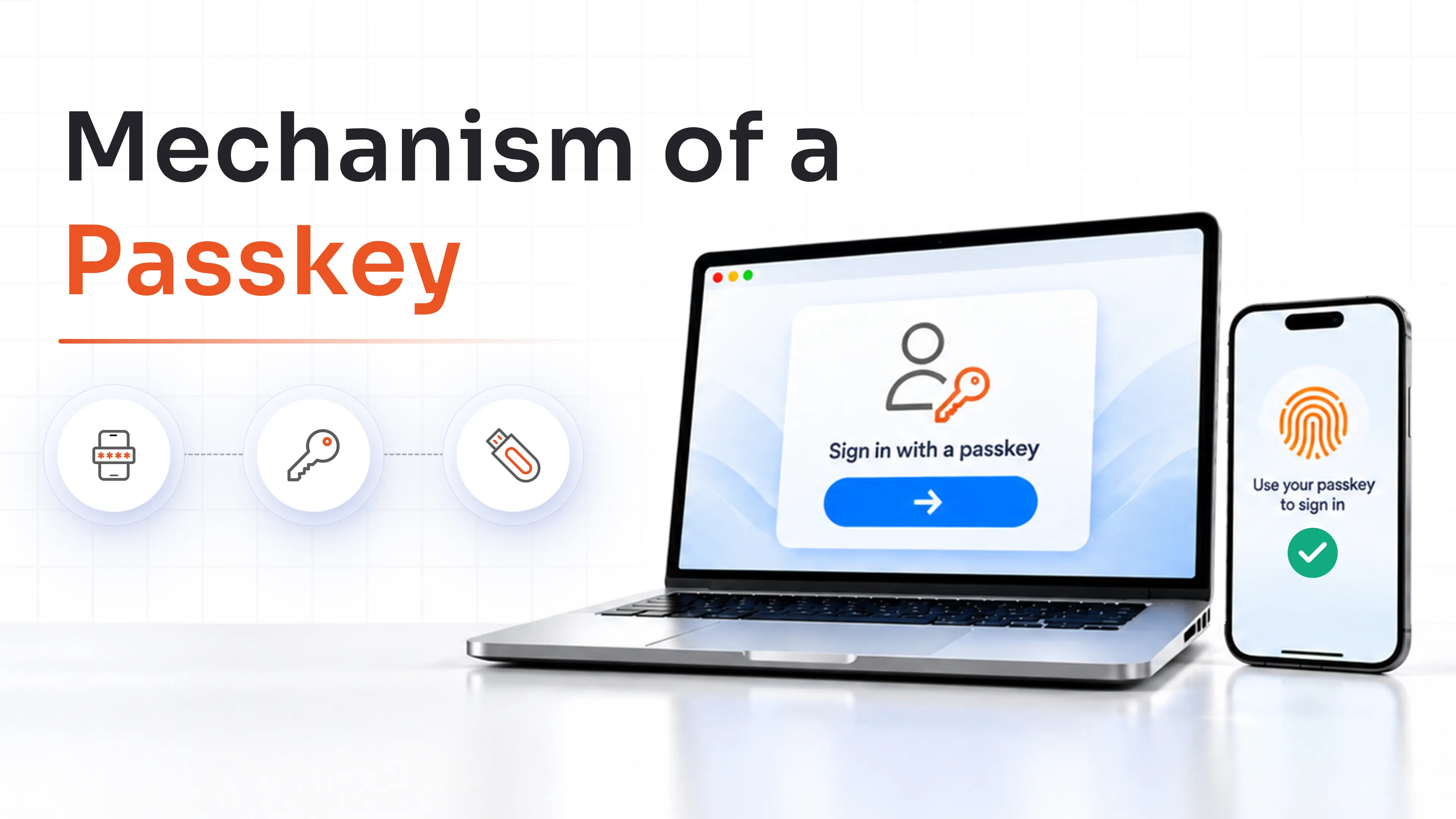
- A private key that stays locked inside your device, phone, security key, or authenticator, and never gets transmitted anywhere.
- A public key that the website or app you're signing up for receives and stores.
These two keys work like a lock and its matching key, except the "lock" (the public key) is useless to anyone who doesn't hold the private key.
When you want to log in, the service asks your device to prove it holds the private key. Your device asks you to confirm you're really there, usually with a fingerprint, a face scan, or a device PIN, and then signs a one-time challenge with the private key. The service checks that signature against the public key it already has on file. If it matches, you're in.
No password ever exists in this exchange. No secret ever travels across the network that a middleman could intercept. That's the fundamental shift passkeys represent, and it's why security teams are watching this technology closely as they plan phishing-resistant authentication strategies.
How Is a Passkey Different From a Password?
A password is something you memorize and type, which means it can be guessed, phished, leaked in a breach, or reused across ten different accounts.
A passkey is something you possess (your device) combined with something you are or know (your biometric or PIN), and it's mathematically unique to every single service you register it with.
Put simply: a password is a secret you share with a server and hope nobody else gets. A passkey is a proof you generate locally that a server can verify without ever holding the secret itself.
We'll unpack the full comparison in detail later in this article, but that distinction is the foundation for everything else.
How Does Passkey Authentication Work?
Passkey authentication isn't a single action; it's a lifecycle with distinct stages: registering the credential, using it to sign in and, increasingly, using it across multiple devices without setting it up from scratch each time.
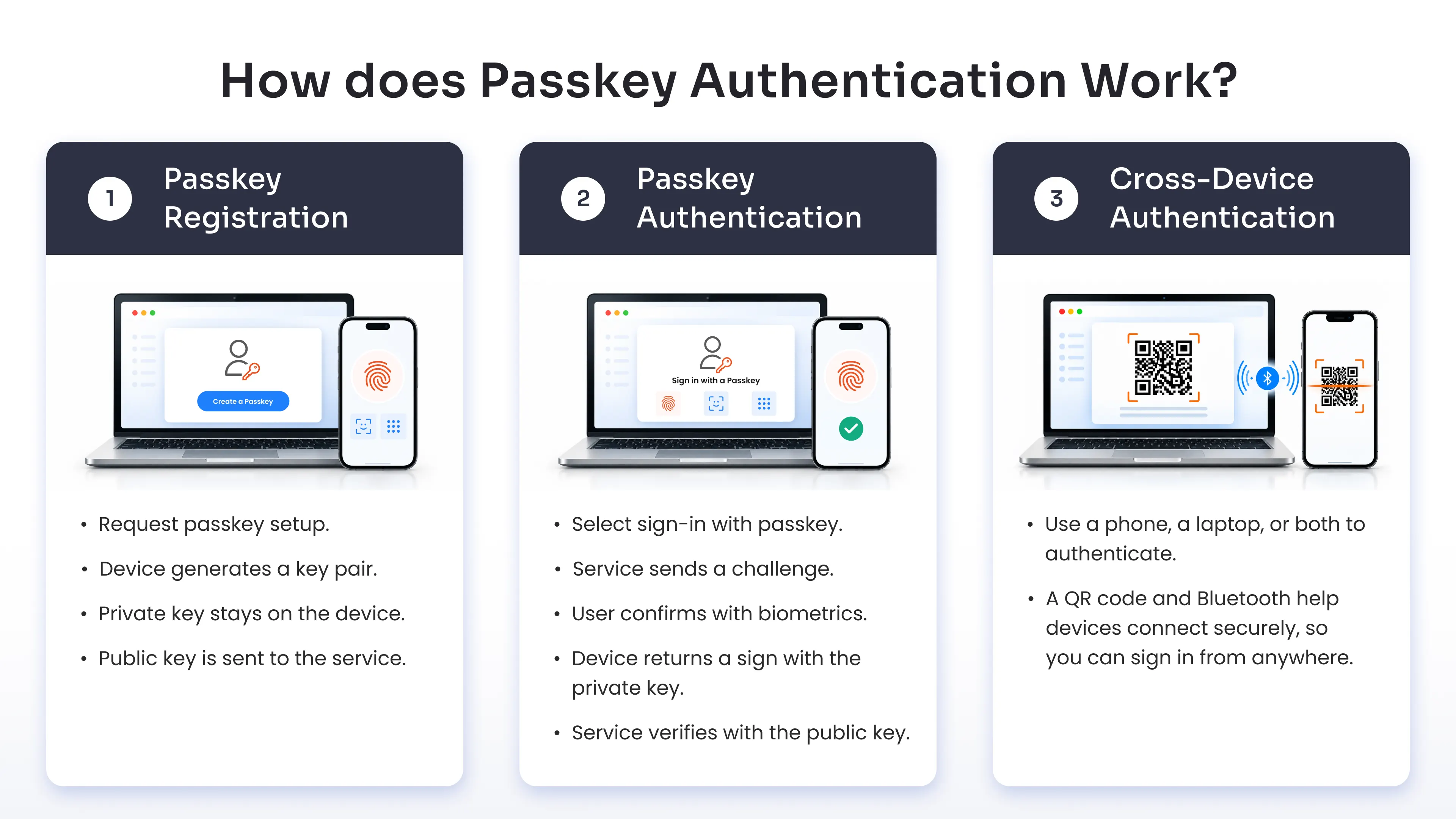
Here's how each stage actually plays out.
Step 1: Passkey Registration
Registration is the one-time setup that creates your passkey. It follows what the WebAuthn standard calls a "registration ceremony," where a public-key credential is created by an authenticator and scoped specifically to the service requesting it.
Here's what happens behind the scenes:
- You choose to set up passkey sign-in for an account, often by selecting an option like "Create a passkey."
- The service (technically called the relying party) sends your device a registration request along with a unique, one-time challenge.
- Your device's authenticator, whether that's your phone's secure hardware, a browser, or a physical security key, generates a new public-private key pair specifically for that service.
- The private key is stored securely on your device or authenticator and never leaves it.
- The public key, along with some metadata, is sent back to the service.
- The service stores that public key and links it to your account.
Because this key pair is generated fresh for each service, a passkey created for one site can't be reused, replayed, or recognized by any other site. That's a structural safeguard, not a policy choice.
Step 2: Passkey Authentication
Once your passkey is registered, logging in looks almost nothing like a password flow.
- You select "Sign in with a passkey" on the login screen.
- The service sends a new, one-time authentication challenge to your device.
- Your device prompts you to verify locally through biometric authentication, such as a fingerprint scan or face recognition, or your device PIN.
- Once verified, the authenticator uses the stored private key to digitally sign that challenge.
- The signed response goes back to the service.
- The service checks the signature against the public key it stored during registration.
- If the signature checks out, you're authenticated and logged in.
The entire exchange usually takes a few seconds, and it's one of the reasons passkeys are a preferred method today.
Step 3: Cross-Device Authentication
One question that trips people up early on: do you need to set up a brand-new passkey on every single device you own? Usually not, and here's why.
Modern passkeys are often "synced," meaning they're encrypted and backed up through a passkey provider, such as your phone's operating system, your browser, or a password manager. That synced passkey becomes available across every device signed into the same account within that ecosystem.
But even when a passkey isn't synced to a particular device, cross-device authentication fills the gap.
Say you're trying to log into a website on a new laptop that doesn't have your passkey stored locally. You can scan a QR code displayed on the laptop screen using your phone, which does hold the passkey.
The phone and laptop then verify they're physically near each other using Bluetooth-based proximity checks, part of the CTAP (Client to Authenticator Protocol) hybrid transport mechanism defined by the FIDO Alliance.
Once proximity is confirmed, your phone signs the authentication challenge on the laptop's behalf, and you're logged in, all without ever creating a second passkey.
This is a meaningful usability win. It means passkeys don't force users into a "register everywhere separately" model the way early hardware security keys sometimes did.
What Happens to the Private Key?
This deserves its own answer because it's the question that matters most for trust in the system: the service never receives, stores, or even sees your private key at any point, ever.
The private key is generated on your device and stays there. During authentication, your device uses that key to create a signature, but the key itself never crosses the network. The service only ever sees the public key and the signatures produced with the private key, neither of which is useful to an attacker trying to impersonate you.
This is the single biggest structural difference between passkeys and passwords. With a password, the server (or a hashed version of it) has to store something derived from your secret. And if that store gets breached, attackers walk away with material they can attack offline. With a passkey, there's nothing on the server worth stealing in the first place.
What Makes Passkeys Phishing-Resistant?
Phishing resistance is the headline reason security teams are moving toward passkeys, and it comes down to one architectural decision: passkeys are bound to the exact website or app they were created for.
Passkeys Are Bound to the Website or App
When your device generates a passkey, it ties that credential to the specific domain of the service you're registering with, say, yourbank.com. That binding happens automatically and can't be overridden by the user, even accidentally.
So if you land on a lookalike phishing site, like yourbank-secure-login.com, your device simply won't offer up the passkey.
It's not that the passkey refuses to work out of caution; it's that the cryptographic binding makes it invisible to any domain other than the one it was created for. There's no prompt to trick, no "are you sure" dialog to click through in a hurry. The mismatch is detected before you even get a chance to make a mistake.
Why Passwords and OTPs Can Be Phished
Compare that to a password or a One-Time Passcode (OTP) sent by SMS or an authenticator app. Both of those credentials are portable by design, which is exactly the problem.
You can type your password into any site that asks for it, including a fake one. You can read an OTP off your phone and enter it anywhere, including into a phishing kit that immediately relays it to the real site in real time.
That's the mechanism behind most modern phishing kits: they don't need to "crack" your password or your OTP; they just need you to hand it over voluntarily on a page that looks convincing enough.
Passkeys close that loophole because there's no human-readable secret to hand over in the first place. The credential simply doesn't function outside the context it was created for.
Passkeys vs. Passwords: What's the Difference?
Here's a side-by-side look at how passkeys and passwords stack up across the factors that matter most for security and usability.
| Feature | Passwords | Passkeys |
|---|---|---|
| Credential type | Shared secret | Public-private key pair |
| User needs to remember it | Yes | No |
| Phishing resistance | Low | High |
| Credential reuse | Possible and common | Unique per service |
| What the server stores | Password or password hash | Public key only |
| Credential theft risk | High | Significantly reduced |
| Brute-force/credential stuffing | Possible | Not applicable in the same way |
| User verification method | Types password | Biometrics, PIN, or security key |
| Password reset burden | High | Reduced |
| Passwordless | No | Yes |
The pattern across nearly every row is the same: passwords depend on a secret staying secret across its entire lifetime, while passkeys depend on a private key that's structurally incapable of leaving the device it was created on.
Are Passkeys the Same as Passwordless Authentication?
Not quite, and this distinction matters more than it might seem. A Passwordless authentication solution is the broader category, referring to any login method that doesn't require typing a password. Passkeys are one specific, standards-based implementation of that category, but they're not the only one.
Other passwordless methods include:
- Biometrics used in isolation, such as unlocking a single app with Face ID, without any underlying cryptographic key exchange with a remote service.
- Standalone security keys, hardware devices that support FIDO2 but may be used outside the specific "passkey" branding and UX conventions.
- Magic links, where a service emails you a one-time login link instead of asking for a password.
- Certificate-based authentication, common in enterprise environments, where a device or user certificate proves identity rather than a password.
It is important to understand this distinction because not every biometric login is a passkey. If an app simply uses your fingerprint to unlock a locally stored password and then auto-fills it, that's biometric convenience layered on top of a password, not a passkey. A true passkey involves the full public-private key exchange with the relying party.
Are Passkeys the Same as MFA?
This is worth answering carefully, because it's easy to overstate. Passkeys are passwordless, and using one typically involves two things: possession of the device holding the private key, and local verification through a biometric or PIN. That combination often satisfies the intent of multi-factor authentication, something you have plus something you are or know.
But whether a specific passkey implementation formally counts as MFA for a given compliance framework depends on how the relying party configures the login flow, and what "user verification" setting it requires.
FIDO's own specification describes passkeys as using a credential on the user's device along with user verification, such as a biometric or PIN, when the relying party requests it. That's a configurable requirement, not a guarantee baked into every passkey deployment.
In practice, this means organizations evaluating passkeys for regulated environments need to check how their identity provider or authentication vendor configures user verification, rather than assuming "we use passkeys" automatically checks the MFA box on an audit.
Passkeys vs. Traditional MFA
A quick comparison helps put this in perspective:
- Password plus SMS OTP: Vulnerable to phishing on both factors. Attackers can capture the password and relay the OTP in real time through phishing kits.
- Password plus authenticator app code: More resistant than SMS, but still depends on a phishable password as the first factor, and OTP codes can still be relayed by sophisticated attackers.
- Passwordless passkey with local verification: Removes the phishable first factor entirely. There's no password to steal, and the biometric or PIN check happens locally on the device, never transmitted anywhere.
This is exactly the gap that phishing-resistant MFA is designed to close, and it's why many security teams are now evaluating passkeys as part of a broader phishing-resistant authentication strategy rather than a standalone login convenience feature.
What Are the Benefits of Passkeys?
Passkeys deliver value across three distinct areas: security, day-to-day user experience, and the operational side of running a business.
1. Security Advantages
- Built-in phishing resistance: Because passkeys are cryptographically bound to a specific domain, they simply won't function on a lookalike or spoofed site.
- No shared secret to steal: Servers store only a public key. Even in the event of a full database breach, there's no password hash for attackers to crack offline.
- Immunity to credential stuffing and brute force: Since there's no password to guess or reuse, the automated attacks that plague password-based systems simply don't apply. Unlike traditional MFA methods, passkeys use cryptographic credentials to provide stronger protection against phishing and credential theft.
2. User Experience Advantages
- Nothing to remember: There's no password to create, forget, or reset, and no complexity rules to satisfy.
- Faster logins: Authentication happens through the same biometric or PIN you already use dozens of times a day to unlock your device.
- Consistent access across devices: Synced passkeys and cross-device authentication mean you're rarely locked out of an account just because you're using a different phone or laptop than usual.
3. Business and Operational Advantages
- Fewer support tickets: Password reset requests are consistently among the top drivers of IT help desk volume. Removing passwords removes that cost center almost entirely.
- Higher completion rates: With passkeys, there’s a higher chance of login success compared to other methods.
- Lower breach exposure: Since passkeys eliminate the password database as an attack target, they remove one of the most common root causes behind large-scale credential breaches.
Where Are Passkeys Stored?
There are three possible places where passkeys are stored, and they are as follows:
1. Device-Bound Passkeys
A device-bound passkey stays permanently on the specific authenticator or device where it was created.
It cannot be exported, copied, or backed up to another device. This makes device-bound passkeys the stronger choice for high-assurance use cases like administrator accounts, since the credential physically cannot leave the hardware it was issued on.
2. Synced Passkeys
A synced passkey is encrypted and backed up through a passkey provider, then made available across every device signed into that same account.
If you create a synced passkey on your phone, it can show up automatically on your laptop and tablet without any additional registration step. This solves the "what if I lose my only device" problem.
3. Passkey Providers
A passkey provider is the system responsible for creating, storing, and, where applicable, syncing passkeys.
Providers generally fall into three categories: operating systems (iCloud Keychain, Google Password Manager, Windows Hello), browsers (Chrome, Safari), and password managers (1Password, Dashlane).
Many enterprises are now landing on a hybrid model: synced passkeys for everyday employee productivity access, and device-bound passkeys, often via hardware security keys, reserved for administrator and privileged accounts.
Where Can Passkeys Be Used?
Here are some prominent places where passkeys can be used:
1. Websites and Web Applications
Any website that implements the WebAuthn standard can offer passkey sign-in directly in the browser, no app download required.
2. Mobile Applications
Native iOS and Android apps can integrate passkey support through platform APIs, using the same biometric check that already unlocks the phone.
3. Enterprise Applications
Internal business tools, from HR systems to finance platforms, increasingly support passkeys as part of a broader identity provider integration.
4. Cloud and SaaS Applications
SaaS platforms across categories, from CRM to collaboration tools to identity and access management systems, are adding native passkey support, often tied to Single Sign-On (SSO) flows.
5. Operating Systems and Devices
This same technology is also showing up at the device level. Unlocking a laptop or approving an admin setting change, like installing new software, increasingly relies on the same passkey-based model instead of a separate login system.
What Are the Limitations of Passkeys?
Here’s a comprehensive list of cons of passkeys that every organization must be aware of:
1. Device Loss and Account Recovery
Losing a device that holds a device-bound passkey, without a synced backup, can genuinely lock a user out. Recovery needs to be deliberately designed, not left as an afterthought.
2. Legacy Application Compatibility
Older applications and internal legacy systems built before WebAuthn often can't support passkeys natively, requiring hybrid authentication during transition.
3. Cross-Platform and Ecosystem Considerations
Syncing behavior still isn't perfectly uniform across Apple, Google, and Microsoft ecosystems, creating friction for employees mixing personal and corporate devices.
4. Shared Account and Access Sharing Challenges
Passkeys are built around individual identity, creating friction for scenarios that rely on shared logins, such as shared service accounts.
5. Enterprise Deployment and Management
Rolling out passkeys across a large workforce requires coordination between identity providers, device management platforms, and application owners, and not every platform has caught up equally.
6. User Adoption and Change Management
Even with a technically sound rollout, employees accustomed to passwords need clear guidance and low-friction enrollment, or adoption can stall regardless of how ready the technology is.
How Can Organizations Adopt Passkeys?
1. Identify High-Risk Applications
Start by mapping where credential theft would cause the most damage: email, VPN access, admin accounts, and business-critical SaaS applications.
2. Start With a Pilot
Test the full lifecycle with a smaller group: enrollment, day-to-day authentication, recovery, device changes, and application compatibility.
3. Define a Recovery Strategy
A weak recovery mechanism can quietly undo the security gains passkeys are supposed to deliver. Design it with the same rigor as the primary authentication method.
4. Support Multiple Authentication Methods During Migration
Very few organizations can flip every application to passkey-only overnight. A comprehensive MFA solution can support passkeys alongside existing MFA methods, keeping operations running smoothly while adoption climbs.
5. Enforce Phishing-Resistant Authentication for High-Risk Access
Once the pilot is validated, extend enforcement to admin, finance, and production-access accounts first, then expand outward.
Will Passkeys Replace Passwords?
Realistically, yes, but not overnight, and not everywhere at once.
Passkeys are explicitly designed as a password replacement, and the adoption curve backs that up: FIDO Alliance data shows 90% global awareness of passkeys, 75% of consumers have enabled at least one, and 68% of enterprises are actively deploying or piloting workforce passkey rollouts.
The realistic near-term picture is hybrid authentication: passkeys as the default for new applications and high-risk access, with passwords and traditional MFA continuing to serve as fallback options for systems that haven't caught up yet.
The transition depends on applications, devices, and operating systems all moving to the new model together, and that kind of ecosystem-wide shift takes time even when the destination is clear.
Why Choose miniOrange for Phishing-Resistant Authentication?
Rolling out passkeys across a real enterprise, with legacy applications, mixed device fleets, and compliance requirements in the mix, takes more than flipping a single switch. A phishing-resistant MFA solution can help organizations extend stronger authentication across these environments while supporting modern passwordless methods such as passkeys and FIDO2. Here's how miniOrange helps you make that shift without leaving anything behind.
1. Passkeys and FIDO2 Authentication
miniOrange supports native passkey and FIDO2 authentication, giving your organization a standards-based foundation for passwordless, phishing-resistant sign-in from day one.
2. Multiple Phishing-Resistant Authentication Methods
Beyond passkeys, miniOrange offers hardware security keys and certificate-based authentication, so you can match the right method to the right risk level.
3. Flexible MFA for Existing Environments
Layer flexible MFA on top of legacy and modern systems alike, so you're not stuck waiting for every application to catch up.
4. Enterprise Application and Infrastructure Coverage
Broad integration support across cloud applications, on-premises systems, and identity providers helps you extend passkey and phishing-resistant authentication across a mixed environment.
5. Passwordless and MFA From One Platform
miniOrange positions passkeys as part of a broader authentication strategy, combining passwordless sign-in with adaptive MFA policies from a single platform.
The Bottom Line on Passwordless Security
Passkeys aren't a minor upgrade to how we log in; they're a structural fix to a problem passwords were never built to solve.
By replacing a shared secret with a cryptographic key pair that never leaves your device, passkeys eliminate the single biggest target attackers have relied on for two decades: the password database.
Adoption is accelerating fast, but the transition is still a journey, which is exactly why a phased, well-planned rollout matters more than a rushed one.
FAQs
Can passkeys be hacked or stolen?
Passkeys dramatically reduce the attack surface compared with passwords, but it's inaccurate to call them completely unhackable.
Can someone steal a passkey through phishing?
No, not through the traditional phishing playbook. Since a passkey is bound to a specific domain and never transmitted as a readable secret, a phishing site can't trick your device into handing it over.
What if someone steals the device?
A stolen device doesn't automatically hand over your passkeys, since the credential is still gated behind the local biometric or PIN check. Device hygiene, like strong PINs, auto-lock, and remote wipe, still matters, since a passkey's protection is only as strong as the device-level authentication guarding it.
What if malware compromises the device?
On a device with hardware-backed key storage, malware generally can't extract the private key itself. However, sophisticated malware that achieves deep device compromise could potentially manipulate an active authenticated session. Endpoint security remains essential, even in a passkey-first environment.
What happens if I lose the device that stores my passkey?
If your passkey was synced through a provider like iCloud Keychain or Google Password Manager, it's typically recoverable on a new device once you sign back into that same account.
Can passkeys be phished?
Not through traditional phishing methods, since a passkey is cryptographically bound to the exact domain it was created for.
What happens if my organization doesn't support passkeys yet?
A majority of organizations are still transitioning, and hybrid authentication is the realistic norm. Start by identifying your highest-risk applications, then look for a platform that supports both passkeys and flexible MFA so you can modernize incrementally.
About the Author

Content Writer
With a background in Journalism and extensive experience in SaaS and cybersecurity content writing, Chaitali Avadhani has contributed to creating various forms of impactful content pieces across multiple verticals. At miniOrange, her role is to craft SEO-friendly and lead-generating content around Identity and Access Management (IAM) products and cybersecurity as a whole.
Leave a Comment