

Summarize with AI
Don't have the time to read the entire post? Our human writers will be sad, but we understand. Summarize the post with your preferred LLM here instead.
Passwords alone are no longer enough to protect access to business applications and sensitive data. That’s the whole reason context-based authentication, also known as adaptive or contextual authentication, exists. It adds another layer of security by evaluating real-time information such as user location, device, behavior, and time of access before deciding whether access should be granted.
Instead of trusting a password on its own, it looks at the situation around the login: who's logging in, from where, on what device, and when. The goal is simple: let the right people in, keep the wrong ones out, and don’t make trusted users jump through hoops they don’t need.
What is Context-Based Authentication?
Context-based authentication is an approach that evaluates the surrounding circumstances, or authentication context, during an access attempt. It uses signals such as user behavior, device type, location, IP address, network, and time of access to determine whether a login attempt appears trusted or risky. It builds a picture of what "normal" looks like for each user, then flags anything that doesn't fit.
Two things happen inside that process:
Establishing a baseline: the system watches typical login patterns over time. This becomes each user’s contextual identity, the behavioral fingerprint the system compares future logins against.
Responding to anomalies: once that baseline exists, every new login gets checked against it in real time. Depending on risk, the system might ask for MFA, trigger step-up verification, or deny access outright.
How Does Context-Based Authentication Work?
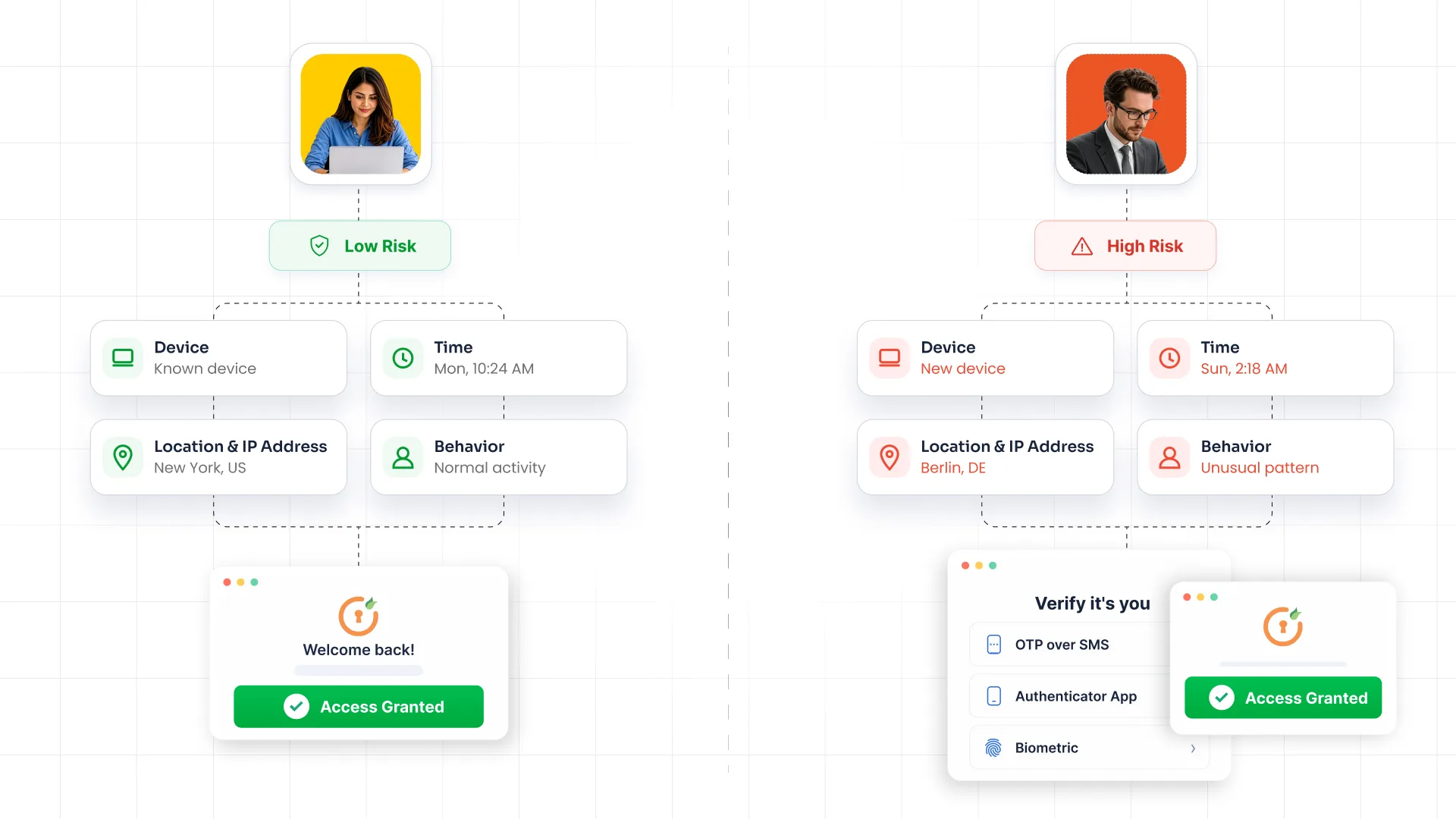
Context-based authentication works by collecting and evaluating information around a user's access request. The process generally involves the following four steps, repeated on every login attempt.
1. Collect contextual signals: The system pulls data at the moment of login: device fingerprint, IP address, geolocation, network type, time of day, and behavioral cues like typing speed or navigation patterns.
2. Assess the authentication risk: Those signals get scored. A login from a known device on the home network at 10 AM scores low risk. A login from a new device on public Wi-Fi at 3 AM scores high.
3. Compare against user and device context: The risk score gets checked against the user's established baseline and the organization's access policies. Is this within their normal pattern? Does the device meet security posture requirements?
4. Take an access decision: Based on that comparison, the system allows access, challenges it with step-up authentication, or denies it. Low risk moves through without interruption. High risk gets stopped or verified further.
This risk-based approach lets organizations apply stronger controls when the situation calls for them instead of applying the same authentication requirement to every login.
What Signals Does Context-Based Authentication Analyze?
The strength of context-aware authentication comes down to how many signals it reads and how well it weighs them.
| Signal | What it evaluates |
|---|---|
| User and behavior | Login patterns, typing and navigation habits, unusual account activity |
| Device | Device identity, security posture, whether it’s managed or jailbroken |
| Location and network | IP address, geographic location, VPN or public network use |
| Time | Login time against a user's typical access hours |
| Risk | Threat intelligence feeds, known-bad IPs, contextual risk scoring |
Context-Based Authentication vs. Traditional Authentication
| Factor | Traditional authentication | Context-based authentication |
|---|---|---|
| Authentication factors | Username and password (sometimes static MFA) | Credentials plus real-time contextual signals |
| Context awareness | None | Continuous, per login attempt |
| Risk evaluation | Not present | Dynamic risk scoring on every attempt |
| MFA requirements | Applied uniformly to every login | Applied only when risk is evaluated |
| User experience | Same friction for every user, every time | Low friction for trusted logins, more checks for risky ones |
| Access decisions philosophy | Correct credentials in, wrong credentials out | Allow, challenge, or deny based on risk |
Traditional authentication typically asks whether the user can successfully provide the required credentials or authentication factors. Context-based authentication adds information about the access request itself before deciding what should happen next.
This makes authentication decisions more responsive to the circumstances surrounding each access request.
What Are the Benefits of Context-Based Authentication?
Implementing context-based authentication gives organizations a way to apply security controls according to the circumstances of an access request. Some of the main benefits include:
1. Enhanced Security
Context-based authentication adds another layer of protection beyond usernames, passwords, or other credentials. It can evaluate several signals at the time of login, including device information, location, network, and user behavior.
Even when valid credentials are used, an unusual context can cause the system to request additional verification. This makes stolen credentials harder to use and helps organizations respond to suspicious access attempts.
2. User Convenience
Context-aware authentication can reduce unnecessary authentication prompts. When a user signs in from a recognized device, location, and other trusted context, the system can allow access with fewer interruptions.
Users therefore spend less time responding to repeated MFA requests during routine work. Additional verification can be reserved for situations that carry more risk.
3. Adaptability
User behavior and work environments change over time. Employees may work from home, switch devices, travel, or connect through different networks.
Context-based authentication can account for these changes by evaluating current signals instead of relying only on fixed rules. Authentication policies can also be adjusted as organizations learn more about their users, applications, and risk patterns.
4. Ensures Regulatory Compliance
Organizations that handle sensitive information need controls that restrict access to authorized users. Context-based authentication can support these access control requirements by considering risk and authentication context when access decisions are made.
It can also provide organizations with a more consistent way to apply authentication policies to sensitive applications and resources. The exact requirements depend on the regulation, industry, and type of data being protected, so context-based authentication should be used as part of a broader security and compliance program.
5. Enables Zero Trust Architecture
Zero Trust security is based on continuously verifying access rather than assuming that a user or device should be trusted simply because it is inside a network.
Context-based authentication supports this approach by evaluating the user, device, location, network, and other signals during access attempts. Organizations can then make access decisions based on the current context and risk level.
6. Improves User Experience (UX)
Authentication becomes easier to use when security controls match the level of risk. A user performing normal work on a recognized device may move through the login process with fewer
prompts, while a higher-risk request can receive stronger verification.
This balance can make secure access less disruptive for employees and customers.
Context-Based Authentication Use Cases
Context-based authentication can be used across workforce access, customer-facing applications, and environments where sensitive information requires stronger access controls.
The decision process can be understood through three elements: the scenario, the contextual signals, and the authentication decision.
Workforce and Remote Access
Scenario: An employee signs in to a business application from home using a company-managed laptop.
Contextual signals: The system checks the user's device, location, login time, IP address, and previous access patterns. The device is recognized and the request comes from a location and time that fit the user's normal activity.
Authentication decision: The user can be allowed to sign in with the standard authentication flow. If the same credentials are later used from an unfamiliar device or unusual location, the system can require additional MFA or block access based on the organization's policy.
This is useful for organizations with remote and hybrid employees because access conditions can change frequently.
Customer and High-Risk Applications
Scenario: A customer signs in to an online application from their usual device and location, then attempts to access a sensitive account function.
Contextual signals: The system evaluates the device, location, network, IP address, recent activity, and other available risk signals.
Authentication decision: A low-risk request may proceed normally. If the activity appears unusual, the application can request step-up authentication before allowing the sensitive action.
This approach can protect customer accounts while avoiding unnecessary authentication prompts during routine activity.
Regulated Industries
Scenario: An employee attempts to access an application containing sensitive financial, healthcare, or other regulated information.
Contextual signals: The organization can evaluate the user's identity, device, location, network, application, and access conditions.
Authentication decision: Access can be allowed when the request meets the organization's policy. A higher-risk request can require stronger authentication or be denied.
For regulated environments like healthcare, finance, and government, this approach can help apply tighter access controls around sensitive applications and data.
What Are the Challenges of Context-Based Authentication?
Context-based authentication can improve access security, but organizations need to configure it carefully. Some common challenges include:
- Balancing Security and User Experience: Too many authentication challenges can interrupt normal work, while weak policies may leave risky access insufficiently protected. Policies need to match the level of risk.
- Managing Privacy and Contextual Data: Context-based decisions can rely on information such as location, device details, IP addresses, and behavior. Organizations need clear rules for collecting, storing, using, and protecting this data.
- Configuring and Tuning Authentication Policies: Risk signals don't always mean an account is compromised. Organizations need to test policies and adjust thresholds so legitimate users aren't repeatedly challenged.
- Integrating With Existing Applications: Older applications may not support modern authentication controls directly. Organizations may need an identity layer or authentication gateway to apply context-based policies without changing every application.
How to Implement Context-Based Authentication?
A successful implementation starts with the access that needs protection and then builds policies around real risk.
1. Identify Users, Applications, and Resources That Need Protection
Start by identifying which users, applications, and resources require stronger access controls. Sensitive applications, administrative accounts, customer data, and critical business systems may need stricter policies than low-risk resources.
2. Define Relevant Contextual Signals
Determine which signals can help you assess the risk of an access request. Common signals include device, location, IP address, network, login time, user behavior, application, and previous access patterns.
The signals you use should match the type of access being protected. A signal that is useful for one application may have less value for another.
3. Create Risk-Based Access Policies
Define what should happen when a login matches a trusted pattern and what should happen when risk increases. For example, a low-risk request can proceed normally, a medium-risk request can trigger MFA, and a high-risk request can be blocked.
Policies should be specific enough to guide access decisions without creating unnecessary challenges for users.
4. Configure Step-Up Authentication
Step-up authentication adds another verification step when the risk of an access request increases. MFA can be triggered when a user signs in from an unfamiliar device, unusual location, or other context that falls outside the organization's normal policy.
For sensitive applications, organizations can use stronger authentication methods when additional verification is required.
5. Test and Tune Authentication Policies
Before applying policies broadly, test them with different users, devices, locations, and access scenarios. Check whether normal activity is being challenged and whether genuinely risky activity receives the required level of verification.
Authentication policies may need regular adjustment as work patterns, applications, and threats change.
6. Monitor Authentication Activity
Monitor authentication attempts, challenges, successful logins, blocked requests, and unusual activity. This helps security teams understand whether policies are working as intended and identify patterns that may require investigation.
Context-Based Authentication and Phishing-Resistant MFA
Context-based authentication and phishing-resistant MFA address different parts of the authentication process.
Context-based authentication decides when and how much authentication is required based on the risk and circumstances of an access request. For example, a familiar login may require the standard authentication flow, while an unusual login may trigger step-up authentication.
Phishing-resistant methods strengthen the authentication factor itself. FIDO2, WebAuthn, passkeys, and security keys use public key cryptography to make authentication resistant to common phishing attacks. Instead of relying on a code that a user can be tricked into sharing, these methods use cryptographic credentials tied to the legitimate website or service.
These approaches can work together to create a more adaptive security strategy. Context-based authentication identifies when stronger verification is needed, while a phishing-resistant MFA solution provides a stronger authentication layer to help protect users against credential-based and phishing attacks.
Conclusion
Cyber threats move faster than static defences can keep up with. Context-based authentication holds up because it doesn’t ask “is the password correct” and stops there. It asks whether the entire situation around a login makes sense, and adjusts in real time when it doesn’t
miniOrange brings this into a full identity and access management suite: Single Sign-On (SSO) solution, Multi-factor authentication (MFA) software, context-aware authentication, risk-based authentication, and biometric authentication, deployable on-premise, hybrid, or in cloud-only environments.
Contact us to find the setup that fits your organization!
FAQs
What kinds of signals does context-based authentication analyze?
Context-based authentication can analyze signals such as user location, device, IP address, network, login time, user behavior, application, and previous access patterns. The exact signals depend on the authentication system and the organization's security policies.
How can organizations reduce unnecessary MFA prompts without weakening security?
Organizations can use risk-based authentication policies that consider the context of each access request. Low-risk requests can follow the normal authentication flow, while unusual or higher-risk requests can trigger MFA or stronger verification.
How does contextual authentication differ from traditional authentication?
Traditional authentication checks credentials once and applies the same rule to every login. Contextual authentication evaluates the situation around each login and adjusts the response, allow, challenge, or deny, based on real-time risk.
What role does device-based authentication play in context-based security?
Device information can help determine whether an access request comes from a known or trusted device. A recognized device may support a lower-risk decision, while an unfamiliar or potentially compromised device can trigger additional authentication or an access block.
How do you implement context-based authentication without disrupting existing applications?
Start with your highest-risk applications, define signals and policies before rollout, and test against real login data to catch false positives. Legacy systems usually need an integration layer or gateway rather than a native rebuild.
Leave a Comment