
Data breaches hit headlines weekly, and phishing scams evolve faster than we can patch them. Amongst this, passwords feel like relics from the dial-up era.
Enter passkeys, a modern authentication solution, and a game-changing shift in authentication that's already being made available by giants like Amazon, Google, and Sony Interactive Entertainment. Passkeys promise phishing-resistant, frictionless logins without the endless "password123?" frustration.
If you're a C-suite leader eyeing enterprise security, a developer building the next secure app, a cybersecurity pro tracking threats, or a student diving into auth tech, this guide explains passkeys in-depth.
Stick around as we unpack what a passkey is, how passkeys work, and why they might just bury passwords for good.
Key Takeaways:
- What is a Passkey: A secure alternative to password-based login, where cryptographic keys are used to sign into apps or websites with the device’s built-in security, like biometrics, acting as a phishing-resistant MFA Method.
- Passkey vs. Password: Password authentication is based on something you know, whereas passkey authentication is based on something you have and something you are, making it an inherently strong MFA method.
- Passkey Benefits: Phishing-resistant, more secure than passwords, and cybercriminals cannot steal them, which makes passkeys an ideal, modern MFA solution.
- Security: Passkeys are not completely hack-proof, but they are more difficult to steal than passwords.
- Integrations: Passkeys can be integrated with systems and platforms such as web browsers, OS, Content Management Systems (CMS), native apps, backend frameworks, and Identity Providers (IdP).
What are Passkeys?
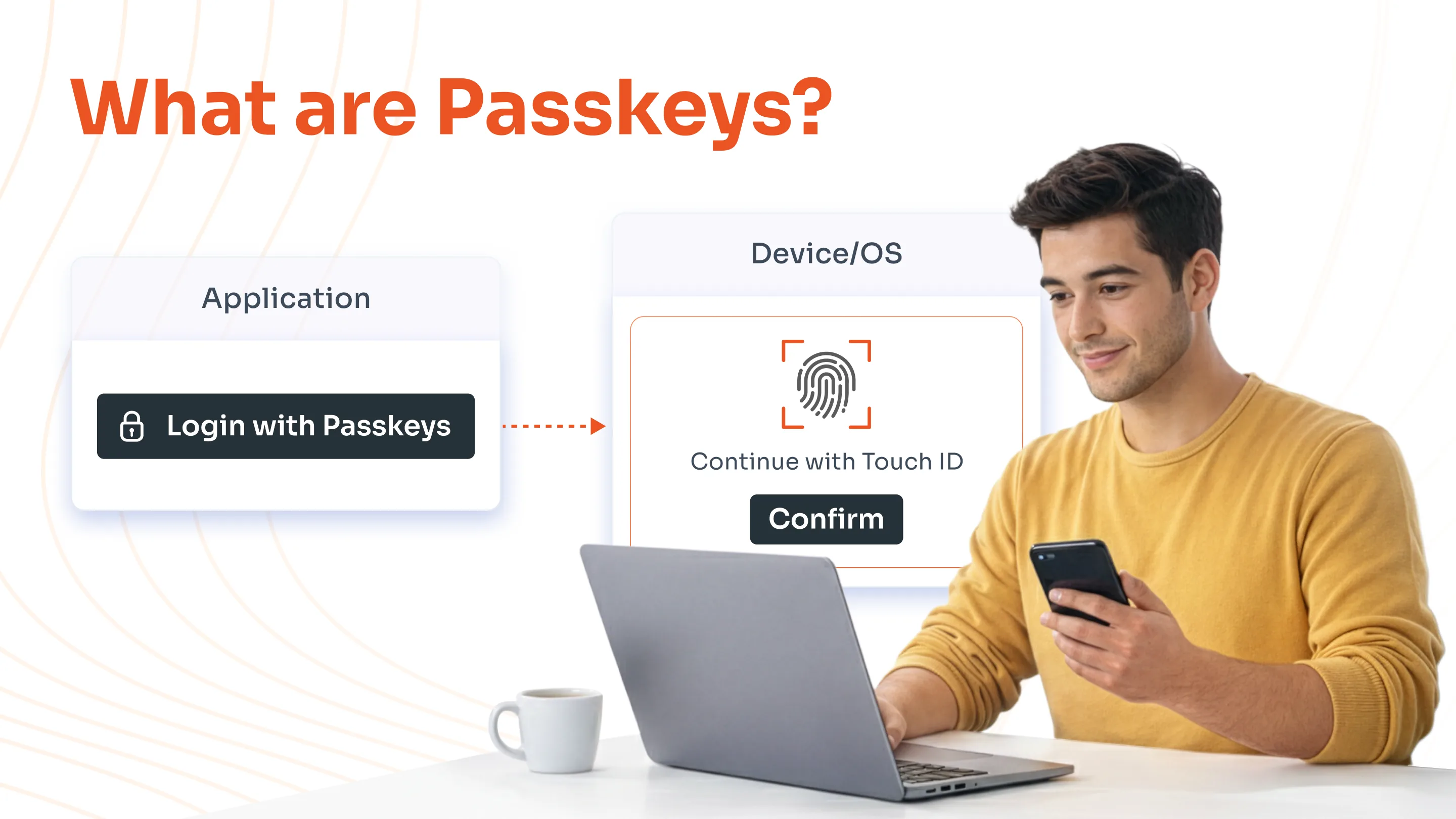
A passkey is a modern digital credential that lets you sign into apps and websites without passwords. Think of it as a tamper-proof house key tied to your smartphone's secure enclave, rather than a scribbled note under the doormat. As an MFA method, it combines device-bound cryptographic keys with user verification, such as biometrics or PIN.
Passkeys have been in development for a decade by the FIDO Alliance (Fast IDentity Online), whose focus is to create passwordless authentication. Cybersecurity giants working on passkeys are Google, Microsoft, and Apple.
C-suite Takeaway: Companies now default to passkeys, reducing breach surfaces. They also align with zero trust principles.
Key Characteristics of Passkeys
- Passwordless: Passkeys run by the principle of passwordless authentication, so there’s no need to remember or enter complex passwords.
- No Expiration: They last indefinitely, tied to your device's security.
- Biometric/PIN-based: Authenticate your device, where the private key is stored with your face, fingerprint, or device unlock code.
- Phishing-Resistant: Works only with the genuine website or application, preventing fake sites from tricking you.
- Cryptographically Secure: Uses public/private key pairs, where the private key never leaves your device.
- Device-Specific Yet Syncable: Unique to your account and device, but syncs across your devices via end-to-end encrypted cloud (e.g., Google Password Manager, iCloud Keychain).
Passkeys vs. Passwords: How Do They Differ?
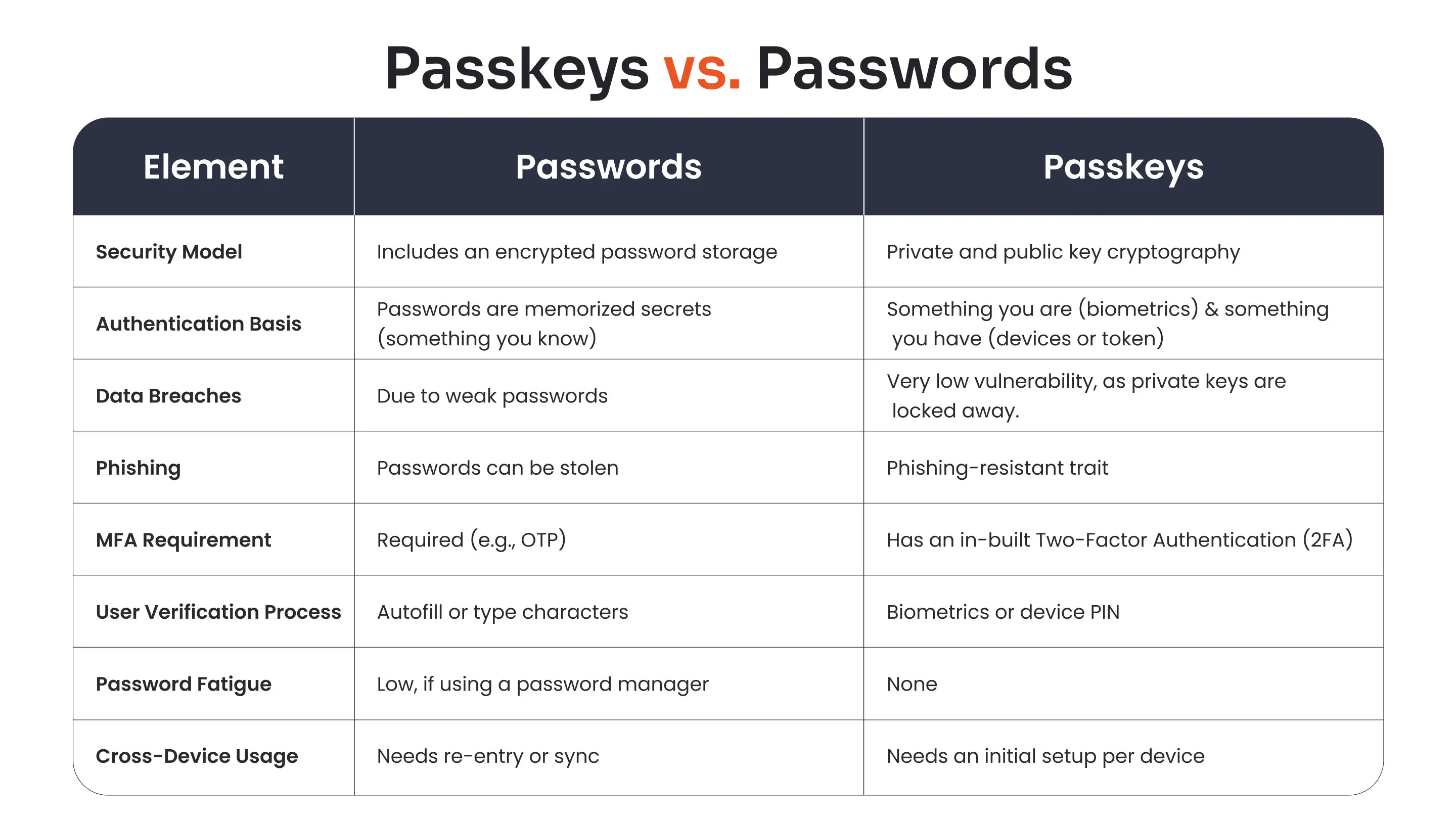
Here's the difference between a password and a passkey in a nutshell:
How do Passkeys Work?
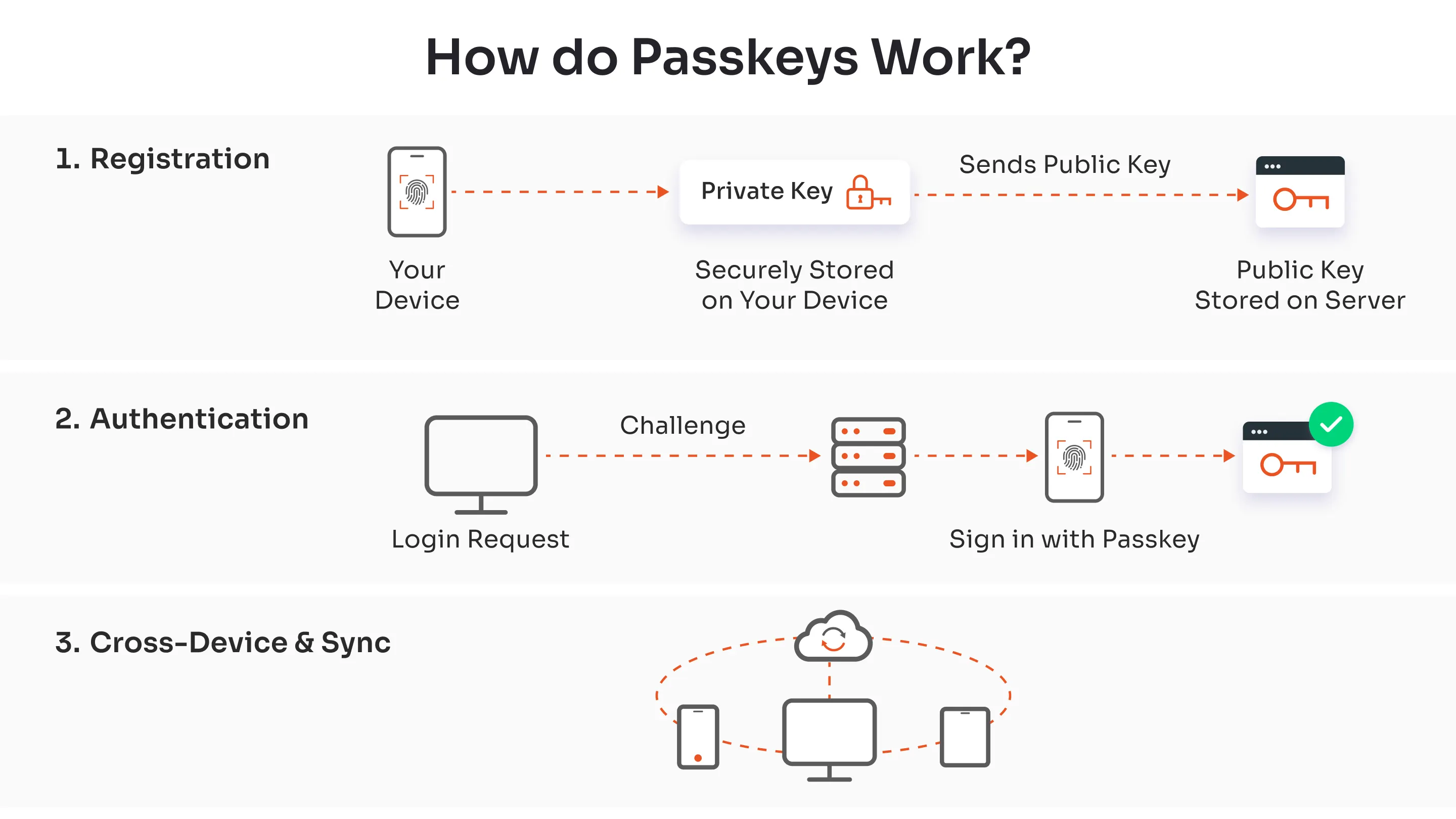
Passkeys enable secure, passwordless logins through public-key cryptography, making authentication fast and phishing-proof.
They rely on a unique key pair generated on your device, where the private key never leaves secure hardware like a phone's enclave. This process replaces typing credentials with a simple biometric scan or PIN, and fits naturally into passwordless MFA solutions that enterprises are adopting.
1. Registration Process
When creating a passkey for a site or app, your device first verifies you via fingerprint, face scan, or PIN. It then generates a public-private key pair tied to that specific domain and account.
The public key uploads to the service's server, while the private key stays locked on your device or syncs encrypted across your ecosystem (e.g., iCloud Keychain or Google Password Manager). No sensitive data travels over the network beyond the public key.
2. Authentication
Login starts with the server sending a random "challenge" to your browser or app. Your device prompts for biometric/PIN approval, then uses the private key to sign that challenge digitally.
The signed response returns to the server, which verifies it against the stored public key. Success grants access; nothing else ever leaves your device.
3. Cross-Device and Sync
Passkeys come in two types: device-bound (local only) or syncable (cloud-backed). During sync, the private key gets end-to-end encrypted and sharded across approved devices.
Platforms like Apple, Google, and Microsoft handle this seamlessly, so a passkey created on your iPhone unlocks your Windows laptop.
Why Passkeys Beat Passwords?
Passkeys crush passwords in security. Passwords share a secret that's easy to phish or steal. Passkeys bind to domains, so fake sites trigger no response. Developers implement this via WebAuthn APIs, as shown, which is simple, standard, and FIDO2-certified for enterprise scale and for building a phishing-resistant MFA solution.
FIDO2 certification ensures resistance to man-in-the-middle attacks, side-channel leaks, and quantum threats.
Additionally, passkeys are secure enough because private keys never leave the hardware enclave. Even if your device is stolen, biometric/PIN gates block access.
Can Passkeys be Hacked or Stolen?
Passkeys aren't invincible, but hacking them demands physical access plus biometrics, which is far harder than phishing.
No remote theft possible; malware can't extract enclave keys. Evil Maid attacks (tampering with unlocked devices) are theoretical risks, mitigated by auto-lock.
What are the Benefits of Passkeys?
Passkeys are widely considered the successor to passwords because they solve the two biggest problems in digital security: human error (weak or reused passwords) and phishing attacks. Let’s look at the benefits in-depth.
1. Security Benefits
- Phishing Resistance: This is the single biggest advantage. A passkey is cryptographically bound to a specific website’s domain. If you accidentally click a link to a fake site, your device will refuse to offer the passkey because the domain does not match.
- No "Shared Secrets": Servers no longer store your actual credentials. They only store a public key, which is useless to a hacker without the private key on your device. If a company's database is hacked, there are no passwords to steal.
- Immune to Brute Force: Since there is no password to guess, attackers cannot use "credential stuffing" or brute-force software to crack your account.
2. User Experience and Convenience
- No Memorization: You do not need to create, remember, or type complex strings of characters.
- Faster Logins: Authentication happens instantly using the method you already use to unlock your phone or computer: Face ID, Touch ID, Windows Hello, or a screen PIN.
- Cross-Device Syncing: Major ecosystems (Apple iCloud Keychain, Google Password Manager, 1Password, etc.) automatically sync passkeys between your devices. If you create a passkey on your iPhone, it is available on your iPad and Mac automatically.
3. Business and Operational Benefits
- Reduced Support Costs: For businesses, the number one IT support ticket is usually "password reset." Passkeys virtually eliminate this cost.
- Higher Login Success Rates: Users abandon carts or apps when they forget passwords. Passkeys have shown to increase login success rates because the failure point (memory) is removed.
Are There Any Limitations to Passkeys?
1. Device Dependency
One key challenge is device dependency. If you lose access to all your synced devices without a recovery plan, regaining account access becomes complicated.
Unlike passwords, which can be reset via email, passkeys tie tightly to your hardware's secure enclave. This makes them ultra-secure but requires proactive backups across multiple devices.
2. Ecosystem Lock-in
Ecosystem lock-in poses another issue. Passkeys shine on modern platforms like iOS 16+, Android 9+, Windows 11, and current browsers such as Chrome 109 or Safari 16.
Users stuck on legacy systems, like old browsers or Android versions, face compatibility roadblocks. This creates friction in diverse work environments with mixed device fleets.
3. Access Sharing
Sharing access remains tricky, too. You cannot easily hand off a passkey like a password scribbled on a Post-it note.
For temporary access, some services offer guest passkeys, but this isn't universal. Teams relying on shared accounts, common in enterprises, may need hybrid password fallbacks during transition.
4. MDM Integration Delays
Enterprises encounter MDM (Mobile Device Management) software integration delays with certain tools.
While leaders like Okta and Microsoft Entra ID support passkeys natively, smaller vendors lag, complicating zero trust deployments. Hybrid authentication modes bridge this gap temporarily.
Elevate Security with miniOrange Passwordless Authentication Solutions
Elevate your security game with miniOrange Passwordless Authentication Solutions, which helps you to shift from risky passwords to phishing-resistant logins via passkeys, biometrics, and magic links as part of a comprehensive MFA solution.
Backed by FIDO standards and integrations like Google Workspace, Okta, Azure AD, and more, miniOrange delivers enterprise-grade protection without the friction.
Ready to go passwordless? Start your free trial today, check flexible pricing, or connect with our experts for a product demo!
FAQs
Do passkeys work with password managers?
Yes, they act as secure vaults, auto-filling across browsers.
What happens if I lose the device with my passkeys?
Synced passkeys transfer to backups. Device-bound ones require service recovery (e.g., email fallback). Always have 2 or more synced devices.
Do passkeys expire?
No, passkeys do not expire. They're valid forever or until revoked/deleted. Rotate via device reset if compromised.
Will passkeys replace passwords in today’s time?
Absolutely, passkeys are going to be the new normal. Fallback passwords will linger for legacy systems, but passkeys dominate new apps and modern MFA solutions focused on phishing resistance and user convenience.
Leave a Comment