

BYOD, or Bring Your Own Device, refers to the practice of allowing employees, contractors, and other authorized users to use personal devices to access company applications, networks, and data. These devices can include smartphones, tablets, laptops, and personal computers.
BYOD security, in simple terms, means the policies, practices, and technologies organizations use to protect corporate resources accessed through personal devices. It helps organizations control access, protect business data, establish device requirements, and respond when a device is lost, compromised, or no longer authorized.
BYOD can support flexible working and reduce the need for organizations to provide company-owned hardware. However, personal devices can have different operating systems, applications, configurations, and security settings. A practical BYOD security strategy helps organizations manage these differences while protecting corporate resources.
Why Does BYOD Security Matter?
When a personal device accesses corporate applications or data, it becomes another endpoint that needs appropriate protection. Unlike company-owned devices, personal devices may not be configured, maintained, or secured according to the same organizational standards.
The main challenge is balancing access, security, and privacy. Employees may use the same device for work and personal activities, while IT teams still need to protect business information. This is why BYOD cybersecurity needs to address both the device and the corporate data accessed from it.
BYOD security matters because it helps organizations:
- Protect sensitive business data
- Control access to corporate applications
- Set minimum device security requirements
- Reduce exposure from lost or compromised devices
- Separate business and personal information
- Establish clear privacy and offboarding processes
A strong BYOD cybersecurity strategy also helps organizations define how personal devices can connect to business resources and what security requirements must be met before access is granted.
What Are the Common BYOD Security Risks?
BYOD security risks can arise from the device, applications installed on it, how users access corporate resources, and how business data is handled.
Unsecured or Outdated Devices
Personal devices may run older operating systems, lack security updates, or use configurations that do not meet organizational requirements. Allowing unsupported devices to connect to corporate resources can increase exposure to known vulnerabilities.
Lost or Stolen Devices
A lost device can contain corporate applications, credentials, files, or cached information. Strong authentication, encryption, and access controls can reduce the risk of unauthorized access.
Malware and Malicious Applications
Personal devices may contain applications that introduce vulnerabilities or malware. A compromised endpoint can provide a route to corporate applications and data.
Data Leakage
Business information can move into personal applications, cloud storage, messaging services, or backups. Without appropriate controls, organizations may have limited visibility into where corporate information is stored or shared.
Privacy Concerns
Employees may hesitate to enroll personal devices if they do not know what IT can see or control. A clear policy should establish the boundary between corporate management and personal information.
Device Diversity
Security teams may need to support different operating systems, hardware, applications, and configurations. Consistent requirements and centralized management can help reduce this complexity.
These BYOD security risks make it important to combine device controls with identity, application, and data security.
Organizations should also consider BYOD security risks when deciding whether a device should receive full management, application-level management, or access based on its current security posture.
How Does BYOD Security Work?
BYOD solution combines policy, identity, device management, application controls, and data protection. The specific controls depend on the organization, users, devices, applications, and data involved.
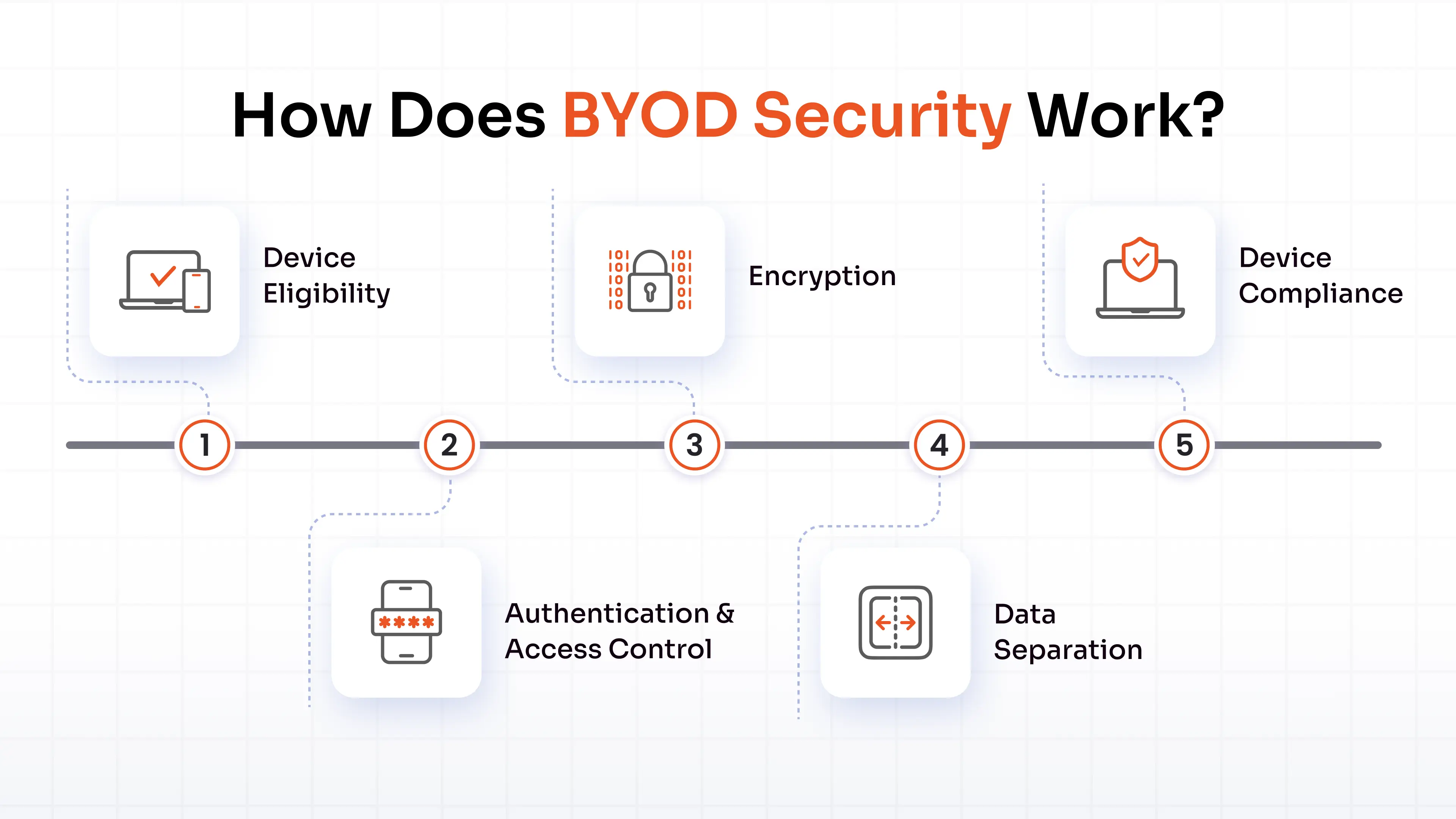
A BYOD program commonly includes:
Device Eligibility
Organizations can define supported devices, operating systems, minimum OS versions, and required security features.
Authentication and Access Control
MFA, SSO, passwordless authentication, and contextual access policies can help verify users before they reach corporate applications. Access can also depend on device posture and user role.
Encryption
Encryption can protect corporate information stored on devices and data moving between the device and corporate services.
Data Separation
Organizations can use containerized work profiles or application-level controls to separate business applications and data from personal content.
Device Compliance
Security teams can check whether devices meet defined requirements before allowing access. Devices that fall out of compliance can be restricted until the required security posture is restored.
A well-designed BYOD cybersecurity program therefore does not rely on one control. It combines identity, device, application, and data protections to create appropriate security around corporate access.
How to Deploy a BYOD Security Policy
Organizations asking how to deploy a BYOD security policy should begin by defining clear requirements for users, devices, applications, data, and offboarding.
A BYOD security policy should explain what devices are permitted, what security controls are required, what corporate resources can be accessed, and how personal information is handled.
1. Define Permitted Devices
Specify supported device types, operating systems, and minimum software versions.
2. Establish Security Requirements
Define requirements for authentication, encryption, updates, passcodes, and device integrity.
3. Define Acceptable Use
Explain which corporate applications and resources employees can access from personal devices and how business information should be handled.
4. Establish Privacy Boundaries
Clearly explain what the organization can manage or access and what remains personal.
5. Define Data Protection Controls
Specify where corporate information can be stored, shared, and accessed. Controls should also address whether corporate information can be transferred to personal applications or cloud services.
6. Plan for Lost or Compromised Devices
Document how users report incidents and how corporate access is restricted when a device is lost, stolen, or no longer trusted.
7. Define Offboarding
Explain how corporate accounts, applications, and data are removed when an employee leaves, or a device leaves the BYOD program.
Knowing how to deploy a BYOD security policy also means defining these processes before employees begin using personal devices for work. This gives both employees and IT teams a clear framework for managing access.
BYOD Security Policy Example
A BYOD security policy could state that employees may access approved business applications from personal smartphones and laptops only when their devices meet defined security requirements.
The policy could require:
- Supported operating systems
- Device encryption
- Strong authentication
- MFA for corporate applications
- Automatic security updates
- Approved business applications
- Separation of business and personal data
- Immediate reporting of lost or stolen devices
- Removal of corporate data when access ends
A BYOD security policy should also explain the organization's privacy practices and employee responsibilities when personal devices are used for work.
What Technology Can Be Used to Increase BYOD Security?
Several technologies can be used to increase BYOD security, depending on the level of control an organization needs.
Mobile Device Management
Mobile Device Management (MDM) manages the device itself and can enforce controls such as security settings, encryption requirements, application policies, remote locking, and wiping.
MDM can be appropriate when an organization needs device-level control. However, full device management may not be suitable for every personal device.
Mobile Application Management
Mobile Application Management (MAM) focuses on corporate applications and data rather than managing the entire device. It can be useful when organizations need to protect business information on personal devices while limiting management of personal content.
Unified Endpoint Management
Unified Endpoint Management (UEM) can provide centralized management across smartphones, tablets, laptops, and desktops. It can help organizations apply different policies based on device type and ownership.
Conditional Access
Conditional access can evaluate the user, device, application, and other context before granting access to corporate resources.
Containerized Work Profiles
A containerized work profile separates corporate applications and data from personal content. This can make it possible to remove business information without removing personal information.
Selective Wipe
Selective wipe removes corporate applications or data from a personal device when access ends or the device is compromised.
Understanding what technology can be used to increase BYOD security helps organizations choose controls according to their actual requirements instead of applying the same management model to every device.
The answer to what technology can be used to increase BYOD security depends on factors such as device ownership, the sensitivity of the data, user type, application requirements, and the level of control the organization needs.
How to Secure BYOD Devices
Knowing how to secure BYOD devices starts with combining identity, device, application, and data controls rather than relying on a single security measure.
Organizations can:
1. Require strong authentication for corporate applications.
2. Keep operating systems and applications updated to reduce exposure to known vulnerabilities.
3. Require encryption where appropriate to protect stored information.
4. Separate business and personal data using application or containerization controls.
5. Restrict access from noncompliant devices based on defined security requirements.
6. Apply least-privilege access according to user roles and business requirements.
7. Prevent corporate data from moving to personal backups and unauthorized applications.
8. Educate employees about secure use of personal devices.
9. Revoke access when devices are lost or compromised.
10. Test offboarding and selective-wipe procedures before they are needed.
These controls provide a practical framework for how to secure BYOD devices without necessarily requiring complete control over the personal device.
A second consideration in how to secure BYOD devices is deciding which controls belong at the device level and which should apply only to corporate applications and data.
BYOD Security Best Practices
BYOD security best practices should combine technical controls with clear employee guidance.
Keep Business and Personal Data Separate
Use application-level controls or containerization where appropriate to establish a clear boundary between corporate and personal information.
Use Strong Authentication
Require MFA, SSO, or passwordless authentication for corporate applications.
Apply Least Privilege
Give users access only to the applications and information required for their roles.
Review Device Compliance
Check that participating devices continue to meet defined security requirements.
Educate Employees
Explain the risks, responsibilities, acceptable-use requirements, and privacy boundaries associated with personal devices.
Test Offboarding
Verify that corporate access and data can be removed without unnecessarily affecting personal information.
These BYOD security best practices should be reviewed periodically as device environments, applications, security requirements, and business needs change.
BYOD Security Solutions
BYOD security solutions can range from MDM and UEM to MAM, conditional access, authentication, encryption, and data separation. The appropriate combination depends on device ownership, user type, application requirements, and data sensitivity.
A practical BYOD security solution should help organizations protect corporate applications and data without requiring unnecessary control over personal information.
Organizations evaluating BYOD security solutions should consider:
- Device ownership and supported platforms
- Application and data sensitivity
- Device compliance requirements
- Authentication methods
- Data separation capabilities
- Selective-wipe requirements
- Privacy requirements
- Deployment options
The right combination of BYOD security solutions can provide protection while giving organizations flexibility to use different management approaches for employees, contractors, and other users.
BYOD Security Solutions With miniOrange
miniOrange UEM provides controls for managing and securing corporate access across personal and organization-owned devices.
Organizations can use miniOrange for:
- Containerized work profiles to separate corporate applications and data from personal content
- Selective wipe to remove corporate data without unnecessarily affecting personal information
- Mobile Application Management (MAM) for devices that do not require full enrollment
- Conditional access based on device posture to restrict access when security requirements are not met
- Centralized management across device types with different policies based on device ownership and use case
- On-premises deployment for organizations that require device and employee data to remain within their own infrastructure
These capabilities allow organizations to apply different policies to personal devices, corporate-owned endpoints, and contractor devices rather than using one management approach for every endpoint.
BYOD Security: A Security Solution Ideal for Your Remote Workforce
BYOD allows employees to use personal devices for work, but it also introduces additional considerations for protecting corporate applications and data.
A practical strategy combines strong authentication, device security, data separation, access controls, application management, and clear employee guidelines. The goal is to protect corporate resources while establishing appropriate boundaries around personal information.
When BYOD security is built around the corporate data and access that organizations need to protect, rather than unnecessary control over the entire personal device, organizations can create a practical and manageable approach to personal-device access.
FAQs
1. Is BYOD suitable for organizations handling sensitive data?
BYOD can be used for sensitive business information when appropriate BYOD security controls are in place. Organizations may restrict access to specific applications, require stronger device controls, or keep highly sensitive workloads on managed devices.
2. Can BYOD security work without installing MDM on every device?
Yes. BYOD security solutions do not always require full device management. Organizations can use Mobile Application Management (MAM), containerized work profiles, conditional access, and identity controls to protect corporate applications and data while limiting management of personal content.
3. Who is responsible for securing a personal device used for work?
Responsibility is shared between the organization and the employee. The organization establishes the BYOD security policy and protects corporate applications and data, while employees are responsible for following security requirements, maintaining their devices, and reporting incidents such as loss or theft.
4. Can employees use BYOD to access corporate resources remotely?
Yes. BYOD cyber security controls can support remote access by combining strong authentication, device compliance checks, and access policies. Organizations can restrict access when a personal device does not meet the required security posture.
5. How should organizations handle BYOD when an employee changes their device?
The new device should meet the organization's BYOD security requirements before corporate access is enabled. The previous device should have corporate accounts, applications, and data removed or access revoked according to the organization's device-change and offboarding procedures.
6. Should contractors follow the same BYOD security policy as employees?
Not necessarily. Contractors may have different access requirements, device ownership arrangements, and engagement periods. Organizations can apply separate BYOD management policies with application restrictions and access expiration dates that correspond to the contract.
Leave a Comment