

Passkeys and security keys both support phishing-resistant authentication, but they differ in how credentials are stored, managed, and used. A passkey is a digital authentication credential, while a security key is a physical authenticator that can store credentials and prove a user's identity.
For enterprises replacing passwords, the distinction affects credential portability, recovery, hardware requirements, and control over authentication. Understanding the passkey and security key difference helps IT teams select methods that meet their security requirements without creating unnecessary friction for employees.
This guide examines their security architecture, usability, costs, recovery mechanisms, and enterprise applications to help security teams make an informed decision.
What Is a Passkey?
A passkey is a passwordless authentication credential built on FIDO standards and public-key cryptography. Instead of entering a password, users authenticate using cryptographic proof that they control a credential registered with a website or application. They typically approve the sign-in using a device PIN, biometric verification, or another supported device-unlock method.
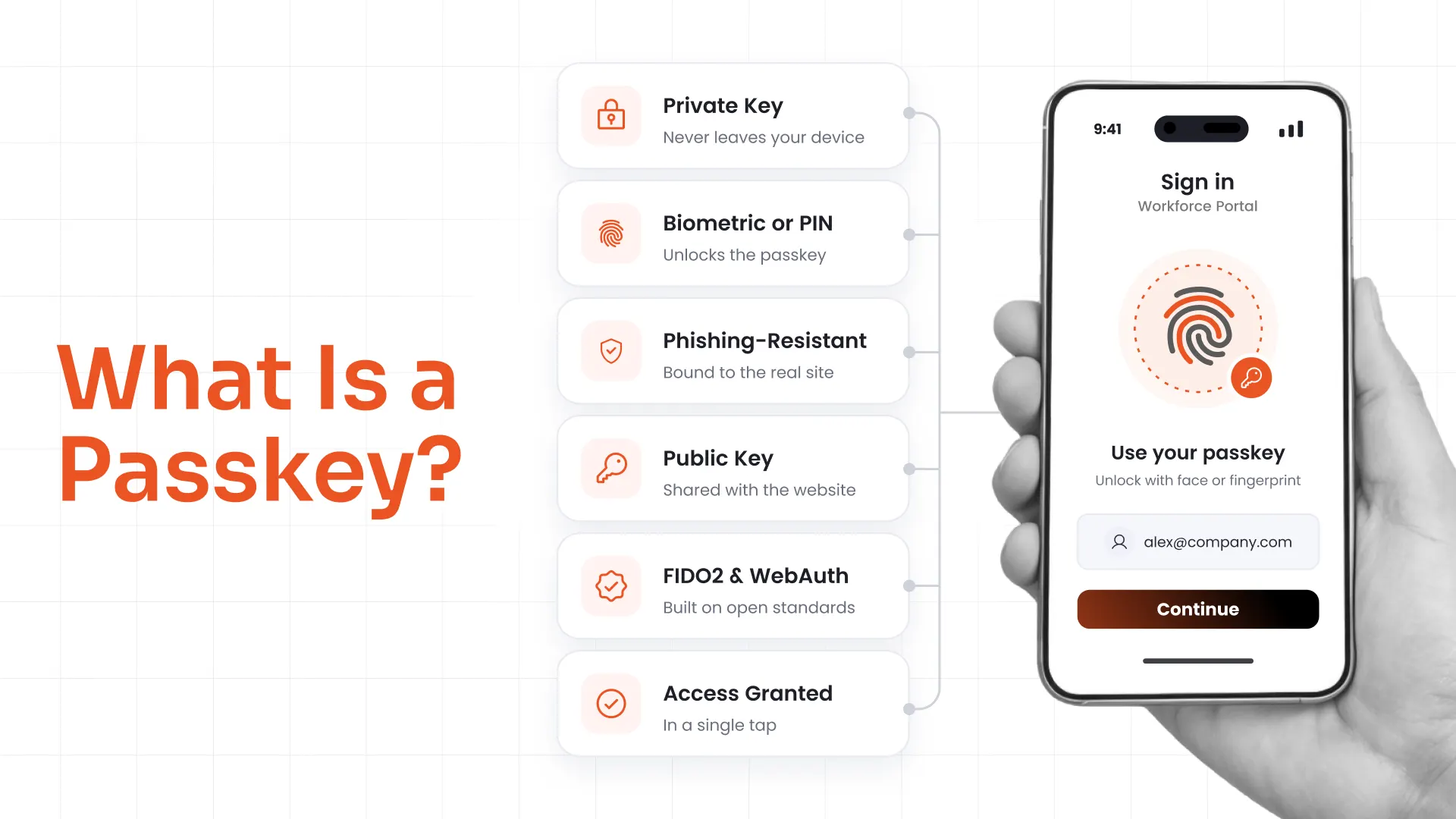
Passkeys fall into two main categories:
- Synced passkeys: Synchronize across supported devices through a credential manager, making account access easier when users switch devices.
- Device-bound passkeys: Remain tied to a particular device or authenticator, providing tighter control over credential portability.
Both models can support phishing-resistant authentication. However, their synchronization, recovery, and key-exportability characteristics differ, making the choice important for enterprise identity policies.
What Is a Security Key?
A security key is a physical authentication device that connects to a computer or mobile device through supported interfaces such as USB or NFC. Some models also support Bluetooth.
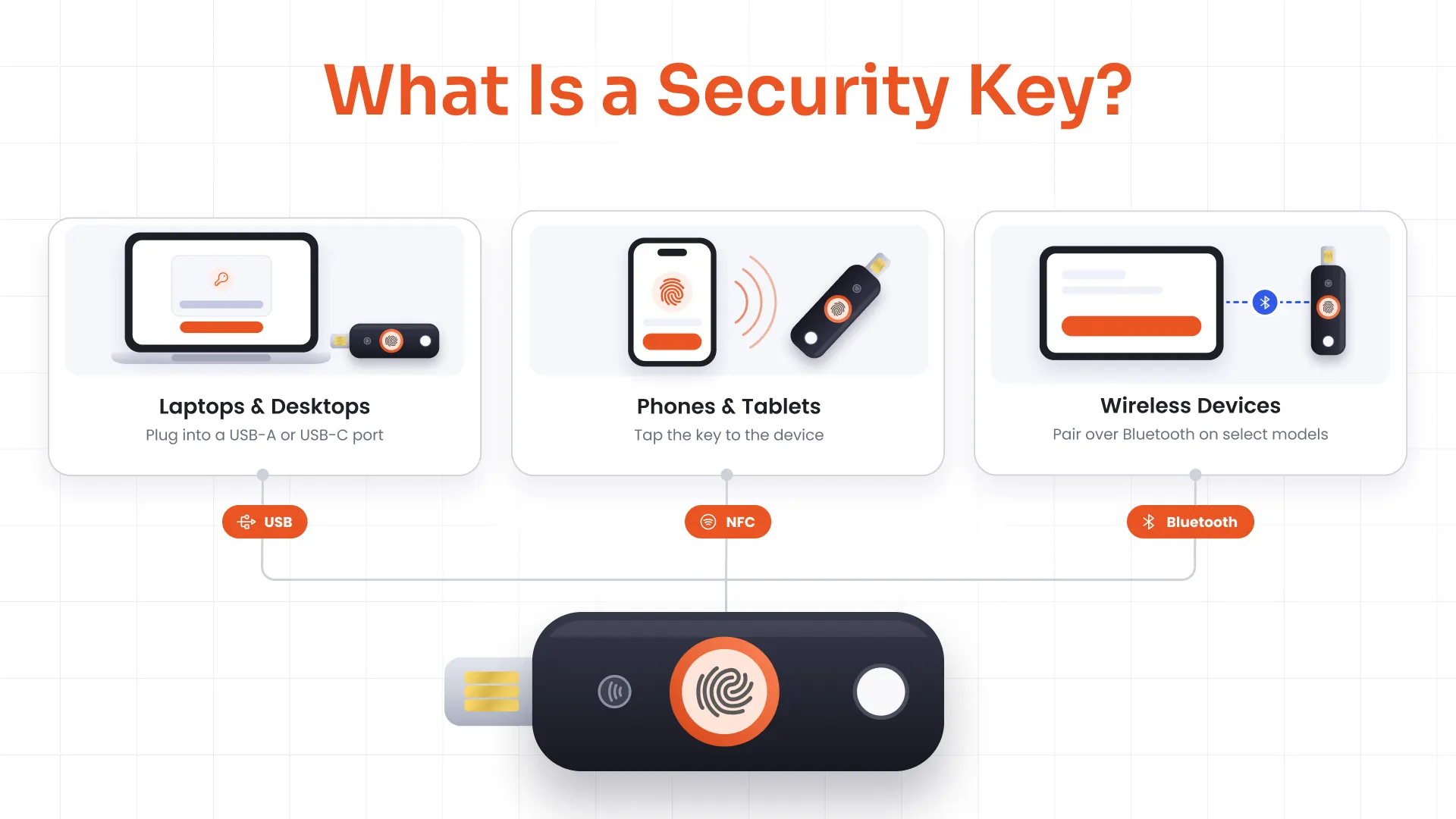
FIDO2 security keys use public-key cryptography to authenticate users without transmitting passwords. Depending on the model, they can store device-bound passkeys or other FIDO credentials.
There is also a distinction between FIDO2 security keys and older FIDO U2F keys. A U2F key can support phishing-resistant authentication without necessarily supporting passkey storage.
Security keys require physical possession of the registered authenticator. This gives organizations a way to restrict authentication to approved hardware, provided their identity system supports the necessary controls.
Passkey vs Security Key: At-a-Glance Comparison
| Factor | Passkeys | Security Keys |
|---|---|---|
| What it is | A digital authentication credential | A physical authentication device |
| Credential storage | Device, credential manager, or supported sync service | Hardware authenticator |
| Portability | Synced passkeys work across supported devices | Requires access to the physical key |
| Phishing resistance | Supported through properly implemented FIDO authentication | Supported through properly implemented FIDO authentication |
| Credential exportability | Depends on the passkey model | Credentials are generally designed to remain bound to the hardware |
| Recovery | Depends on synchronization, account recovery, and enrollment policies | Usually requires a registered backup key or secure re-enrollment |
| Cost | Often uses existing devices | Requires purchasing and managing hardware |
| User experience | Convenient for everyday sign-ins | Requires carrying and presenting a key |
| Enterprise control | Depends on the credential provider and management model | Can provide tighter control over physical authenticators |
| Attestation | Depends on the authenticator and implementation | May support hardware or enterprise attestation |
| Best suited for | Broad workforce adoption and supported multi-device access | Privileged, high-assurance, or policy-restricted access |
The key distinction is that a security key is not automatically more secure than every passkey. Security depends on credential storage, user verification, implementation, assurance requirements, and recovery controls.
How Do Passkeys and Security Keys Differ in Security?
The security difference between a passkey and security key becomes more significant when organizations need to control private-key portability, verify authenticator characteristics, or satisfy specific assurance requirements.
1. Phishing Resistance
Passwords and one-time codes can be captured through fraudulent login pages and adversary-in-the-middle attacks. FIDO authentication addresses this risk through cryptographic verification tied to the legitimate website or application's identity.
During authentication, the authenticator signs a challenge associated with the relying party. A credential registered for one domain cannot simply be used to authenticate to an impostor domain.
Both passkeys and compatible security keys benefit from this origin-binding mechanism, making them a strong foundation for a phishing-resistant MFA solution. A physical authenticator does not inherently provide stronger phishing resistance simply because it is hardware.
However, phishing resistance does not eliminate every identity threat. Organizations must also account for:
- Session theft: Attackers may target authenticated sessions rather than credentials.
- Compromised endpoints: Malware or unauthorized device access can undermine otherwise strong authentication.
- Account recovery abuse: Weak recovery procedures can become an alternative route into an account.
- Excessive permissions: Successful authentication does not guarantee that a user has appropriate access rights.
Authentication should therefore be evaluated alongside session protection, endpoint security, and authorization controls.
2. Credential Storage and Key Protection
The main difference between synced passkeys, device-bound passkeys, and credentials stored on hardware is their portability and control model.
Synced passkeys
- Can be available across supported devices.
- Depend on the credential provider's account security and synchronization protections.
- May not satisfy assurance requirements that demand non-exportable private keys.
Device-bound passkeys
- Remain associated with a particular device or authenticator.
- Can provide tighter control over credential portability.
- Require an alternative access method or recovery process if the device becomes unavailable.
Passkeys stored on security keys
- Keep the credential on a compatible physical authenticator.
- Require possession of the registered key.
- Allow organizations to specify approved hardware where their identity system supports such restrictions.
Synced passkeys are not inherently insecure. Their suitability depends on the synchronization mechanism, account protections, and organizational requirements.
For example, NIST's Authentication Assurance Level 3 (AAL3) requirements include phishing resistance and a non-exportable private key. Synced passkeys do not meet the non-exportability requirement because their keys can be copied through the synchronization mechanism. A device-bound passkey may qualify only if the complete authenticator and authentication implementation satisfies the applicable requirements.
3. Attestation and Assurance Requirements
Some enterprises need evidence about an authenticator's capabilities or provenance, not just proof that a user successfully authenticated.
Attestation can provide information about an authenticator's characteristics, depending on the device, protocol, and implementation. Compatible hardware security keys may support attestation mechanisms that help organizations verify whether a device meets their requirements. Passkey implementations may also expose relevant signals, but support varies.
Security teams should assess:
- Whether the authenticator meets the required assurance level.
- Whether hardware-backed key protection is required.
- Whether attestation is available and necessary.
- Whether user verification is enforced.
- Whether the complete authentication system satisfies the applicable policy.
Purchasing a hardware security key does not automatically establish compliance with a particular assurance level. The authenticator, protocol, identity system, and surrounding controls must be evaluated together.
How Do Passkeys and Security Keys Differ in Usability, Cost, and Recovery?
Authentication decisions affect employee experience, IT workload, hardware budgets, and the ability to restore access safely. These operational factors can determine whether an otherwise strong authentication strategy succeeds.
Usability and Device Compatibility
Passkeys generally provide a convenient sign-in experience because users can authenticate through supported devices they already use. Biometrics and device PINs reduce the need to enter passwords or carry additional equipment.
Security keys introduce a physical step. Users must have the key available and connect it or present it to a compatible device. Organizations also need to check operating-system, browser, interface, and application support.
Passkeys may suit organizations that:
- Need passwordless authentication across a broad workforce.
- Support employees using multiple compatible devices.
- Want to reduce the need to distribute physical authenticators.
Security keys may suit organizations that:
- Require approved physical authenticators for specific roles.
- Need tighter control over where credentials are stored.
- Can support hardware distribution and replacement.
Cost and Management
Passkeys often avoid dedicated hardware purchases, although organizations may still incur costs for identity infrastructure, compatible devices, administration, and user support.
Security keys introduce additional lifecycle responsibilities:
- Purchasing and distributing approved devices.
- Maintaining inventory and tracking assignments.
- Issuing backup keys where required.
- Replacing lost, damaged, or outdated hardware.
- Revoking access when employees leave or change roles.
When evaluating the best security key for enterprise use, consider protocol support, device compatibility, user-verification capabilities, attestation, durability, and lifecycle-management requirements. Security key types vary, and a device suitable for one environment may not meet another's requirements.
Recovery and Device Loss
Recovery is part of the authentication architecture, not an afterthought.
If a user loses a device containing a device-bound passkey, access may depend on another registered authenticator or the organization's recovery process. Synced passkeys may be recoverable through the supported credential ecosystem, subject to its account-security controls.
If a user loses a security key, a registered backup key can restore access. Without one, the organization may need to verify the user's identity and enroll a replacement through an approved process.
A recovery plan should define:
- Backup requirements: Which users must register another authenticator?
- Identity verification: How will support teams confirm a user's identity before restoring access?
- Credential revocation: How quickly can a lost device or key be invalidated?
- Replacement procedures: How will users enroll a new authenticator?
- Emergency access: What controlled process applies when all registered authenticators are unavailable?
A weak recovery process can undermine strong authentication. If an attacker can bypass normal sign-in controls through an easily exploited account reset, the protection offered by passkeys or security keys is reduced.
Make Passwordless Support Easier to Manage
Device replacements, employee onboarding, lost authenticators, and access restoration can generate support requests when procedures are unclear.
Prepare your IT support team for credential replacement, enrollment issues, and access restoration with a passwordless support plan designed around your workforce.
Button: Discuss Your Support Requirements
When Should You Use Passkeys vs Security Keys?
Neither method is the universal winner. The right choice depends on assurance requirements, device policies, application sensitivity, and the degree of control needed over credentials.
When Passkeys Make Sense
Passkeys are a strong option when organizations want to:
- Enable passwordless authentication across a broad workforce.
- Reduce phishing and password-reuse risks.
- Simplify sign-ins for employees using supported devices.
- Support multi-device access through an approved synchronization model.
- Reduce the need to procure and distribute dedicated authentication hardware.
Synced passkeys may suit general workforce access when the organization's risk assessment permits them and the credential provider's security and recovery controls meet policy requirements.
When Security Keys Make Sense
Security keys may be appropriate when organizations need to:
- Protect administrator and privileged-user accounts.
- Keep credentials bound to dedicated physical authenticators.
- Restrict authentication to approved hardware.
- Support authenticator attestation where available and required.
- Meet assurance requirements that depend on non-exportable cryptographic keys.
- Provide a separate authentication method for sensitive environments.
Organizations asking why to use security keys instead of passkeys should start with the specific requirement driving the decision. If hardware-bound credentials, approved authenticator models, or particular assurance requirements are essential, a compatible security key may be the better fit.
Passkeys vs Security Keys for Enterprise and Privileged Users
Standard workforce accounts and privileged accounts do not necessarily require the same authentication policy.
For general workforce access, approved passkeys can support scalable passwordless authentication solutions across compatible applications. For privileged users, security teams may require hardware-bound credentials, stricter authenticator registration, or additional controls based on the sensitivity of the systems being accessed.
A practical policy can define:
- General workforce: Permit approved passkeys for routine access.
- Privileged users: Require approved security keys where the risk assessment calls for hardware-bound credentials.
- Sensitive applications: Enforce authentication methods that satisfy the application's assurance requirements.
- Recovery: Require backup authenticators and secure re-enrollment procedures for designated users.
This approach addresses passkeys vs security keys for privileged users without imposing the cost and operational burden of dedicated hardware on every employee.
How Should Enterprises Deploy Passkeys and Security Keys Together?
A successful rollout requires clear policies for enrollment, access, recovery, and ongoing administration. A five-stage approach can help organizations introduce passwordless authentication without creating avoidable access problems.
1. Assess requirements
Identify applications, privileged accounts, user groups, and access scenarios that need phishing-resistant authentication. Document regulatory obligations and internal assurance requirements before selecting an authenticator.
2. Segment users
Determine which groups can use synced passkeys, device-bound credentials, or approved security keys. Account for contractors, remote workers, administrators, and users with restricted device choices.
3. Pilot enrollment and recovery
Test sign-in, device compatibility, backup registration, lost-authenticator scenarios, and account recovery with representative users. Resolve support and compatibility issues before broad enforcement.
4. Deploy in phases
Expand enrollment by user group or application. Provide setup guidance, communicate authentication requirements, and establish a secure process for users who lose access.
5. Monitor and refine
Review enrollment coverage, authentication failures, recovery requests, new authenticator registrations, and policy exceptions. Reassess the deployment as business requirements and security risks change.
Centralized identity administration helps organizations apply authentication policies consistently. These policies should work alongside session controls, authorization, device security, and account lifecycle management.
How miniOrange Supports Passkey and Security Key Authentication
Enterprises do not always need to standardize on one authentication method. They need to make different methods available under policies that reflect user roles, application requirements, and acceptable risk.
miniOrange MFA software supports passkey authentication and FIDO2 security-key authentication as part of its authentication capabilities. Organizations can evaluate these methods alongside other supported MFA options when planning a passwordless deployment.
The practical consideration is how authentication choices fit the organization's identity and access management. Teams should validate the relevant product edition, supported integrations, policy capabilities, enrollment workflows, and recovery options against their requirements before deployment.
The Right Credential Strategy Starts With the Risk
Passkeys and security keys address the same fundamental challenge: proving identity without relying on passwords alone. Their differences become important when organizations need to control where credentials reside, how users regain access, and which authentication methods satisfy specific assurance requirements.
The strongest approach is to evaluate these factors against the organization's access risks rather than select one method for every situation. With appropriate authentication policies, enterprises can strengthen phishing resistance while keeping security requirements aligned with operational needs.
FAQs
Which Is Better: Passkey or Security Key?
Neither is universally better. Passkeys can simplify passwordless access across supported devices, while security keys provide a physical authenticator that can keep credentials bound to hardware. The right choice depends on assurance requirements, device policies, credential portability, and recovery.
Are Security Keys Safer Than Passkeys?
Not in every situation. Both can provide phishing-resistant authentication when properly implemented. Security keys can offer non-exportable credentials and tighter hardware control, while synced passkeys simplify access across supported devices. Security depends on the implementation and the organization's requirements.
Why Do Enterprises Use Both Passkeys and Security Keys?
Enterprises may use both to balance usability and assurance requirements. Passkeys can support broad workforce adoption, while security keys can provide tighter control over physical authenticators for privileged users or sensitive applications.
Can a Security Key Store a Passkey?
Yes. Compatible FIDO2 security keys can store device-bound passkeys. However, support varies by device, and older FIDO U2F security keys may not support passkey storage.
Are Synced Passkeys Secure in BYOD Environments?
Synced passkeys can provide phishing-resistant authentication in bring-your-own-device (BYOD) environments when the credential ecosystem, account protection, and recovery controls meet organizational requirements. Enterprises should also assess device security, approved synchronization providers, and the risks associated with personal accounts.
What Happens If I Lose My Security Key or Device With a Passkey?
Access depends on the recovery options configured for the account. A user may authenticate with another registered device or backup security key, or complete an approved recovery and re-enrollment process. Organizations should establish secure recovery procedures before enforcing passwordless authentication.
Leave a Comment