
Privileged accounts have elevated access that can be used to rewrite system configurations, alter sensitive databases, create new admin users, and exfiltrate confidential customer data. This makes them attractive targets for attackers and risky when poorly managed.
Basic passwords and network firewalls aren’t enough to protect them. You need to monitor them continuously.
This is where Privileged Account and Session Management (PASM) becomes essential. By combining robust credential protection with real-time privileged session monitoring, you build an impenetrable defense.
In this guide, we will break down what privileged account and session management is, how it works, its core features, and how you can use it to secure your organization.
What Is Privileged Account and Session Management?
Privileged Account and Session Management (PASM) is a core part of Privileged Access Management (PAM) that helps you secure privileged accounts and credentials while controlling, monitoring, and recording privileged sessions.
PASM addresses two closely connected parts of privileged access:
What Is Privileged Account Management
Privileged account management focuses on security before a session begins. It involves controlling privileged accounts and protecting the credentials associated with them.
That can include discovering unknown admin accounts, storing credentials in a hardened vault, enforcing least-privilege policies, and rotating passwords automatically.
If you want to go deeper into the account itself, see what privileged accounts are and why they need tighter controls.
What Is Privileged Session Management?
Privileged session management focuses on in-session security. It records sessions, indexes executed terminal commands, monitors keystrokes, and flags abnormal behavior.
If an admin attempts a dangerous operation, you can terminate the session immediately.
Securing a privileged account does not automatically give you visibility into everything a user does after logging in. Likewise, recording sessions does not solve the problem of unmanaged privileged credentials.
With privileged account and session management, you can bring the account, credential, access, and session under a more consistent security model.
How Does Privileged Account and Session Management Work?
A typical PASM workflow connects account management with session controls. The exact workflow depends on how you configure your environment and access policies.
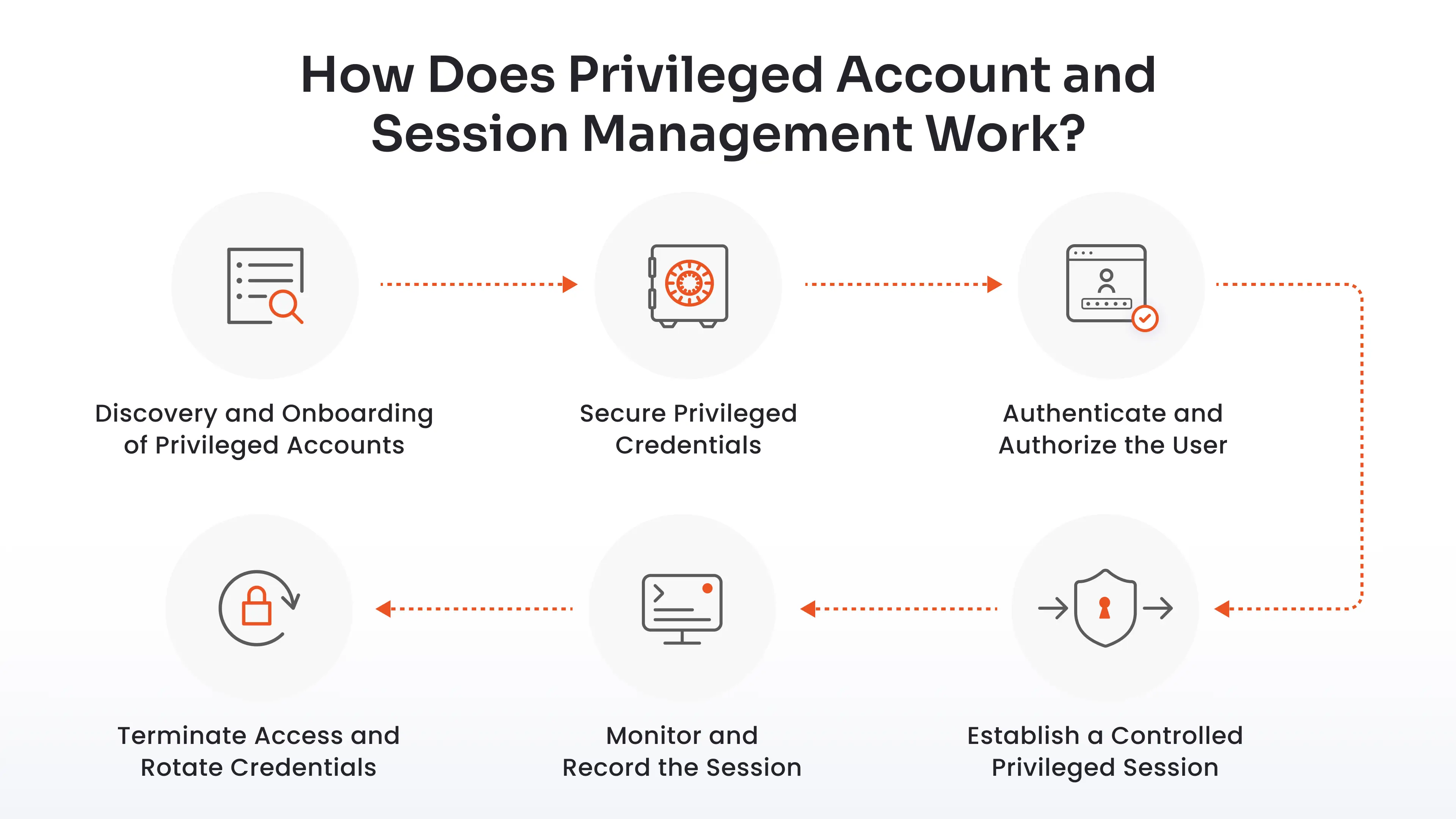
Here is what that process can look like.
Step 1: Discovery and Onboarding of Privileged Accounts
A PASM solution continuously scans your environment to discover privileged identities. It identifies default admin accounts, orphaned contractor logins, shadow admin privileges, and unmanaged service accounts. Once discovered, the system automatically brings these accounts under central management.
Step 2: Secure Privileged Credentials
Next, PASM places the administrative passwords, SSH keys, and API tokens inside an enterprise-grade, encrypted credential vault. Passwords undergo automatic encryption using AES-256 standards. Admins no longer have access to the actual passwords to target infrastructure.
Step 3: Authenticate and Authorize the User {step3}
When an admin needs elevated access, they log into the central portal. The portal verifies their identity using Multi-Factor Authentication (MFA) or Single Sign-On (SSO) integrations.
You can also use a JIT workflow to grant access for a defined period and revoke it afterward.
Step 4: Establish a Controlled Privileged Session {step4}
Once approved, the system brokers an isolated connection. An agentless proxy gateway creates two independent connectivity tunnels. One tunnel connects the user's browser or client to the gateway. A second tunnel connects the gateway to the target asset.
The proxy retrieves the required password from the vault and injects it directly into the session. The user never accesses the plain-text credentials.
Step 5: Monitor and Record the Session {step5}
The proxy records the privileged activity, which you can review during an audit or investigation.
You can also use AI-based anomaly detection to identify deviations from normal privileged user behavior. For example, unusual commands or abnormal access times can trigger attention.
Step 6: Terminate Access and Rotate Credentials
When the approved time window expires, or the admin logs off, the proxy ends the session immediately. To prevent credential reuse, the system automatically rotates the account password or SSH key in the background. Even if someone manages to intercept a session key, that credential becomes instantly useless.
What Is the Difference Between Privileged Account Management and Privileged Session Management?
While both disciplines fall under the broader PAM umbrella, they solve different parts of the access risk puzzle.
| Security Dimension | Privileged Account Management | Privileged Session Management |
|---|---|---|
| Primary Focus | Securing static credentials and identities | Controlling and auditing live connection activity |
| Operational Timing | Pre-session: Before access is requested | In-session: During active asset connection |
| Core Mechanisms | Discovery, credential vaulting, password rotation, RBAC | Proxy brokering, credential injection, session recording, live kill |
| Primary Threat Prevented | Credential theft, unauthorized logins, hardcoded passwords | Insider threats, malicious commands, lateral network movement |
| Key Output | Audit log of credential checkouts and password changes | Video playbacks, indexed keystrokes, searchable command logs |
| User Exposure | Determines who gets access | Determines what they can execute while connected |
PASM Features and Capabilities
An enterprise-ready privileged account and session management solution combines account-level controls with session-level controls.
Here are the key capabilities you should demand from your platform:
-
Privileged Account Discovery: Automated scanning tools crawl domain controllers, cloud subnets, hypervisors, and databases. They identify hidden admin accounts, forgotten temporary logins, service accounts, and hardcoded script credentials.
-
Credential Vaulting and Password Rotation: Store administrative secrets in an enterprise-grade, AES-256-encrypted vault. Automate complex password rotation policies based on fixed schedules, such as every 30 days, or specific events.
-
Policy-Based Access Control (RBAC): Define strict access rules based on user roles, departments, time windows, and target asset groups. Ensure users receive the absolute minimum level of access required to complete their daily duties.
-
Just-In-Time (JIT) Privileged Access: Get rid of 24/7 standing privileges. With JIT access, administrative rights remain revoked by default. Users request access for specific tasks, triggering automated approval workflows. Access rights expire automatically once the time window ends.
-
Real-Time Session Monitoring: Your security teams gain a bird’s-eye view of all active administrative sessions across the network. Security Operations Center (SOC) analysts can view live video feeds, pause interactive controls, or kill connections instantly if they spot suspicious behavior.
Security teams can also collaborate on active privileged sessions, allowing multiple authorized users to observe and assist with troubleshooting without sharing credentials.
-
Privileged User Behavior Analytics: Integrate advanced privileged user behavior analytics to establish baseline behavior profiles for every administrator. The engine analyzes login times, source locations, accessed systems, and command sequences.
-
Full Session Recording: Record privileged sessions with video playback, timestamps, user identity, target system information, and command-level tracking. These recordings can help you investigate incidents, review administrative work, troubleshoot issues, and support audit requirements.
-
Session Isolation: Prevent direct network connections between user workstations and critical servers. With agentless privileged session isolation, you prevent endpoint malware from hopping onto production assets or capturing plain-text passwords.
-
Immutable Audit Logs: Maintain central, tamper-proof audit trails for all credential access requests, password rotations, and session logs. Easily prove compliance during rigorous ISO 27001, SOC 2, PCI DSS, HIPAA, and RBI audit reviews.
Why Privileged Account Activity Management Matters
Your privileged accounts are not static. That is why static credentials cannot keep them secure enough. One compromised admin credential can destroy your production environment in seconds.
You need privileged account activity management.
miniOrange PAM delivers an all-in-one, identity-centric platform that secures your privileged credentials and remote connections out of the box. It brings all the controls you need together.
Secure the credentials. Limit access. Monitor the session. Record activity. Respond when something looks wrong.
With miniOrange PAM, you can manage these controls from a broader PAM platform built for privileged access management.
Take complete control over your elevated identities before an unmonitored session turns into your next security headline.
FAQs
What does PASM stand for?
PASM stands for Privileged Account and Session Management. It refers to the controls used to secure privileged accounts and credentials while managing, monitoring, and recording privileged sessions.
What is the difference between PAM and PASM?
PAM stands for Privileged Access Management and refers to the broader approach to securing and controlling privileged access.
PASM focuses specifically on privileged accounts and the sessions associated with them. It covers areas such as account discovery, credential management, session monitoring, session recording, and access controls.
How does PASM protect privileged accounts?
PASM can protect privileged accounts by helping you discover them, centralize their credentials in a secure vault, control who can access them, rotate passwords, and apply time-bound access policies.
It also adds session-level controls so you can monitor and record activity after access is granted.
Can PASM help prevent insider threats?
Yes. PASM is one of the most effective controls against insider threats. It eliminates unmonitored access, enforces strict least privilege, records video and command logs for every action, restricts high-risk terminal commands, and enables live session termination if suspicious activity occurs.
About the Author

Senior Content Writer
Chinmay has extensive experience in writing thought leadership and marketing content for B2B IT companies. He specializes in cybersecurity, AI, ERP, CRM, and custom software development, creating content that not just informs, but sells.
Leave a Comment