
The FIDO Alliance and W3C came up with FIDO (Fast Identity Online) in 2018 as a global authentication standard that would replace passwords with cryptographic security. The protocol makes sure that each user-device connection has its own unique key pair by using public key cryptography. Because no shared secrets are sent over the internet, the chances of phishing, credential theft, and illegal access attempts are far lower.
Organizations can use biometrics or hardware security keys to authenticate users without passwords if they follow FIDO2 standards. This method reduces the attack surface of the business, makes sure it follows the rules, and lowers the costs of operations that come with resetting passwords and identity theft. Companies may improve their access control and scalability in a variety of situations by using FIDO-based authentication.
This blog post explains how FIDO2 offers robust authentication that follows the zero trust model. It also talks about how it can lower business risk, make compliance easier, and allow for safe integration with miniOrange solutions for large-scale application and device ecosystems.
What is FIDO2?
Where conventional passwords risk out credential abuse, going passwordless with the help of FIDO2 authentication protocol sorts out
- It was developed by the FIDO Alliance and W3C in 2018 to make logins safer and simpler across web and mobile platforms.
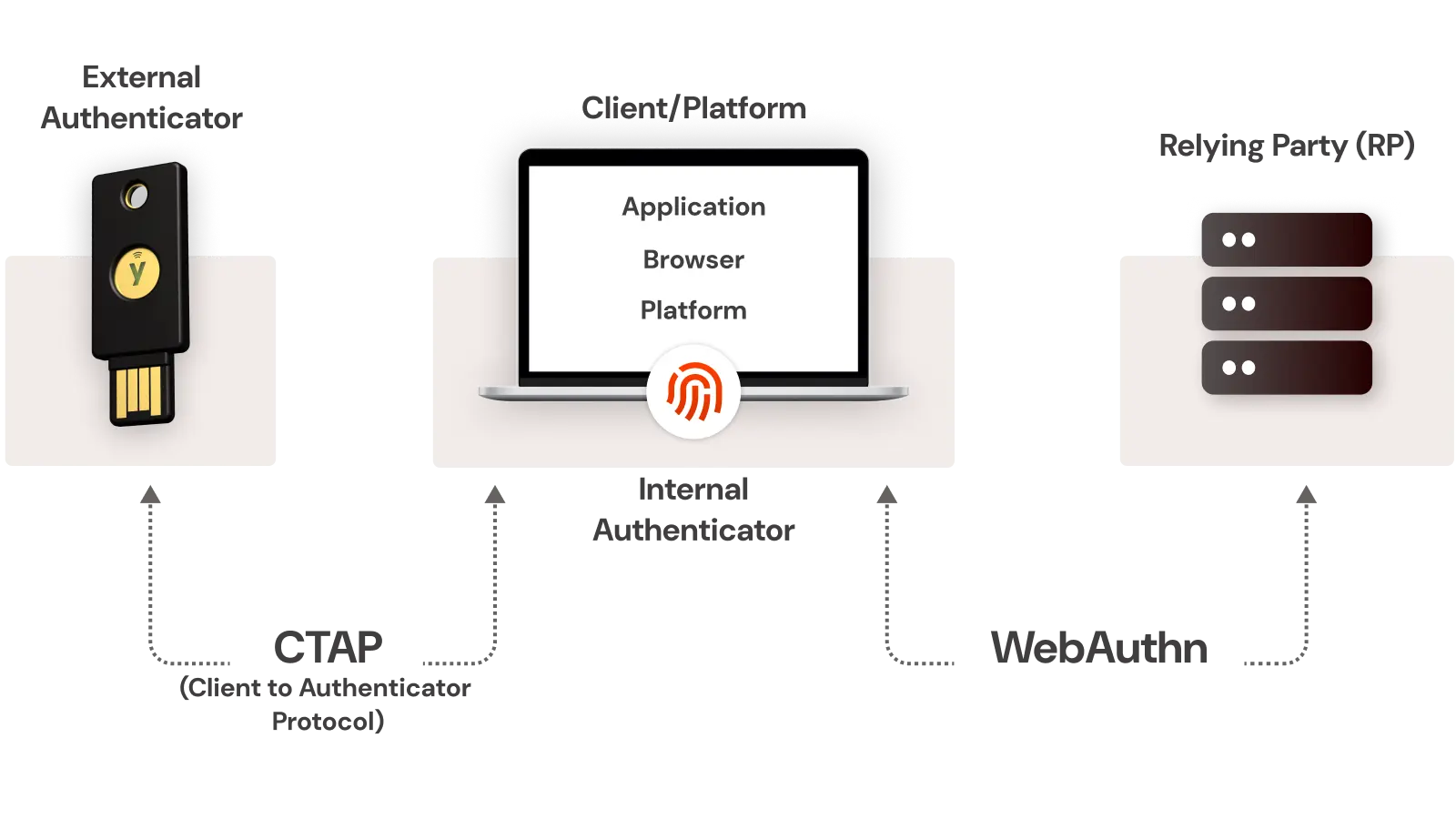
- The FIDO2 system contains two essential elements, which include WebAuthn for browser-based authentication and CTAP for authenticator connections to biometric readers and security keys and smartphones.
- The authentication system stores credentials directly on user devices, which prevents private keys from escaping the device. It protects users from phishing attacks and prevents both credential theft and data breaches.
- The security system connects each key pair to specific websites and applications, which prevents attackers from using stolen credentials to access different platforms.
The authentication system of FIDO2 enables users to perform passwordless login through a secure and fast process that protects against phishing attacks. Organizations implement this solution to enhance their identity protection systems while delivering better user experiences and achieving Zero Trust and compliance framework requirements.
How Does FIDO2 Work?
The FIDO2 authentication system provides users with a secure passwordless authentication system that uses cryptographic methods to protect their data from phishing attacks. The authentication system protects user credentials through its public-private key system, which remains secure when database breaches occur. The standard that the FIDO Alliance and major browsers support provides users with trustworthy and secure and convenient login experiences.
1. Registration
The FIDO2 authenticator generates a special public-private key pair, which includes a fingerprint sensor and security key and Windows Hello. Users need to protect their private key through device security measures, while they should register their public key with their website or application server.
2. Challenge and Response
The server requires users to complete a cryptographic challenge after their failed sign-in attempt. The authenticator signs this challenge using the private key. The private key never leaves the device.
3. Verification
The server uses its stored public key to authenticate the challenge which has been signed. The matching signature allows users to prove their request origin through their authorized device without revealing their login information to the internet.
4. Security Benefits:
- Stops phishing and credential theft.
- Authenticates ties through its connection to the website domain which protects against replay attacks.
- Operates across different browsers and platforms through its WebAuthn API standard compliance.
The security features of FIDO2 enable users to achieve secure login operations through its design which eliminates password requirements and shared secret authentication and protects users from reuse attack vulnerabilities. The miniOrange solution provides users with an easy deployment process for FIDO2 authentication APIs which enable smooth integration with their current IAM or SSO infrastructure.
The current implementation of FIDO2 technology enables trust-based systems, which provide better user experience and establish vital elements for building an authentication system without passwords.
FIDO2 Components
FIDO2 authentication runs on two key parts: WebAuthn and CTAP, which enable secure, passwordless logins bound to hardware devices.
- WebAuthn: A browser API that lets web apps create and use cryptographic credentials. It supports built-in authenticators like Touch ID or external ones like security keys, removing the need for passwords.
- CTAP: A protocol that allows browsers to communicate with external authenticators such as phones or security keys, ensuring safe, direct credential exchange.
Together, WebAuthn and CTAP power FIDO2’s passwordless framework, delivering phishing-resistant, user-friendly authentication that strengthens identity security.
FIDO2 Authenticators
The authentication process of today depends on authenticators, which provide both secure and user-friendly identity verification methods. The two major types of authentication systems include biometric authentication and external hardware keys such as YubiKey, which both minimize password usage but offer different levels of security and user convenience. There are some physical keys that support biometrics as an extra method for authentication on top of the inherent key.
| Aspect | Built-in (Biometrics) | External (YubiKey) |
|---|---|---|
| Convenience | High. Works instantly with fingerprint or face recognition; no extra hardware. | Moderate. Requires carrying and connecting the key. |
| Security | Strong but device-dependent. | Highest, hardware-based, phishing-proof authentication. |
| Usability | Seamless across personal devices. | Adds a step but works consistently on any platform. |
Built-in authenticators offer speed and simplicity, ideal for personal or single-device use. Their security depends on device integrity. External authenticators like YubiKey serve as reasonable assurance through cryptographic verification, making them perfect for high-security or compliance-driven environments.
Users can access applications through a smart solution that provides easy access to all the applications using single sign-on while using hardware authentication to perform secure identity verification.
FIDO2 vs Other Passwordless Authentication Standards
The development of passwordless authentication creates confusion because users need to understand FIDO and its related standards including FIDO2 and WebAuthn and U2F. The different standards for digital identity protection known as FIDO and FIDO2 and WebAuthn and U2F serve distinct purposes while offering different capabilities and user experience benefits. The evaluation of FIDO2 position requires analysis of its relationship with other prominent security protocols.
| Aspect | FIDO (2013) | FIDO2 (2018) | WebAuthn | U2F |
|---|---|---|---|---|
| Passwordless Support | Limited | Yes | Yes | No (2FA) |
| Biometric Support | Limited | Yes | Yes | No |
| Browser Native Integration | No | Yes | Yes | Limited |
| Cross-Platform Compatibility | Partial | Full | Web-focused | Hardware-based |
| Authentication Method | Hardware tokens, biometrics (pilot stage) | Public-key cryptography using hardware or platform authenticators | Web API for browser-based authentication | USB or NFC security keys |
| Protocol Type | Framework for passwordless and MFA | Enhanced standard combining CTAP2 + WebAuthn | Web API (W3C Standard) | FIDO standard for physical key-based 2FA |
| Deployment Complexity | Moderate | Low (browser-supported) | Low (built into modern browsers) | Higher (Hardware dependency) |
| Primary Use Case | Early passwordless and MFA | Unified passwordless login framework | Web-based authentication for browsers | Two-factor authentication |
FIDO2 combines WebAuthn and CTAP2 to deliver complete passwordless authentication using public-key cryptography. The authentication method exists as a native browser feature, which enables users to authenticate through their platform authenticators, including biometric data and security keys like passkeys. It eliminates password requirements but maintains user authentication data storage on the device at all times. The modern enterprise benefits from FIDO2's adaptable framework, which supports multiple authentication methods through both hardware-based and software-based 2FA authentication.
The security features of FIDO2 combine with its user-friendly design and protection of personal information to make it stand out. FIDO2 protects users from phishing attacks and credential theft while it supports all devices and browsers natively, and it protects user privacy by storing private keys on local devices. The standard receives support from major technology companies and the open FIDO Alliance, which enables organizations to transition from passwords to a secure and adaptable authentication solution.
Benefits of Passwordless Authentication using FIDO2
FIDO2 passwordless authentication provides users with enhanced access protection through cryptographic keys and biometric verification, replacing traditional passwords. It enables rapid account access while safeguarding information with advanced security protocols.
Phishing-Resistant Security
FIDO2 protects users from phishing attacks because it does not require passwords. User devices securely store credentials, making them resistant to network-based attacks that could otherwise intercept or steal data. The protection of device-bound private keys prevents unauthorized access and makes replay attacks difficult to execute.
Superior User Experience
Users often interrupt login attempts because they forget passwords or face complicated reset procedures. Passwordless authentication resolves these issues through biometrics such as fingerprints, facial recognition, and device PINs for verification. The approach improves accessibility and encourages higher adoption rates, while organizations benefit from stronger efficiency and smoother user experiences.
Massive Cost Savings
Gartner reports that password reset requests account for 30 to 40% of IT helpdesk tickets. By eliminating passwords, organizations can reduce support demands and related expenses. A well-implemented passwordless model allows IT teams to focus on innovation and proactive security instead of repetitive reset tasks.
Built for Zero Trust
Under Zero Trust, user identity and device security must be verified continuously. FIDO2 supports this model through secure encryption and possession-based authentication. It enables safe access to organizational resources from any location while maintaining compliance with frameworks such as NIST and ISO 27001.
Proven Security and Reliability
FIDO2 is widely adopted across finance, healthcare, and government sectors. Its hardware-backed authentication and encryption methods protect sensitive information and ensure uninterrupted access. Implementing this technology strengthens identity protection and simplifies authentication for users.
FIDO2 Use Cases
The FIDO2 system allows users to authenticate without passwords, which defends multiple business sectors from phishing threats while making their operations more compliant through its protected cryptographic authentication mechanism.
Leading examples include:
- Google and Microsoft: The two companies should adopt FIDO2 technology to let their staff members access their accounts through passwordless authentication, which provides better security and improved user experience and removes the need for password resets and protects against phishing attacks.
- PayPal and major banks: The passwordless authentication system protects customer transactions through PayPal and major banks by using FIDO2-backed authentication, which meets all regulatory requirements and stops account-related fraud attempts.
- The U.S. Department of Defense (DoD): uses FIDO2 for Zero Trust compliance and phishing-resistant logins to provide secure access to all government systems.
- miniOrange: It allows organizations to implement FIDO2 authentication with single sign on (SSO) and multi-factor authentication (MFA) security solution, and IAM platforms, which provides complete passwordless access to all enterprise and cloud applications through secure and scalable solutions.
FIDO2 has already reached its future state because it exists as a present-day technology. The authentication system operates as a security solution that enables governments and global tech firms to achieve authentication that meets both security and compliance requirements. The IAM leader miniOrange provides passwordless login solutions, which both organizations and businesses can implement effectively.
Limitations and Considerations in FIDO2
Challenges in FIDO2 Adoption
The security features of FIDO2 provide robust passwordless protection, but organizations face multiple challenges when they try to implement this technology. The common barriers include:
- Users must complete proper training about FIDO2 operations and the security benefits of this system compared to traditional password systems before system activation. Without guidance, they tend to resist the switch.
- The process of integrating FIDO2 with existing systems proves difficult for IT teams because they need to link it with different applications and systems that have different device requirements.
- FIDO2 allows users to retrieve their accounts but this recovery process leads to authentication problems when users forget their authenticators or reset them, which causes system lockouts that create difficulties for support teams and continuity operations.
- The initial management of these problems will stop them from blocking deployment and from creating trust problems.
Solutions to Overcome These Challenges in FIDO2
Organizations should follow a planned implementation process for FIDO2 because this approach makes the transition easier while maintaining both security requirements and user-friendly interface functionality.
- FIDO2 passwordless authentication needs users to complete short training sessions that teach them how to use it through basic instructions about its phishing defense and easy authentication features.
- The passwordless authentication system deployment process needs to start with technical staff and first users who will test it before organizations can use it for their entire workforce.
- It needs to provide backup MFA capabilities, which include authenticator apps and hardware tokens and secure fallback methods.
- The integration process becomes faster through expert vendors who provide prebuilt connectors and API support and end-to-end deployment assistance, according to miniOrange.
- Organizations can achieve the complete potential of FIDO2 through controlled deployment under expert direction which results in enhanced security and easier authentication and improved user trust.
Steps for FIDO2 Implementation
FIDO2 implementation delivers phishing-resistant, passwordless authentication through WebAuthn and CTAP standards. Developers follow these six steps to deploy it securely and meet 2026 Zero Trust mandates.
- Assess compatibility and HTTPS: Check your app supports WebAuthn API across browsers like Chrome, Firefox, and Edge. Enforce HTTPS everywhere, as browsers block FIDO2 on non-secure origins; generate self-signed certs for dev using tools like keytool.
- Integrate WebAuthn/CTAP libraries: Add JavaScript libraries for client-side handling, such as vertx-auth-webauthn or webauthn-simple-app from GitHub. Configure options like RP ID, challenge length (minimum 32 bytes), and transports (USB, NFC, BLE).
- Select authenticators and register users: Choose YubiKeys, biometrics, or platform authenticators; support both roaming keys and resident credentials. Use sample code to generate challenges, call navigator.credentials.create(), and store public keys post-verification.
- Add server-side verification: Implement endpoints in Node.js with fido2-lib or Vert.x to validate registrations and assertions. Verify challenges, signatures, and origins using stored public keys before granting sessions.
- Educate users and monitor analytics: Train teams on enrollment via demos and FAQs; track adoption metrics like success rates and helpdesk tickets. FIDO2 cuts password resets by 100% and boosts productivity with 2-3 second logins.
- Enforce via Zero Trust policies: Mandate FIDO2 for high-risk access in 2026 compliance strategies; phase rollouts starting with IT admins. Pair with PAM solutions like miniOrange for privileged accounts.
Teams achieve 99% phishing reduction with FIDO2. Integrate via miniOrange for seamless Zero Trust rollout.
FIDO2 and the Future of Passwordless Authentication
The authentication system of FIDO2 uses public-key cryptography to establish passwordless authentication, which allows users to access their accounts through secure biometric authentication and security key verification without needing passwords. The system provides users with secure access through their synchronized phishing-resistant authentication system, which works between the Apple, Google, and Microsoft platforms. The FIDO Alliance 2025 State of Authentication Report shows that passkey adoption continues to rise while Microsoft enables their Entra ID system to activate passkeys automatically.
The FIDO Device Onboard or FDO, system provides secure IoT deployment through device ownership verification, which functions as essential authentication for systems lacking inherent authentication features. A significant shift in password breaches in organizations is observed and continues. It is because Gartner in 2025 predicts that passwordless authentication will become the standard for more than 50% of businesses within the next two years to enhance security and user experience.
The upcoming era will unite FIDO2 authentication protocols with AI-powered anomaly detection and edge identity verification to establish a permanent zero trust security framework. Organizations need to start their passwordless readiness assessment by uniting their identity infrastructure with their endpoint security systems and user experience requirements to protect against future authentication threats.
FAQs
What is the difference between FIDO2 and passkeys?
FIDO2 is the standard used for passwordless authentication, whereas passkeys are synced key pairs for multi-device use.
Is FIDO2 phishing-proof?
Yes. The security system of FIDO2 protects users through its implementation of site-specific keys, which defend against phishing attempts and replay attacks.
Which browsers support FIDO2?
FIDO2 is natively supported in Chrome, Firefox, Safari, and Edge.
What happens if a key is lost?
Users who need to access their accounts can do so by using backup authentication methods which enable them to confirm their identity through different authentication options or get their account access back through email fallback.
How much does miniOrange FIDO2 cost?
The pricing system of miniOrange allows businesses to scale their costs, while customers can access a complimentary demo version.
Is FIDO2 suitable for enterprises?
Yes. The solution follows Zero Trust security models which allow organizations to connect with Role-Based Access Control (RBAC) systems.
Can you use FIDO2 to authenticate mobile device users?
Yes. The FIDO2 authentication system operates completely on mobile devices through their integrated biometric authentication systems.

Leave a Comment