

Modern enterprises no longer operate within a single office network or rely on a limited set of company-owned devices. Employees now access corporate resources using laptops, smartphones, tablets, and even personal devices from multiple locations. While this flexibility improves productivity, it also dramatically increases the attack surface.
This is where Unified Endpoint Management (UEM) becomes critical. UEM provides organizations with a centralized way to manage, secure, and monitor all endpoint devices, regardless of platform, ownership, or location, without relying on multiple disconnected tools.
Unified Endpoint Management (UEM) Explained
Unified Endpoint Management (UEM) is a centralized approach to managing, securing, and monitoring all endpoint devices within an organization through a single platform. These endpoints include desktops, laptops, smartphones, tablets, and increasingly, IoT and wearable devices.
Instead of relying on separate tools for mobile devices, desktops, and applications, UEM brings everything together into one unified interface. IT teams can monitor device health, apply security policies, enforce compliance, and troubleshoot issues across all operating systems (Windows, macOS, iOS, Android) from a single dashboard.
A core benefit of UEM is consistency. Security configurations, access rules, and compliance policies can be applied uniformly across all endpoints, reducing gaps caused by fragmented management. This centralized control also simplifies troubleshooting and reduces operational overhead for IT teams, allowing them to focus on higher-value initiatives rather than day-to-day device maintenance.
The Evolution Of UEM
The rise of UEM did not happen overnight. It is the result of years of evolution in endpoint and mobility management, driven largely by changing work patterns and an expanding threat landscape.
As organizations adopted laptops, smartphones, and personal devices for work, endpoints multiplied rapidly. Each device became a potential entry point for attackers, especially when unmanaged or poorly secured.
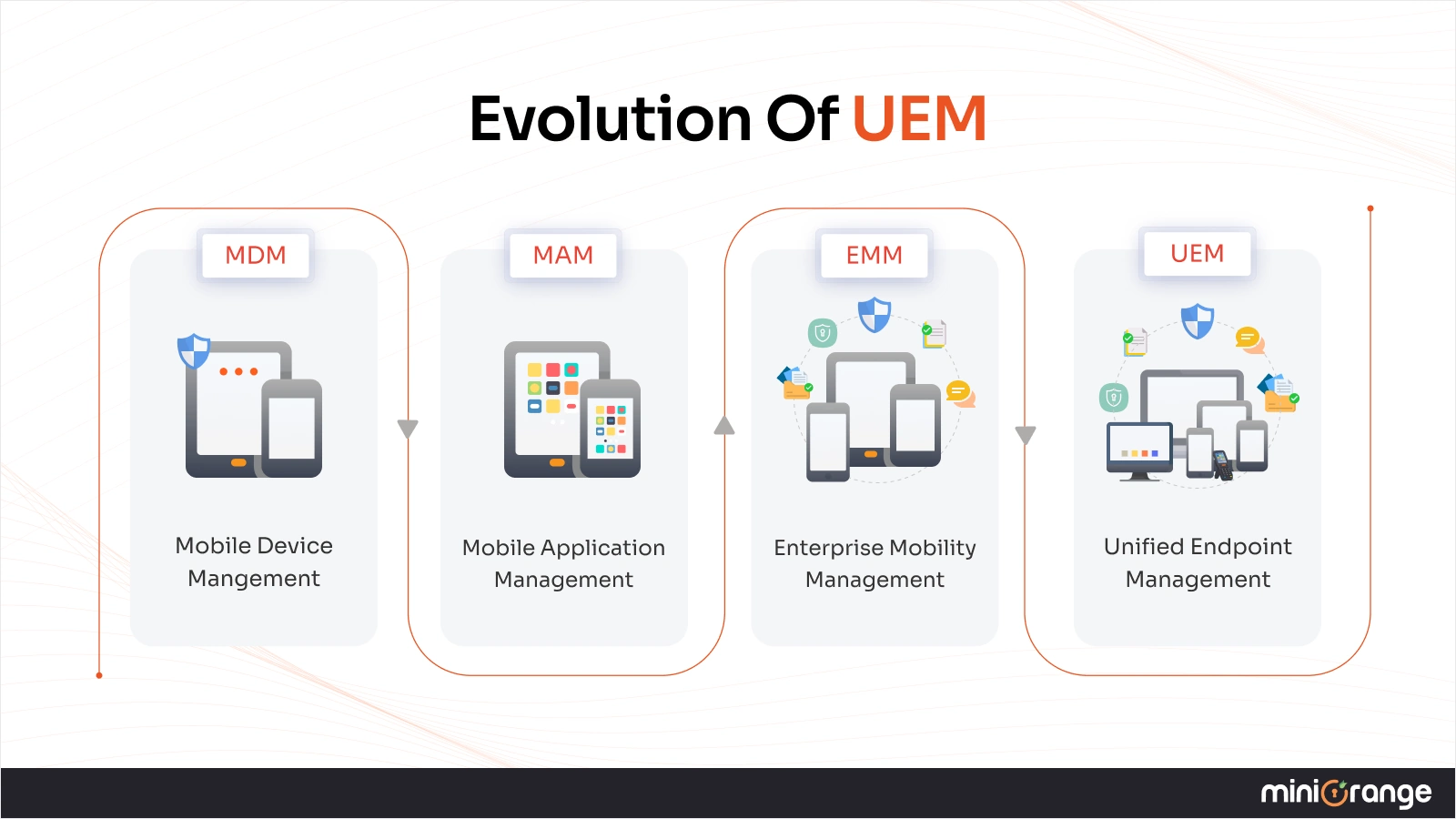
Understanding UEM's role requires a quick look at how endpoint management has evolved:
From MDM
Mobile Device Management (MDM) was designed for a time when mobile devices were company-owned and tightly controlled. IT administrators could provision devices, enforce encryption, manage wireless access, install apps, track locations, and remotely wipe lost or stolen devices.
MDM worked well…until personal devices entered the workplace.
To MAM
As BYOD became common, employees resisted giving IT full control over personal devices. This led to Mobile Application Management (MAM), which focused on securing corporate apps and data without touching personal content. While MAM improved privacy, it lacked broader visibility and control.
To EMM
To address growing complexity, vendors introduced Enterprise Mobility Management (EMM), a combination of MDM, MAM, and related tools. EMM extended control to off-site laptops and mobile endpoints, improving security for remote workforces.
To UEM
However, EMM still left a critical gap: on-premises desktops and laptops were managed separately, often using legacy client management tools. This fragmented approach created policy inconsistencies, increased manual effort, and introduced security risks, especially as remote and hybrid work expanded.
UEM emerged to close this gap by combining EMM capabilities with traditional client management tools, creating a single platform for managing all endpoints, both on-site and remote.
Recent endpoint security trends highlight why this shift became essential:
- 68% of organizations have experienced a successful endpoint attack that compromised data or infrastructure.
- 54% of security professionals say over 20% of their endpoints are unmanaged, leaving gaps in protection.
- Endpoint malware detections surged dramatically in 2024, reflecting rapidly escalating malicious activity.
These trends underscore the importance of centralized, proactive endpoint management, rather than reactive approaches.
Key Components of UEM
A modern UEM tool brings together several critical capabilities to manage endpoints effectively at scale.
- Device management ensures all endpoints across multiple operating systems, including Windows, iOS, and Android, are enrolled, configured, and monitored from a unified interface. This eliminates the need for platform-specific tools.
- Application management allows administrators to distribute approved software, enforce usage policies, and automate updates across all devices, ensuring users always have secure and up-to-date applications.
- Security and compliance features enforce encryption, device posture checks, and regulatory compliance through continuous monitoring and automated remediation.
- Unified policies and configuration ensure consistent enforcement of security rules, access controls, and network settings across all endpoints, reducing misconfigurations.
- Identity and access management (IAM) integrates user identity with device trust, ensuring only authorized users and compliant devices gain access to corporate resources.
- Remote monitoring and troubleshooting enable IT teams to diagnose and resolve issues without physical access, minimizing downtime and support costs.
How Does Unified Endpoint Management (UEM) Work?
A well-implemented UEM strategy revolves around a centralized dashboard where IT and security teams can:
- Discover & Enroll Devices: Detect and provision new devices automatically, even during user self-registration.
- Apply Security Policies: Define policies like multi-factor authentication, encryption standards, and password rules, then enforce them uniformly.
- Push Updates and Patches: Automate patching of operating systems and critical applications to address vulnerabilities quickly.
- Control Applications: Permit or block apps based on corporate policies to prevent data leakage. -Secure Network Connections: Define approved network types (e.g., VPN, Wi-Fi) for secured access.
- Isolate Corporate & Personal Data: Enable BYOD usage while separating personal information and corporate data.
- Detect & Respond to Threats: Integrate with advanced detection tools to identify anomalies and trigger responses.
- Remotely Lock, Wipe, or Retire Devices: Securely disable end-of-life, lost, or stolen devices to protect sensitive information.
Benefits of Unified Endpoint Management (UEM)
From both operational and security standpoints, UEM plays a central role in enterprise endpoint security.
Key benefits include:
- Stronger security posture: Consistent policies and automated updates close gaps and reduce exploitable weaknesses.
- Improved risk management: Encryption, compliance auditing, and remote response capabilities mitigate threats before they turn into breaches.
- Simplified IT administration: Centralized workflows save time, reduce errors, and reduce reliance on specialized tools.
- Reduced operational costs: Eliminating multiple point solutions decreases licensing, maintenance, and training overhead.
- Better employee experience: Seamless access to corporate tools and fewer disruptions improve productivity.
- Scalability: UEM scales with organizational growth and supports future device types without fragmentation.
Differences Between MDM, EMM, and UEM
| Criteria | MDM (Mobile Device Management) | EMM (Enterprise Mobility Management) | UEM (Unified Endpoint Management) |
|---|---|---|---|
| Primary Focus | Managing and securing mobile devices | Managing mobile devices, apps, and data | Managing all endpoints from a single platform |
| Device Types Supported | Smartphones and tablets (company-owned) | Smartphones, tablets, and off-site laptops | Desktops, laptops, mobiles, tablets, IoT, wearables |
| Management Scope | Device-centric | Device + application-centric | Device, application, identity, and security-centric |
| On-Prem vs Remote Device Management | Not designed for remote work | Primarily focused on mobile/remote users | Equal treatment of on-site and remote endpoints |
| Tool Consolidation | Requires multiple additional tools | Reduces some tooling | Replaces multiple endpoint and mobility tools |
| Best Suited For | Small environments with company-owned mobiles | Mobile-first or BYOD-heavy organizations | Modern enterprises with hybrid workforces |
How does UEM Improve Enterprise Endpoint Security?
Endpoint security breaks down most often because organizations manage devices in silos—different tools for laptops, mobiles, on-prem systems, and remote users. This fragmented approach creates visibility gaps, inconsistent policies, and configuration errors that attackers exploit.
UEM in cyber security solves this by bringing every endpoint, user, and policy into a single security framework.
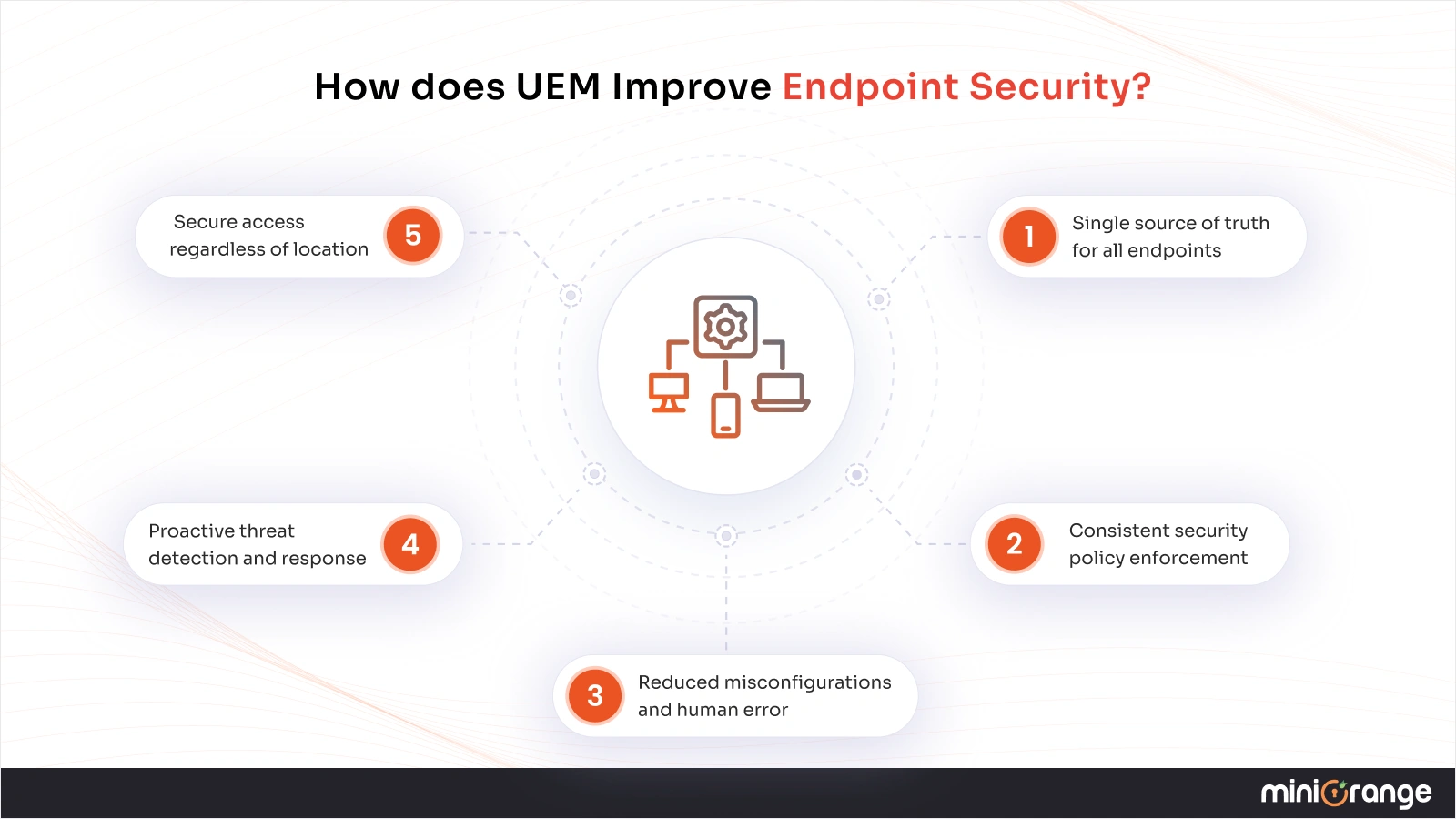
How UEM strengthens enterprise endpoint security in practice:
1. Single source of truth for all endpoints
UEM provides real-time visibility into every connected device, managed or unmanaged, on-site or remote. IT teams no longer operate blind spots where rogue or non-compliant devices can go unnoticed.
2. Consistent security policy enforcement
Password rules, encryption standards, MFA requirements, and compliance checks are applied uniformly across all devices and operating systems. This eliminates policy drift caused by multiple management tools.
3. Reduced misconfigurations and human error
Centralized policy templates and automation reduce manual configuration work, significantly lowering the risk of security gaps introduced by mistakes.
4. Proactive threat detection and response
By integrating with endpoint security tools like EDR and UEBA, UEM can identify abnormal behavior early and trigger automated remediation—before threats escalate.
5. Secure access regardless of location
Whether employees connect from home, public Wi-Fi, or corporate networks, UEM ensures access decisions are based on device posture, user identity, and security compliance.
In short, UEM allows security teams to stop treating endpoint diversity as a risk and start managing it as a controlled, enforceable environment.
Common Challenges in UEM Implementation
Despite its advantages, deploying UEM solutions can present certain challenges. Here are a few of the common ones and tips to overcome them:
- Device & OS diversity: Ensuring consistent policy coverage across many platforms requires strong cross-platform support.
Tip: Choose a UEM tool with broad device support and unified policy templates.
- Balancing security and privacy: Especially with BYOD, maintaining user privacy while enforcing controls can be complex.
Tip: Use containerization to separate corporate and personal data securely.
- Integration with existing infrastructure: Legacy tools and workflows can complicate deployments.
Tip: Plan phased rollouts and choose UEM tools with flexible APIs for integration.
Best Practices for Successful UEM Deployment
Deploying UEM successfully requires more than selecting the right platform. Organizations need a strategy that balances security, usability, and long-term scalability.
Best practices to follow:
1. Build a comprehensive endpoint management strategy
Modern environments include laptops, smartphones, tablets, shared devices, and IoT endpoints. UEM Services should be configured to manage all endpoint types from day one, rather than treating mobile and desktop devices separately.
2. Prioritize data separation for BYOD
Use UEM capabilities to isolate corporate data from personal data. Containerization protects sensitive information while maintaining employee privacy—critical for BYOD adoption and compliance.
3. Define clear security and compliance baselines
Establish standardized policies for:
- Device enrollment
- Authentication and access
- Encryption and patching
- Application usage
Apply these baselines consistently across all endpoints to avoid configuration drift.
4. Plan for incident response and troubleshooting
Even with automation, issues will occur. Ensure IT teams and end users know:
- How to report device or access issues
- What remediation steps are automated
- When escalation is required
Remote diagnostics and remediation should be enabled by default.
5. Optimize for user experience
Security that disrupts productivity leads to policy circumvention. Gather employee feedback regularly and refine UEM policies to keep authentication, updates, and access as seamless as possible, without weakening security.
Conclusion
Unified Endpoint Management has become a foundational component of modern enterprise security. By centralizing endpoint visibility, policy enforcement, and security controls, UEM technology enables organizations to manage complexity without compromising security.
If you're looking to implement a scalable, security-focused UEM platform, explore the Unified Endpoint Management (UEM) Solution from miniOrange, designed to help enterprises manage, secure, and future-proof their endpoint environments from a single, unified console.
Frequently Asked Questions
1. What is UEM in cybersecurity?
UEM in cyber security refers to a centralized approach to securing all enterprise endpoints by combining device management, identity enforcement, and threat response into a single platform.
2. What does UEM stand for?
UEM technology stands for Unified Endpoint Management. It refers to a centralized approach that allows organizations to manage, configure, and secure all endpoint devices, such as desktops, laptops, mobile devices, and other connected endpoints, through a single management platform.
3. How is UEM different from MDM and EMM?
MDM and EMM primarily focus on mobile devices and off-site endpoints, requiring separate tools for desktops and on-prem systems. UEM goes a step further by unifying the management of all endpoints under one platform, enabling consistent security policies, simplified operations, and reduced management overhead.
4. How can UEM help with BYOD (Bring Your Own Device) management?
UEM supports BYOD by separating corporate and personal data on the same device. IT teams can enforce security policies, manage applications, and remotely wipe corporate data if needed, while preserving user privacy.
5. Can UEM integrate with existing IT systems?
Yes. Most UEM platforms are designed to integrate with existing IT and security ecosystems, including identity providers, directory services, SIEM tools, endpoint security solutions, and legacy management systems. This ensures organizations can adopt UEM without disrupting current workflows or infrastructure.
6. How does UEM improve remote work security?
UEM improves remote work security by ensuring that access to corporate resources is based on device compliance, user identity, and security posture, regardless of location. It enables secure enrollment, continuous monitoring, automated patching, and policy enforcement for remote endpoints, reducing risks associated with unmanaged or insecure devices.
Leave a Comment