
As organizations embrace remote work, cloud apps, and multiple device types, managing endpoints has become more complex than ever. IT teams are no longer dealing with just company-issued smartphones, today’s environment includes laptops, tablets, desktops, rugged devices, and even IoT endpoints.
This evolution has led many decision-makers to ask an important question: UEM vs MDM — what’s the difference, and which one do you really need?
While both Mobile Device Management (MDM) and Unified Endpoint Management (UEM) aim to secure and manage devices, they are not interchangeable. In this blog, we’ll break down what each solution does, explore their key differences, and help you decide which approach best fits your organization.
What is MDM (Mobile Device Management)
Mobile Device Management (MDM) is a technology designed to manage, secure, and monitor mobile devices such as smartphones and tablets used within an organization.
Originally developed to support corporate-owned mobile phones, MDM has since expanded to include basic management of laptops and some other endpoints. However, its core focus remains on mobile platforms.
Key Capabilities of MDM
- Device enrollment and provisioning
- Enforcing passcodes and security policies
- Remote lock and wipe in case of loss or theft
- App installation, updates, and removal
- Basic compliance monitoring
- Email and Wi-Fi configuration
Where MDM Works Best
MDM is a solid choice for organizations that:
- Primarily manage smartphones and tablets
- Have simple security requirements
- Need basic visibility and control over mobile devices
While MDM plays an important role in mobility management, it wasn’t built to handle the modern sprawl of endpoints that businesses use today.
What is UEM (Unified Endpoint Management)
Unified Endpoint Management (UEM) is the evolution of MDM. It extends device management beyond mobile devices to include laptops, desktops, wearables, rugged devices, virtual machines, and even IoT endpoints, within a single management console.
UEM unifies multiple management tools into one platform, offering deeper visibility, stronger security, and more automation.
Key Capabilities of UEM
- Management of mobile, desktop, and non-traditional endpoints
- Unified policy enforcement across all device types
- Integrated identity and access controls
- Zero Trust and conditional access support
- Patch management and OS updates
- Endpoint security posture assessment
- Application lifecycle management
Why Organizations Adopt UEM
- A single console instead of multiple tools
- Better security consistency across devices
- Improved IT efficiency and automation
- Strong support for hybrid and remote work
In short, UEM treats all endpoints as part of one ecosystem rather than separate silos.
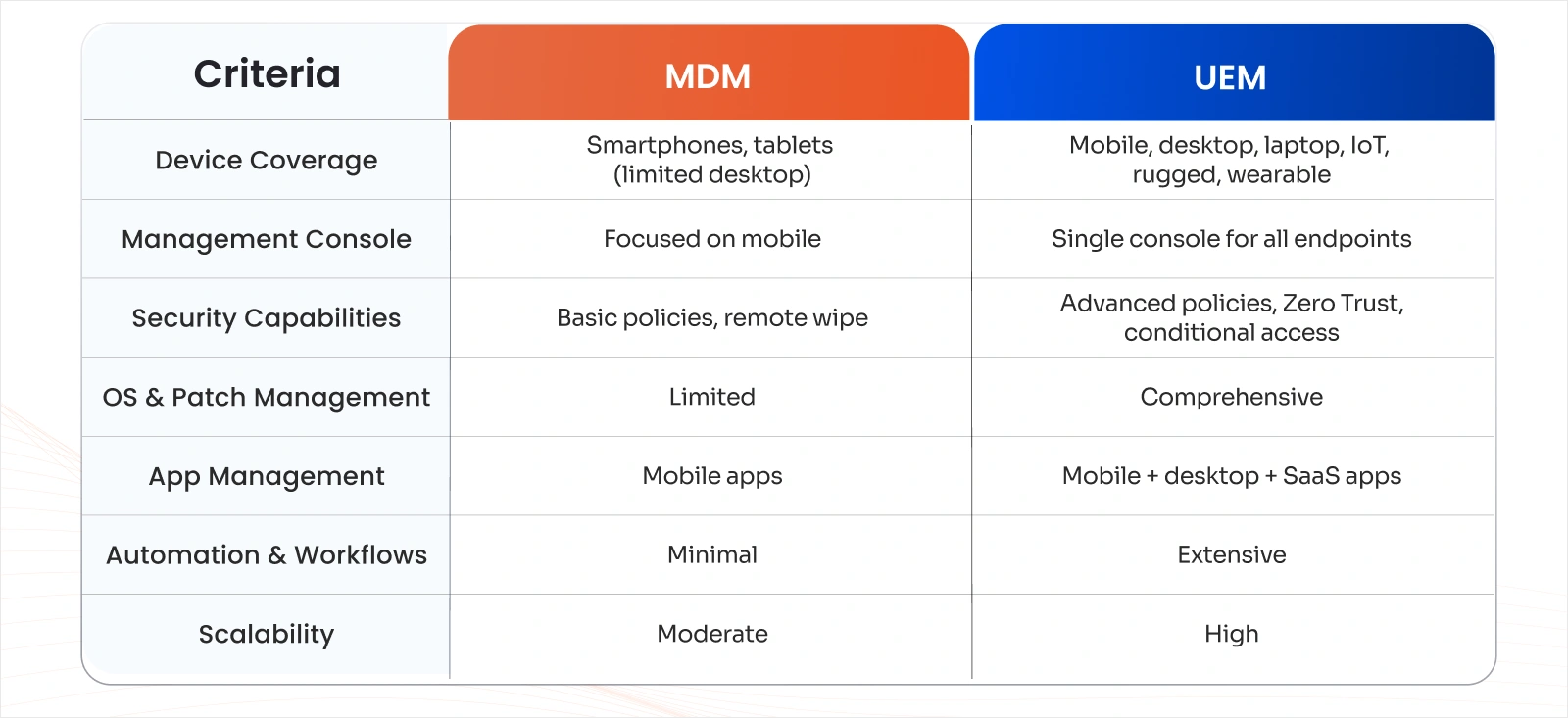
MDM vs UEM: Feature Comparison
Here’s a high-level look at the difference between Mobile Device Management (MDM) and Unified Endpoint Management (UEM) and how they compare across core features:
MDM vs UEM: How to Choose the Right Solution for Your Organization
Choosing between Unified Endpoint Management vs Mobile Device Management depends largely on your current environment and future goals.
Choose MDM If:
You only manage smartphones and tablets You have a small IT team and simple policies You need quick deployment with minimal complexity
Choose UEM If:
You manage laptops, desktops, and mobile devices You support hybrid or remote work You require stronger security and compliance controls You want to consolidate multiple endpoint tools
A Practical Rule of Thumb
If your organization has grown beyond “mobile-only,” UEM is almost always the better investment.
Why UEM Is Becoming the Standard
The workplace has changed. Employees use multiple devices, switch locations, and access cloud services constantly. Security threats are more sophisticated, and compliance requirements are stricter.
UEM addresses these realities by:
- Centralizing management
- Reducing operational overhead
- Strengthening endpoint security
This is why many organizations start with MDM but eventually transition to UEM.
Final Thoughts
When comparing UEM vs MDM, it’s important to view MDM as a foundational technology and UEM as its modern evolution.
- MDM manages mobile devices.
- UEM manages everything.
If your organization is planning for growth, hybrid work, and stronger security, UEM offers the flexibility and depth that modern IT environments demand.
Frequently Asked Questions
1. Is UEM the same as MDM?
No. MDM focuses on managing mobile devices, while UEM manages all endpoints—mobile, desktop, laptop, and more—from one platform. MDM is essentially a subset of UEM.
2. How do MDM and UEM help with compliance requirements?
Both enforce security policies and monitor device compliance. UEM offers broader coverage with continuous monitoring, automated remediation, and detailed compliance reporting across all device types.
3. Which solution is the best for BYOD (Bring Your Own Device)?
UEM is better for BYOD because it supports work profiles, app-level controls, and conditional access without fully controlling personal devices.
4. Are UEM and MDM secure for remote work?
Yes. Both secure remote devices, but UEM provides stronger protection by covering laptops and desktops and enabling advanced access controls.
Leave a Comment