
Introduction
With features that support everything from product listings to payments and fulfillment, Shopify has become the go-to solution for launching and scaling online storefronts.
What is Shopify?
Shopify is one of the world’s leading eCommerce platforms, powering millions of businesses ranging from direct-to-consumer brands to global wholesalers. With a consistent focus on updates like enhanced Shopify B2B functionalities with Customer Accounts and the new Horizon theme update, the platform is evolving rapidly for both merchants and customers.
However, as merchants expand their operations by creating private stores for employees or adding multiple regional storefronts, managing Shopify eCommerce login across multiple stores and user groups can become complex. Users often face repetitive Shopify login prompts or security risks from shared credentials.
This is where Shopify SSO login plays a key role, allowing customers, employees, and partners to seamlessly login into Shopify using a single, secure set of credentials.
Challenges Faced by Shopify Merchants & Users
As the Shopify ecosystem evolves, merchants and customers may find themselves repeatedly navigating the Shopify login page to perform a Shopify store login on each platform they manage or interact with. This creates friction and inefficiencies for businesses of all sizes.
What are the Major Shopify Login Problems Faced by Merchants and Users?
- Shopify login problems arise when merchants manage multiple stores or regions, requiring separate logins for each instance.
- Using a shared password across stores weakens security, while managing multiple credentials becomes overwhelming.
- Customers accessing a store from different platforms must repeat the login process, leading to a poor user experience.
- For large organizations with several registered users, frequent password resets and access issues can flood helpdesks and overwhelm support teams.
- Manual user session management increases security risks and operational overhead for enterprises.
These Shopify challenges compound as user roles and store complexity increase, making automation and centralized login essential. Single Sign-On (SSO) offers a seamless way to automate user authentication, reduce friction, and enhance security across all Shopify store login experiences.
What is Single Sign-On (SSO)?
Single Sign-On (SSO) is a simple way to log in to multiple stores, platforms, or applications using your existing credentials, like username and password. Instead of signing in separately to each Shopify store, app, or service, you only need to log in once, and SSO takes care of the rest.
With Shopify SSO login, businesses don’t need to store and manage passwords for every platform. A centralized system handles user login securely, helping reduce password-related errors, reset requests, and security risks.
For Shopify users, this means faster access to all connected stores and tools without repeated Shopify login steps, making it a convenient and secure option for employees, vendors, and customers.
Why is Single Sign-On (SSO) Important for Shopify?
As Shopify continues to grow, with advanced Customer Accounts functionalities and expanding support for B2B and multi-store setups, managing user access across stores has become more complex. This is where Single Sign-On (SSO) plays a critical role for Shopify eCommerce login.
By enabling users to login with Shopify using credentials from connected stores or platforms, SSO can reduce friction, enhance security, and improve operational efficiency.
For merchants, SSO simplifies access for internal teams, resellers, or distributors, especially when managing multiple Shopify stores. For customers, it delivers a seamless login experience across websites without repetitive Shopify login steps.
In short, Shopify SSO login is essential for scaling operations, improving user satisfaction, and maintaining secure access without manual password management.
How to Login to a Shopify Store using SSO?
If you're using Shopify Plus, SSO support is technically available through Shopify Multipass login and OAuth configurations. However, implementing default Shopify Plus login flows requires custom theme changes and development support, whether you’re operating on Legacy or Customer Accounts.
With the Shopify SSO solution from miniOrange, you can seamlessly setup SSO for legacy and customer accounts without any complexities and allow users to securely log into your Shopify store without touching any code. Our app supports seamless auto-login for Shopify Plus stores, giving you a flexible and convenient authentication experience across use cases like consumer login, employee access for swag stores, or even Shopify collaborator login.
For non-Plus stores, Shopify doesn’t provide a multipass option to connect with external Identity Providers. However, our SSO solution enables login with Shopify by connecting your non-Plus store to any external IdP using SAML, OAuth, or OIDC protocols.
Whether you're setting up Shopify ecommerce login for customers or internal teams, our app works across Shopify Legacy & Customer Accounts, with no theme-level development required. You just need to install the app and follow the simple configuration steps to enable SSO on your store.
Basic Components of Shopify SSO (IdP, SP, Broker)
To understand how Shopify SSO login works behind the scenes, it's important to know the three core components involved: the Identity Provider (IdP), Service Provider (SP), and the Identity Broker.
-
Identity provider (IdP): This is the system responsible for storing and verifying user credentials such as usernames, passwords, or email IDs. When a user initiates a Shopify login, the IDP confirms whether the user is valid and authenticated. Common third-party IdPs include miniOrange, Entra ID (formerly Azure AD), Okta, AWS Cognito, and Salesforce. These platforms help simplify Shopify ecommerce login for customers, vendors, and internal users by centralizing credential management.
-
Service provider (SP): The Service Provider refers to the Shopify store itself. It holds the resources (products, content, etc.) a user is trying to access. When a user attempts to login into Shopify, the store (SP) reaches out to the configured IDP to validate the user’s credentials. Once approved, the SP allows access.
-
Identity Broker: An Identity Broker acts as a bridge between different types of IDPs and SPs. For instance, if your Shopify Plus login needs to connect to a legacy system using SAML while your IDP uses OAuth, the broker helps establish compatibility. This is useful when dealing with varied authentication protocols or multiple business systems.
These components work together to resolve common Shopify challenges around user access, and create a unified login with Shopify experience for all types of users.
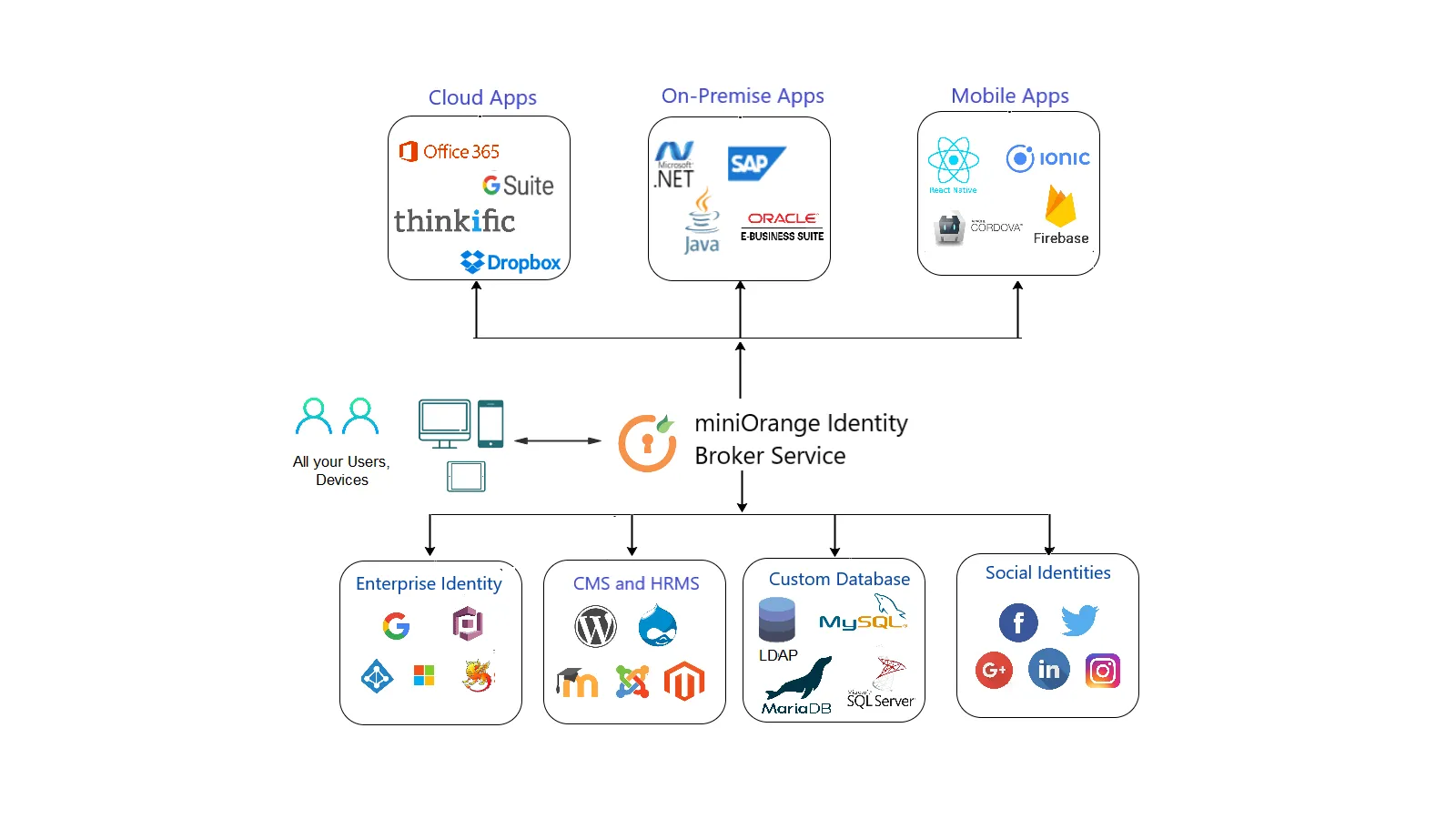
By looking at the above diagram we can see that miniOrange Identity Broker is connecting different Identity providers with different Service providers regardless of their authentication protocol being used.
Use Cases: Shopify Single Sign-On (SSO)
From startups to large enterprises, businesses often operate across multiple platforms and need a simplified login experience. Here's how different types of SSO use cases come into play:
- Businesses using internal systems, CRMs, or external identity providers that want to allow customers or employees to log into a Shopify store or mobile app without creating new accounts.
- Organizations that want to use Shopify as an Identity Provider to authenticate users into other business apps or third-party platforms via Shopify OAuth integration, as well as other protocols like SAML or OpenID.
- Merchants that want to offer Shopify social login options, enabling users to sign in with Google, Facebook, or Apple while keeping customer accounts secure and centrally managed.
- Enterprises needing restricted store access or content visibility, where users login into Shopify through different identity providers and are granted conditional access to specific products, pages, or collections based on the login source.
- Content management platforms (CMS) or learning management systems (WordPress, Moodle, or Canvas) requiring seamless login with Shopify stores; using Shopify as either the Identity Provider or as the Service Provider.
These use cases address a range of business needs, from customer access and user onboarding to mobile app authentication, helping merchants overcome login-related Shopify challenges without compromising on user experience.
Key Benefits of Implementing SSO on Shopify Stores
- The solution supports all major authentication protocols, including SAML, OAuth, OpenID Connect, and JWT, allowing flexible and secure integration with any identity provider or platform.
- You can integrate multiple identity providers (IDPs), even if they use different authentication protocols. In multi-site environments, SSO can be configured to navigate users to the right store based on their configured IDP.
- Implement adaptive authentication that evaluates the user’s device, location, and time of access to provide an added layer of protection across your Shopify login flow.
- Assign user roles tailored to your business needs. Whether it’s internal teams or external users, role-based access ensures the right people access the right data.
- Add another layer of security during login into Shopify by enabling MFA. Users can verify their identity using various methods, enhancing protection against unauthorized access.
- Reduce risk with rules that restrict access based on IP address, device type, location, and login time; ideal for securing sensitive operations on your Shopify ecommerce login.
How will Single Sign-On Help to Overcome Shopify Login Challenges?
For growing businesses, managing multiple stores, platforms, and user types can quickly become overwhelming. Single Sign-On (SSO) eliminates repetitive logins and fragmented user data by letting you login with Shopify once and gain access to every connected application or storefront, whether it’s another website, internal dashboard, or mobile app.
With Shopify SSO login, users no longer need to remember multiple credentials. A single set of Shopify store login details will let you authenticate across your entire ecosystem, saving time, reducing errors, and enhancing user experience.
Conclusion
Single Sign-On plays a crucial role in simplifying access while maintaining enterprise-grade security.
miniOrange’s Single Sign-On solution supports all standard protocols (SAML, OAuth 2.0, OIDC etc.), works across Shopify Plus and non-Plus stores on Legacy as well as Customer Accounts, and enables seamless authentication for Shopify B2B and D2C environments alike.
SSO also allows your Shopify store to act as an Identity Provider (IDP), making it easier to unify access across connected CMS, LMS, or other stores. In short, if you're scaling across platforms, regions, or user types, implementing a robust SSO framework isn't just helpful, it’s essential.
Looking to implement SSO for your Shopify store? Reach out to explore tailored solutions for your setup.
Frequently Asked Questions (FAQs)
What are the common Shopify login challenges faced by growing businesses?
Businesses expanding into B2B or multi-brand models often face Shopify login problems such as: duplicate accounts, lack of role-based access, no centralized identity management, and difficulties onboarding external users like collaborators or vendors. Login with Shopify using an SSO solution solves these challenges by unifying authentication across users and platforms.
Is Shopify SSO login compatible with Multipass and other login flows?
Yes. miniOrange supports Shopify Multipass login for Shopify Plus stores, and offers full SSO login functionality using OAuth, SAML, and OpenID protocols for other Shopify plans too. This ensures you can enable a secure, unified Shopify store login experience regardless of your subscription plan.
Can I enable one‑click social login on Shopify?
Absolutely. Our Shopify SSO solution supports one-click login using existing user credentials from popular social providers such as Google, Facebook, LinkedIn, and many others. Whether you’re simplifying access for regular customers or offering social login options for faster onboarding, Single Sign-On ensures a smooth experience while still giving you control over who can access your store.
Can I customize the Shopify store login experience based on the user type?
Yes. You can completely tailor your Shopify store login flow with miniOrange. Whether it’s enabling Shopify collaborator login for vendors or setting up Shopify social login for consumers, the experience can be adapted based on your audience. You can even redirect different user types to specific dashboards or store sections after login.
Can I use Shopify SSO login for partners and customers?
Yes. Shopify SSO can be configured to authenticate not just internal users, but also for Shopify partner login and other external stakeholders like distributors or B2B customers. With miniOrange’s SSO solution, you can connect existing customer accounts or external directories (like Azure AD or Okta) to your Shopify store, enabling secure, frictionless access for all user types across B2B and D2C setups.
Leave a Comment